HIPAA compliant email solutions include a range of technologies, services, and processes that enable healthcare organizations to communicate electronically while protecting protected health information (PHI) according to HIPAA regulations. The best HIPAA compliant email software solutions include encrypted email platforms, secure messaging systems, email gateways, and managed services that provide the administrative, physical, and technical safeguards required for PHI transmission. Healthcare communication needs vary widely across different organization types and sizes. Small practices require different capabilities than large hospital systems, yet all must meet the same regulatory standards for protecting patient privacy and maintaining secure communications.
Types of Email Security Solutions Available
Gateway solutions filter and encrypt emails automatically as they pass through organizational email infrastructure. These systems work with existing email platforms like Microsoft Exchange or Google Workspace to add HIPAA compliance capabilities without requiring users to change their communication habits. Hosted email platforms provide complete email infrastructure designed specifically for healthcare compliance. These cloud-based solutions handle all technical requirements while offering user interfaces similar to consumer email services, making adoption easier for healthcare staff. Hybrid approaches combine on-premises email servers with cloud-based security services. Organizations maintain control over their email data while leveraging specialized compliance expertise from third-party providers to ensure proper PHI protection.
Deployment Models for Different Healthcare Settings
Small medical practices often benefit from fully managed email solutions that require minimal internal IT support. These turnkey systems include setup, training, and ongoing maintenance while providing fixed monthly costs that help practices budget for compliance expenses. Large healthcare systems typically need enterprise solutions that integrate with existing IT infrastructure and support thousands of users. These deployments require careful planning for user migration, system integration, and staff training across multiple departments and facilities. Multi-location organizations face unique challenges coordinating email security across different sites. The top HIPAA compliant email solutions provide centralized management capabilities while accommodating local operational requirements and varying technical infrastructures.
Choosing Between Cloud and On-Premises Options
Cloud-based email solutions offer rapid deployment and reduced internal IT requirements but require careful evaluation of vendor security practices and data location policies. Healthcare organizations must ensure cloud providers offer appropriate business associate agreements and maintain adequate security controls. On-premises solutions provide direct control over email infrastructure and data storage but require significant internal expertise for implementation and maintenance. Organizations choosing this approach must invest in security training, hardware maintenance, and software updates to maintain HIPAA compliance. Cost considerations extend beyond initial implementation expenses to include ongoing maintenance, security updates, and compliance monitoring activities. Cloud solutions offer predictable monthly expenses while on-premises deployments involve variable costs for hardware replacement and staff training.
Evaluating Vendor Capabilities and Track Records
Security certifications provide objective evidence of vendor compliance capabilities and commitment to protecting healthcare data. Organizations should look for certifications like SOC 2 Type II, HITRUST, or ISO 27001 that demonstrate comprehensive security management practices. Client references from similar healthcare organizations help evaluate how well solutions perform in real-world environments. Vendors should provide case studies and references that demonstrate successful HIPAA compliance implementations and ongoing customer satisfaction. Breach history and incident response capabilities reveal how vendors handle security challenges and protect client data. Healthcare organizations should investigate any past security incidents and evaluate vendor transparency and response procedures.
Implementation Planning and Change Management
User training programs must address both technical aspects of new email systems and HIPAA compliance requirements. Healthcare staff need to understand how to use new tools while maintaining proper PHI handling procedures throughout their daily communications. Data migration strategies ensure that existing email archives and contacts transfer securely to new HIPAA compliant email solutions. Organizations must plan for potential downtime and establish backup communication methods during transition periods. Policy updates help align organizational procedures with new email solution capabilities. Entities should review and revise their HIPAA policies to reflect new technical safeguards and user responsibilities for PHI protection.
Measuring Success and Return on Investment
Compliance metrics help organizations track their success in meeting HIPAA requirements and reducing violation risks. Key indicators include user adoption rates, security incident frequency, and audit finding trends that demonstrate improved PHI protection. Operational efficiency improvements often result from implementing modern HIPAA compliant email solutions. Healthcare organizations may experience reduced IT support requirements, faster communication workflows, and improved care coordination capabilities. Risk reduction benefits include lower potential for HIPAA violations, reduced liability exposure, and improved patient trust in organizational privacy practices. These intangible benefits can be impactful but may be difficult to quantify in traditional financial terms.
Future-Proofing Email Security Investments
Technology evolution requires email solutions that can adapt to changing security threats and regulatory requirements. Healthcare organizations should select vendors with strong research and development capabilities and track records of staying current with emerging threats. Scalability considerations ensure that HIPAA compliant email solutions can grow with healthcare organizations and accommodate changing communication needs. Solutions should support increasing user counts, message volumes, and integration requirements without requiring complete replacement. Regulatory changes may affect email compliance requirements over time.
Erik Kangas
With 30 years engaged in to both academic research and software architecture, Erik Kangas is the founder and Chief Technology Officer of LuxSci, playing a core role in building the company into the market leader for HIPAA compliant, secure healthcare communications solutions that it is today. An international lecturer on messaging security, Erik also advises and consults on email technology strategies and best practices, secure architectures, and HIPAA compliance. Erik holds undergraduate degrees in physics and mathematics from Case Western Reserve University, and a doctoral degree in computational biophysics from MIT.
Erik Kangas — LinkedIn
Most conversations about HIPAA compliant email eventually land on the same acronym: TLS. It’s the most common encryption method in use, and for good reason — it’s widely supported and relatively simple to enforce. But TLS isn’t the only encryption standard healthcare organizations should understand, and it isn’t always the right tool for securing your email address and message content.
S/MIME is the other name that comes up frequently, especially in healthcare, and usually in the same breath as PGP, along with some confusion about what it actually does differently. This guide breaks down what S/MIME is, how MIME works underneath it, how to configure it, and — just as importantly — when it’s genuinely worth the effort versus when it isn’t, based on both the technical standard and real feedback from the people who’ve actually had to manage it.
If you haven’t yet worked through the basics of what makes email HIPAA compliant in the first place, our HIPAA Compliant Email guide is a useful starting point before diving into a specific encryption standard like this one.
What Is S/MIME?
S/MIME stands for Secure Multipurpose Internet Mail Extensions (also written Secure/Multipurpose Internet Mail Extensions). It’s a security extension of MIME, the original standard introduced in 1992 that first allowed email to carry more than plain text — attachments, formatting, and different character sets. Understanding how MIME works helps explain what S/MIME adds on top: where MIME made richer content possible, S/MIME made that content secure by encrypting it and digitally signing it.
S/MIME’s roots as a security standard go back to the early 2000s, largely through work done by RSA Security, one of the earliest companies focused on computer and network security. Because it’s been around for so long, S/MIME is supported natively by most major email clients, including Outlook and Apple Mail, without requiring third-party software or plugins.
At its core, S/MIME provides three distinct protections for email security:
Encryption — ensures that only the intended recipient, using their private key, can read the email messages sent to them
Sender authentication — verifies the identity of the sender, so the recipient can trust the email actually came from who it claims to be from
Digital signing — confirms the message wasn’t altered in transit, effectively letting you digitally sign each message you send
This combination is what distinguishes S/MIME from encryption methods that only protect the connection a message travels over. S/MIME protects the message itself — a meaningful distinction for any organization handling sensitive data security requirements.
How Does S/MIME Work?
S/MIME is built on Public Key Infrastructure (PKI) and asymmetric encryption — a system that uses two mathematically linked digital certificates instead of one shared password.
Public key — shared openly, used by others to encrypt messages sent to you and to verify your digital signature
Private key — kept secret and secure, used by you to decrypt received messages and sign outgoing ones
When someone sends you an S/MIME-encrypted email, they encrypt it using your public key. Only your corresponding private key can decrypt it, meaning that even if the message is intercepted somewhere along its path, it remains unreadable without that specific private key. This is what people mean when they describe S/MIME as end-to-end encryption: the protection travels with the message itself, not just the connection carrying it.
To configure S/MIME, both the sender and recipient need:
A digital certificate, issued by a trusted certificate authority (CA), tied to their specific email address
That certificate properly installed and configured in their email client
Each other’s public key, exchanged in advance, so encryption and decryption can actually happen
If any one of these pieces is missing on either side, S/MIME simply doesn’t work for that exchange — a limitation that comes up constantly in practitioner discussions, and one worth understanding before you invest time configuring it.
What IT Practitioners Actually Say About This
One useful, if slightly humbling, reality check comes up repeatedly in IT forums when people ask whether they should bother configuring S/MIME: as one systems administrator put it plainly, most people you correspond with have no idea how to verify a digital signature and won’t even notice if one is missing. Emails from your bank or a government tax agency, they pointed out, typically aren’t S/MIME signed at all — a sign of just how limited real-world verification behavior actually is outside of specific technical or regulatory contexts.
Another common thread: several IT professionals candidly noted that email clients like Outlook can create friction by automatically trying to reply with an S/MIME signed message, which can be genuinely annoying for a recipient who has no certificate configured and no way to make sense of the added complexity. Their advice, consistently, boiled down to one clarifying question: it isn’t a question of whether you should configure S/MIME, but whether you actually need it — if none of the people you communicate with require signed email, the added configuration probably isn’t buying you anything meaningful.
That distinction — need versus want — is exactly the lens healthcare organizations should apply too, and it’s the framing this guide uses throughout.
S/MIME vs. TLS vs. PGP: How They’re Different
It’s easy to lump every encryption acronym together, but each one solves a slightly different problem.
Method
What It Protects
Identity Verified Via
Complexity
TLS
The connection between mail servers
Server-level certificates, not individual senders
Low — largely automatic, minimal user setup
S/MIME
The message content itself, end-to-end
Trusted certification authorities issue and vouch for individual certificates
High — requires certificates and key exchange for every sender/recipient pair
PGP
The message content itself, end-to-end
A decentralized “web of trust” — users vouch for each other directly
High — similar certificate/key management burden as S/MIME
TLS encryption – most people interact without realizing it — it’s what protects the connection when your email travels from your server to the recipient’s server. The tradeoff is that TLS only protects the message in transit; once it lands on a mail server, TLS’s job is done.
S/MIME and PGP both aim to close that gap by encrypting email messages themselves, so they remain protected even after delivery. The key difference, as one privacy-focused forum discussion put it well, comes down to how identity is managed: S/MIME farms identity verification out to a trusted certification authority, while PGP requires you to manage that trust relationship yourself. For most healthcare organizations, S/MIME’s centralized CA model is the more practical fit, since it aligns better with how enterprise IT departments already manage digital certificates and existing vendor relationships.
Key Benefits of S/MIME
Genuine end-to-end protection. Because the message itself is encrypted, S/MIME protects data security even if it passes through servers that don’t support encryption.
Built-in sender authentication and message integrity. Digital signatures verify both the identity of the sender and that the message hasn’t been tampered with — a layer TLS alone doesn’t provide.
Broad native support across email clients. Most major email clients support S/MIME out of the box, without requiring a separate plugin.
Flexibility to sign without encrypting. As one practitioner pointed out, you can digitally sign an outgoing message without encrypting it — useful for something like a mailing list, where you want recipients to trust the message came from you, but full encryption isn’t necessary or practical for a broad distribution list.
The Real Tradeoffs of S/MIME
Certificate management is ongoing, not one-time. Every sender and recipient needs a certificate tied to their email address, renewed and reissued as staff change roles or leave. Manageable for a small group; significant admin overhead for a whole organization.
Both parties must be configured correctly. If a recipient lacks a certificate or the sender’s public key, the message bounces or fails to send encrypted — some systems fall back to TLS, but only if configured to do so.
Most recipients can’t verify it anyway. IT practitioners consistently note that outside specific business or regulatory contexts, recipients have no practical way to check a digital signature — and default behaviors like auto-signed replies can just create friction.
It doesn’t scale to high-volume email. S/MIME suits direct correspondence between known parties, not appointment reminders, billing notices, or large mailing lists.
It can conflict with malware scanning. End-to-end encryption blocks gateway-level inspection, so scanning has to happen at the endpoint instead.
How to Configure S/MIME?
For Individuals
Obtain an S/MIME certificate from a trusted certificate authority. Certificates come in different validation levels — Basic (validates only the email address), Individual Validation (confirms personal identity), Organization Validation (confirms the business’s legitimacy), or Sponsor validation (combining both).
Install the certificate in your email client — most major email clients, including Outlook and Apple Mail, support this natively.
Configure the client to use the certificate for both encrypting outgoing messages and verifying signatures on incoming ones.
Exchange public keys with anyone you intend to correspond with securely — typically by sending them a signed (but not necessarily encrypted) email first, which shares your public key automatically.
For Organizations
Determine the validation level your organization actually needs. Higher validation levels provide stronger identity assurance but involve more verification steps and cost.
Use centralized tools to manage the certificate lifecycle. Protocols like LDAP or endpoint management platforms (such as Microsoft Intune) can significantly reduce the manual burden of distributing and renewing digital certificates at scale.
Distribute certificates and provide clear installation guidance to every employee who needs S/MIME — this is often where organizations underestimate the support burden, particularly for less technical staff.
Set clear policies on when S/MIME is required versus when other encryption methods, like enforced TLS, are sufficient. Treating S/MIME as a blanket requirement across an entire organization typically creates more friction than protection, echoing exactly what practitioners report when they configure it without a clear need.
When Does S/MIME Actually Make Sense?
Given its administrative overhead — and the recurring, practical feedback from people who’ve actually configured it — S/MIME is best reserved for specific, high-sensitivity use cases rather than applied indiscriminately:
Clinician-to-clinician communication involving particularly sensitive diagnoses or treatment details, where both parties are known and willing to maintain certificates
Cross-organization referrals where a small, defined group of specialists regularly exchanges detailed patient information and can reasonably manage the certificate relationship
Legal, compliance, or executive correspondence where verifying the sender’s identity and confirming message integrity outweighs the setup cost
For everything else — appointment reminders, billing communications, marketing outreach, or high-volume patient correspondence — enforced TLS or a managed encryption platform that automatically selects the right method per recipient is almost always the more practical choice. This mirrors exactly what experienced IT practitioners consistently conclude on their own: it’s not about whether S/MIME can work, it’s about whether your specific communication actually needs it.
A Simpler Path: Automated, Per-Recipient Encryption
The tradeoff most organizations run into with S/MIME isn’t whether it works — it’s whether staff can reliably manage digital certificates for every relevant contact without errors slipping through, and without creating the kind of recipient friction practitioners describe so consistently.
Rather than requiring every sender and recipient to individually configure S/MIME, some HIPAA compliant email platforms automatically select the appropriate encryption method per recipient — TLS when it’s sufficient, a secure portal when the recipient’s system doesn’t support TLS, and PGP or S/MIME when the situation calls for genuine end-to-end protection and sender verification. This removes the burden of manually deciding — and manually maintaining certificates — from individual staff members, while still making S/MIME available for the specific cases where it’s the right tool.
What Should I Do Now? (revised with target-keyword anchor text)
S/MIME is a legitimate, well-established way to secure your email and verify the sender — but understanding when to use it, and when a simpler method is more appropriate, matters just as much as knowing how to configure it. Most healthcare organizations don’t need S/MIME everywhere; they need the right encryption method applied automatically, based on the situation.
Here’s where to go next:
Learn more about HIPAA compliant email encryption to see how encryption standards like S/MIME fit into a broader compliance strategy.
Explore Secure High Volume Email to see how automatic, per-recipient encryption — including S/MIME and PGP where appropriate — removes the manual certificate management burden from your staff.
Talk to a LuxSci expert if you’re evaluating which encryption approach fits your organization’s specific mix of high-sensitivity and high-volume email.
FAQs
1. Is S/MIME better than TLS for email security?
Neither is universally better — they solve different problems. TLS protects the connection a message travels over and suits high-volume, everyday email. S/MIME protects the message content itself, end-to-end, and suits specific, high-sensitivity communications between known parties who can manage digital certificates.
2. What happens if I send an S/MIME encrypted email to someone who doesn’t support it?
The message typically won’t deliver as encrypted, and depending on how the sending system is configured, it may bounce back to the sender or automatically fall back to TLS.
3. Do I need a separate digital certificate for every email address, or just one for my organization?
Each individual email address needs its own certificate issued by a certificate authority. A single organizational certificate doesn’t cover every employee — certificates are tied to specific addresses, not the organization as a whole.
4. Can I digitally sign an email without encrypting it?
Yes. Signing confirms the identity of the sender and that the message wasn’t altered, without requiring the recipient to have a certificate of their own. This is useful for situations like mailing lists, where full encryption isn’t practical but sender verification still adds value.
5. Is S/MIME a good fit for HIPAA compliant marketing emails?
Generally, no. S/MIME’s certificate and key exchange requirements don’t scale well to high-volume or one-to-many communication like marketing campaigns. Enforced TLS or a platform that manages encryption automatically per recipient is typically the better fit for that use case.
Few terms in healthcare get thrown around as loosely as “HIPAA violation.” It gets invoked when a nurse mentions a patient’s diagnosis to a friend outside of work, when a technician talks about a well-known patient who came through the clinic, or when a physician casually brings up a person’s rare diagnosos at a backyard barbecue — situations that sound like violations but often have nothing to do with the actual law. That confusion isn’t just an oversight, but rather, it points to a gap in understanding what HIPAA covers, who it applies to, and what genuinely puts an organization at risk.
For health care providers, compliance officers and IT professionals, the stakes behind that confusion are anything but casual. The Department of Health and Human Services (HHS) Office for Civil Rights (OCR) has issued settlements ranging from a few thousand dollars to over $16 million for the same underlying failures, such as a missed risk assessment, an unencrypted laptop, a chart accessed by the wrong person. This guide breaks down what actually constitutes a HIPAA violation, the most common ways organizations end up on OCR’s radar, what genuinely falls outside HIPAA’s scope, and what to do if you’re managing risk or responding to an incident right now.
If your organization handles PHI over email — one of the highest-risk channels for exactly this kind of violation — our HIPAA Compliant Email guide is a useful next read once you’ve worked through this one.
What Is a HIPAA Violation?
A HIPAA violation occurs when a covered entity, business associate, or a member of either’s workforce fails to comply with a standard set out in the HIPAA Privacy Rule, Security Rule, or Breach Notification Rule — or fails to follow an internal policy implemented to support HIPAA compliance.
That definition matters because it draws a hard boundary around who can actually commit one. HIPAA applies to:
Covered entities — healthcare providers, health plans, healthcare suppliers, payers, and healthcare clearinghouses
Business associates — vendors and contractors that create, receive, maintain, or transmit protected health information (PHI) on a covered entity’s behalf
Workforce members — employees, volunteers, and contractors of either of the above
HIPAA does not apply to private individuals acting outside of a covered role — a distinction that trips up far more people than you’d expect, and one we’ll come back to later in this guide.
The Health Insurance Portability and Accountability Act (HIPAA) was designed to protect the confidentiality of medical records and patient data while still allowing healthcare organizations to function and share information when appropriate. A violation happens when that balance breaks down — when PHI is accessed, used, or disclosed in a way the law doesn’t permit, or when required safeguards simply aren’t in place.
The Three HIPAA Rules a Violation Can Break
Every HIPAA violation traces back to one (or more) of three core rules. Understanding which rule is in play helps clarify what actually went wrong — and what needs to be fixed.
Rule
What It Governs
Example Violation
Privacy Rule
Who can access, use, and disclose PHI, and under what circumstances
Sharing a patient’s diagnosis with someone outside their care team without authorization
Security Rule
Administrative, physical, and technical safeguards for electronic PHI (ePHI)
Failing to encrypt emails in transit or a laptop that stores patient information
Breach Notification Rule
Requirements for notifying affected individuals and HHS after a breach of unsecured PHI
Missing the 60-day deadline to notify patients after a data breach
Most real-world violations involve more than one rule at once, such as a stolen, unencrypted laptop is a Security Rule failure that can also trigger Breach Notification Rule obligations. Keeping the three rules distinct in your own documentation, though, makes it much easier to identify exactly where a gap exists.
Most Common Types of HIPAA Violations
These are the violation categories that show up most often in OCR settlements, and the ones every provider, payer, and supplier organization should actively guard against.
Unauthorized Access / Snooping
This is the violation most people have actually heard about, usually because of a celebrity or high-profile patient case that made headlines. A staff member accesses a patient’s medical record without a legitimate, job-related reason — often out of curiosity, not malice — and it still counts as a serious violation.
What’s easy to miss here: the violation is about the access itself, not just what happens to the information afterward. Looking at a chart you have no clinical reason to view is a violation the moment it happens, even if you never repeat, share, or act on what you saw. Hospitals take this seriously enough to flag high-profile patient charts automatically and audit access in real time — which is exactly why staff who snoop tend to get caught quickly, and why termination is the near-universal outcome when they do.
A useful way to think about it: the sensitivity of the underlying information isn’t what determines whether accessing it was a violation — the authorization to access it through that specific system is and if a job role requires it. Pulling PHI through a restricted system without a legitimate reason is a violation even in cases where the same information might, in theory, be available through some other, non-restricted channel. Improper access through the wrong door is still improper access.
Example: Dr. Huping Zhou was sentenced to four months in federal prison after accessing celebrity medical records 323 times with no legitimate reason. UCLA Health System was separately fined $865,000 related to similar unauthorized access incidents.
Failure to Conduct a Risk Analysis
The Security Rule requires covered entities and business associates to conduct an organization-wide risk analysis identifying vulnerabilities to the confidentiality, integrity, and availability of ePHI. Skipping this step — or doing a superficial version of it — is one of the single most commonly cited failures in OCR settlements, because it’s foundational: nearly every other safeguard depends on knowing where your actual risks are.
Example: Premera Blue Cross paid $6,850,000, and Excellus Health Plan paid $5,100,000, both tied in part to failures to conduct adequate risk analyses before major breaches occurred.
Insufficient Access Controls
Access controls determine who can view or modify ePHI, and they need to be granular enough that staff can only access the minimum information necessary for their role. When access controls are too loose, such as shared logins, no role-based restrictions, no automatic logoff, organizations lose the ability to actually enforce the “minimum necessary” standard HIPAA requires.
Example: Anthem Inc. paid $16,000,000, the largest HIPAA settlement to date, following a breach connected in part to access control failures affecting nearly 79 million individuals.
Failure to Encrypt ePHI on Portable Devices
Laptops, phones, and USB drives leave the building. When they’re lost or stolen without encryption, an isolated incident becomes a reportable breach — because unencrypted PHI on a missing device is, by definition, unsecured PHI.
Example: Children’s Medical Center of Dallas paid $3.2 million after multiple incidents involving lost, unencrypted mobile devices containing ePHI.
Missing or Incomplete Business Associate Agreements
Any vendor that creates, receives, maintains, or transmits PHI on a covered entity’s behalf — from a billing company to an email provider — is a business associate under HIPAA, and business associates are legally required to sign a Business Associate Agreement (BAA) before handling that data. Skipping this step, or using a vendor without one, is a violation regardless of whether anything actually goes wrong with the data itself.
Example: North Memorial Health Care of Minnesota paid $1.55 million after failing to enter into a BAA with a business associate that later experienced a breach.
Impermissible Disclosures of PHI
This category covers PHI shared with someone who wasn’t authorized to receive it — a press release naming a patient, a social media post, filming patients without consent, or telling family or coworkers more than they’re entitled to know.
Example: New York Presbyterian Hospital paid $2,200,000 after filming patients for a documentary without proper consent.
Improper Disposal of PHI
Paper records tossed in regular trash instead of being shredded, or old hard drives discarded without being wiped, both count as impermissible disclosures — PHI doesn’t stop being protected just because someone’s done using it.
Example: Parkview Health paid $800,000 after leaving patient medical records unattended in a driveway during a records transfer.
Exceeding Breach Notification Deadlines
Once a breach of unsecured PHI is discovered, the Breach Notification Rule sets a hard 60-day deadline to notify affected individuals (and HHS, for breaches involving 500+ records). Missing that window turns a bad situation into a compounding one.
Example: Presence Health paid $475,000 for failing to notify affected individuals within the required timeframe following a breach.
Denying Patient Access to Records
Patients have a right to access their own medical records, generally within 30 days of a request, without excessive fees or unreasonable barriers. Denying or delaying that access is one of the more consistently enforced violation categories in recent years.
Example: Cignet Health of Prince George’s County paid $4,300,000 for denying 41 patients access to their own medical records.
Every one of these categories comes back to the same underlying question: does your organization actually have documented, enforced processes for who can touch PHI, how it’s protected, and what happens when something goes wrong? If email is part of that picture — and for nearly every healthcare organization, it is — our HIPAA Compliance Checklist walks through exactly what needs to be in place.
What Is Not a HIPAA Violation (Common Misconceptions)
HIPAA gets invoked constantly in situations it has nothing to do with — and clearing up that confusion matters, because it helps healthcare professionals, IT and compliance teams focus their actual attention where it belongs.
A family member discussing your health isn’t a HIPAA violation. HIPAA governs covered entities, business associates, and their workforces — not private individuals speaking in a personal capacity. Your mother telling a relative about your diagnosis might be a breach of your trust, but it’s not a HIPAA violation, because she isn’t bound by HIPAA in the first place.
Confusing HIPAA with FERPA or the ADA is common, and usually incorrect. Educational records fall under FERPA (the Family Educational Rights and Privacy Act), not HIPAA — a teacher discussing a student’s grades or attendance isn’t a HIPAA issue. Similarly, questions about a disability accommodation, like a mask exemption or a service animal, generally fall under the Americans with Disabilities Act (ADA), not HIPAA.
Asking about someone’s health isn’t the same as disclosing it. HIPAA restricts what covered entities and their workforces can disclose, it doesn’t restrict what any individual, including a coworker, cashier, or stranger, can ask. Someone asking why you’re wearing a mask or requesting proof of a medical condition might be inappropriate or even illegal under a different law, but it isn’t itself a HIPAA violation.
Vague references aren’t the same as identifiable disclosures. HIPAA violations require that protected health information (PHI) be tied to an identifiable individual. Referring to “a patient” or “a young adult male” in casual conversation is too vague to trigger a violation. Naming a specific person — “my patient, Mike, who lives on Oak Street” — alongside health information crosses that line.
A simple way to keep the distinction clear:
A nurse telling friends a specific patient’s name, date of birth, and diagnosis → HIPAA violation.
A pharmacist telling a customer their prescription refill is delayed → not a HIPAA violation.
The line isn’t about whether something feels private. It’s about whether protected health information tied to an identifiable person was disclosed by someone bound by HIPAA in the first place.
HIPAA Violation Penalties: The 4-Tier Structure
OCR calculates civil penalties based on the violator’s level of culpability, not just the severity of the incident. Understanding which tier applies matters, because the same underlying mistake can result in wildly different consequences depending on whether it was a one-off oversight or a known, ignored risk.
Tier
Culpability Level
Fine Range (Per Violation)
Annual Cap
Example Scenario
Tier 1
No Knowledge
$100 – $50,000
$25,000
The organization could not have reasonably known about the violation
Tier 2
Reasonable Cause
$1,000 – $50,000
$100,000
The organization should have known, but the violation wasn’t due to willful neglect
Tier 3
Willful Neglect (Corrected)
$10,000 – $50,000
$250,000
Willful neglect occurred, but the issue was corrected within 30 days
Tier 4
Willful Neglect (Not Corrected)
$50,000 (fixed)
$1.5 million+
Willful neglect occurred and was not corrected in time
Penalty amounts are periodically adjusted for inflation, and current maximum penalties can exceed $2 million annually per violation category — figures worth confirming against HHS’s current published rates before citing specific numbers internally.
Criminal penalties sit outside this civil tier structure entirely. Knowing or willful violations can result in criminal fines ranging from $50,000 to $250,000, plus up to 10 years in prison for the most serious offenses — typically reserved for cases involving intent to sell, transfer, or use PHI for personal gain or malicious harm.
How Are HIPAA Violations Discovered?
Violations don’t usually surface because someone confesses. They’re found through a handful of consistent channels:
Audit logs and automated access-flagging. Most modern EHR systems automatically flag unusual access patterns — a chart accessed by someone outside the care team, or a spike in access to a high-profile patient’s record. This is precisely how most unauthorized-access violations come to light; systems are built to catch exactly this pattern.
Patient complaints. Patients can, and do, file complaints directly with HHS when they believe their information was mishandled.
Breach self-reporting. Covered entities and business associates are required to self-report breaches meeting certain thresholds.
OCR compliance audits. HHS periodically conducts proactive audits of covered entities and business associates, independent of any specific complaint or breach.
One nuance worth understanding: not every violation escalates the same way. A single, isolated mistake, such as an email sent to the wrong recipient or a chart accidentally opened, is often handled through internal correction and documentation. A repeated pattern of the same behavior is a different story entirely, and is far more likely to become something an organization is required to report to HHS. This is one of the most important distinctions for healthcare organizations and compliance teams to build into internal escalation policies: document every incident, but treat repetition as a signal that internal correction alone is no longer sufficient.
How to Report a HIPAA Violation
If you’re a patient, employee, or compliance officer who has identified a potential violation, there are two established paths ti report a violation, and they aren’t mutually exclusive.
Step 1: Report it to the employer or covered entity directly. Most healthcare organizations have an internal compliance officer or reporting process specifically for this purpose. Internal reporting is often the fastest way to get a genuine mistake corrected before it escalates.
Step 2: File a complaint with HHS’s Office for Civil Rights. If internal reporting isn’t appropriate, isn’t effective, or the violation is serious enough to warrant it, complaints can be filed directly through HHS’s official complaint portal. Complaints generally must be filed within 180 days of when the violation was discovered, though extensions are sometimes granted for good cause.
A few practical notes:
Anonymous reporting is possible, but limited. OCR accepts anonymous complaints, but the lack of contact information can restrict how thoroughly they’re able to investigate.
Retaliation against someone who reports in good faith is itself prohibited under HIPAA.
Not every complaint results in a formal investigation — OCR reviews each complaint to determine whether it falls within HIPAA’s scope before proceeding.
How to Avoid HIPAA Violations & Fines
For Organizations
Conduct — and document — a genuine risk assessment. This isn’t a one-time checkbox; risk assessments should be revisited whenever systems, vendors, or workflows change.
Sign a BAA with every vendor that touches PHI, including email, billing, and IT service providers — no exceptions.
Implement role-based access controls so staff can only access the minimum PHI necessary for their specific role.
Encrypt ePHI in transit and at rest, especially on portable devices and email, where enforced encryption remains one of the most consistently under-implemented safeguards.
Train staff regularly, not just at onboarding. A single training session at hire rarely holds up against years of evolving risk.
For Individual Staff Members
Only access patient records tied to a legitimate, job-related reason — never out of curiosity, even for patients you know personally.
Never discuss identifiable patient information outside of your care team, including with family, friends, or on social media.
Report suspected violations, including your own mistakes, immediately rather than waiting to see if anyone notices.
Treat every device and email containing PHI as if it could be lost, stolen, or misdirected tomorrow, because eventually, statistically, one will be.
Since email remains one of the highest-volume channels for exactly this kind of accidental exposure, secure, HIPPA compliant solutions, such as LuxSci’s SecureLine encryption technology, are built specifically to remove the guesswork — enforcing encryption automatically rather than relying on staff to remember to apply it correctly every time.
HIPAA vs. State Privacy Laws
HIPAA sets a federal floor, not a ceiling. States are free to enact privacy laws that are stricter than HIPAA, and when they do, the stricter standard generally governs. This matters for multi-state healthcare organizations especially, such as a provider, payer, or supplier operating across state lines may need to comply with HIPAA everywhere, plus additional, more stringent requirements in specific states.
This guide focuses on federal HIPAA requirements, but compliance officers should treat HIPAA as the baseline, not the finish line, when evaluating their organization’s full regulatory exposure.
What Should I Do Now?
Understanding what counts as a HIPAA violation is the first step. Actually closing the gaps that lead to one is the harder, ongoing work — and email is one of the most common places that work quietly falls through the cracks.
Here are three ways to keep moving forward:
Read our HIPAA Compliant Email guide to understand exactly what makes an email platform compliant — and where standard email tools like Gmail and Microsoft 365 fall short.
Work through our HIPAA Compliance Checklist to audit your organization’s current safeguards against what HIPAA actually requires.
Explore LuxSci’s SecureLine encryption technology to see how enforced encryption and a signed BAA work together to close the exact gaps that show up most often in OCR settlements.
The most common violations include unauthorized access to patient records, failure to conduct a risk analysis, insufficient access controls, failure to encrypt ePHI on portable devices, missing Business Associate Agreements, impermissible disclosures of PHI, improper disposal of records, and exceeding breach notification deadlines.
2. What’s the difference between a HIPAA violation and a FERPA or ADA issue?
HIPAA governs protected health information handled by covered entities and business associates in healthcare settings. FERPA governs education records, and the ADA governs disability discrimination and accommodation. A teacher discussing grades falls under FERPA, not HIPAA. A question about a disability accommodation typically falls under the ADA, not HIPAA.
3. How do I report a HIPAA violation?
Report it directly to the employer or covered entity first, if appropriate. If that isn’t effective or the violation is serious, file a complaint with HHS’s Office for Civil Rights within 180 days of discovering the violation, using the official HHS complaint portal.
4. Can I sue someone for violating HIPAA?
No. HIPAA does not provide a private right of action, meaning individuals cannot sue directly under HIPAA. Patients can file a complaint with HHS/OCR, and in some cases may have separate legal remedies under state privacy or negligence laws.
5. Is looking up a patient’s chart without a work reason a HIPAA violation, even if I don’t share the information?
Yes. Accessing a patient’s record without a legitimate, job-related reason is a violation the moment it happens — it doesn’t require sharing, saving, or acting on the information afterward. This is one of the most consistently enforced categories, particularly for high-profile or celebrity patients whose charts are routinely audited.
In healthcare IT, the term “secure email” gets thrown around loosely. Vendors slap the label on anything with a padlock icon, and internal teams often assume that because their provider offers TLS, they’re covered. They’re not, and the gap between what’s assumed and what’s actually required is where data breaches occur and HIPAA violations happen.
This guide breaks down exactly what secure email means from a technical and regulatory standpoint, why the email platform your staff uses every day probably isn’t compliant out of the box, and what to look for when evaluating a provider that needs to protect PHI at scale. If you want the full picture of what compliance requires beyond email specifically, our HIPAA Compliance Checklist is a useful companion read.
What Is Secure Email?
Secure email refers to an email system that protects the confidentiality, integrity, and availability of message content — specifically PHI — through a combination of technical safeguards and contractual protections. It’s not a single feature. It’s a stack of controls working together.
At minimum, secure email in a healthcare context includes:
Enforced encryption in transit, so messages can’t fall back to plaintext delivery
Encryption at rest, so stored messages remain protected on the server
Authentication protocols (SPF, DKIM, DMARC) that prevent spoofing and impersonation
Access controls and audit logs that track who accessed what, and when
A signed Business Associate Agreement (BAA) with the email provider
The distinction that trips up most organizations is this: encryption is a component of secure email, not the whole picture. A provider can offer encryption and still fail to meet HIPAA requirements if that encryption isn’t enforced, if there’s no BAA in place, or if audit logging doesn’t exist. Secure email is the combination of all these pieces functioning as a system, which is why it needs to be evaluated holistically rather than checked off feature by feature.
For healthcare provider, payer, and supplier organizations, this matters because email remains one of the highest-volume channels for PHI exposure, from clinical referrals to patient billing statements to routine staff communication. Getting the definition right is the first step toward closing the compliance gap.
Why Standard Email Is Not HIPAA-Compliant
Many healthcare organizations run on Gmail (Google Workspace) or Microsoft 365, and most assume they’re protected because encryption exists somewhere in the stack. That assumption is the single most common — and most dangerous — misconception in healthcare email security.
Here’s the problem: standard email services use opportunistic TLS by default. TLS is attempted between mail servers, but if the receiving server doesn’t support it, the message is delivered anyway — unencrypted, in plaintext. Neither the sender nor the recipient typically sees a warning. The email just goes through.
This isn’t a hypothetical edge case. IT professionals managing healthcare email infrastructure have flagged this exact issue directly: opportunistic TLS is often enabled by default and creates a false sense of security, since it offers no guarantee that a given message, including one containing PHI, won’t be transmitted in plaintext if the recipient’s mail server doesn’t support encryption. Organizations assume they’re protected simply because TLS is technically “on,” without realizing it isn’t enforced.
That gap has real consequences under HIPAA. The Security Rule currently treats transmission encryption as an “addressable” safeguard, meaning covered entities can, in theory, implement an equivalent alternative measure instead. In practice, regulators and auditors from the Office for Civil Rights (OCR) expect enforced encryption as the standard of care. “Addressable” has never meant optional — it means an organization needs a documented, defensible reason if it isn’t doing enforced encryption, and few reasons hold up under scrutiny. Finally, under OCR’s proposed changes to the HIPAA Security Rule for ePHI, scheduled for final publication in July 2027, email encryption moves from addressable to mandatory.
Beyond the encryption gap, standard consumer and even most business email plans typically lack:
A BAA that’s actually offered and signed (available on some enterprise tiers, but not automatic)
Audit logging sufficient to meet HIPAA Security Rule requirements
Built-in encryption at rest guarantees for stored messages
None of this means Gmail or Microsoft 365 are inherently insecure products. It means their default configuration is built for general business use, not for an environment where every misrouted or intercepted message carries breach notification liability. Making either platform HIPAA-appropriate requires layering on additional tools, policies, and critically, a provider relationship that includes a signed BAA covering the exact services in use.
The Technical Components of Secure Email
Secure email is built upon five technical layers. Understanding each one, and where it fails in standard email, clarifies exactly what a compliant solution needs to deliver.
Encryption in Transit (TLS)
Transport Layer Security (TLS) encrypts the connection between mail servers as a message travels from sender to recipient. There are two flavors, and the difference between them is the crux of most healthcare email compliance failures:
Opportunistic TLS attempts an encrypted connection but falls back to unencrypted delivery if the receiving server doesn’t support it. This is the default across most consumer and business email platforms.
Enforced TLS requires an encrypted connection for delivery to succeed. If encryption can’t be established, the message fails to send rather than going out in plaintext, or a link to secure portal can be sent to securely access the information.
HIPAA’s Security Rule lists encryption as addressable, but enforced TLS has become the de facto standard that auditors and OCR expect from covered entities and business associates handling PHI over email. As one healthcare IT professional put it while debating this exact tradeoff internally: the goal is to require TLS for all outbound email and then document the remaining controls around it, treating enforced TLS as the technical baseline, with policy and process built on top.
Encryption at Rest
Transit encryption only protects a message while it’s moving. Once it lands on a mail server — sender’s outbox, recipient’s inbox, backups, archives — it needs to remain encrypted in storage. This is encryption at rest, and it’s where many organizations underestimate their exposure.
Encryption in transit alone offers zero control over a message after it’s been delivered. If the destination server isn’t itself encrypting stored data, or if a backup snapshot is taken without encryption, PHI sitting in an inbox is exposed regardless of how securely it arrived. HIPAA’s Security Rule requires safeguards for ePHI both in transit and at rest, a compliant secure email provider needs to guarantee both, not just one.
End-to-End Encryption (S/MIME, PGP)
End-to-end encryption (E2EE) encrypts message content itself, not just the connection it travels over — meaning even the email provider can’t read the content. Two standards dominate here:
S/MIME uses certificate-based encryption and is common in enterprise environments, such as healthcare, particularly where organizations already manage a public key infrastructure.
PGP (Pretty Good Privacy) uses a public/private key model and is more common in technical or security-conscious communities, though it’s less frequently deployed at scale in healthcare due to key management complexity.
E2EE isn’t a baseline requirement for every PHI-containing email, enforced TLS plus encryption at rest satisfies most use cases. But it becomes necessary for especially sensitive communications, cross-organization data sharing where you don’t control the recipient’s infrastructure, or when a business associate agreement specifically requires it.
Authentication (SPF, DKIM, DMARC)
These three protocols work together to prevent domain spoofing and email impersonation, a growing attack vector against healthcare organizations specifically, given how often phishing campaigns impersonate providers, payers, or patients.
SPF (Sender Policy Framework) specifies which mail servers are authorized to send email on behalf of a domain.
DKIM (DomainKeys Identified Mail) adds a cryptographic signature verifying a message wasn’t altered in transit.
DMARC (Domain-based Message Authentication, Reporting & Conformance) tells receiving servers what to do when SPF or DKIM checks fail, and provides reporting visibility.
Without these configured correctly, an organization’s domain can be spoofed to send convincing phishing emails to patients or staff, creating a security failure that compounds the compliance risk of email interception.
Digital Signatures
Digital signatures verify sender identity and confirm a message hasn’t been tampered with between sending and receipt. Paired with encryption, they close the loop on message integrity, confirming not just that content was protected, but that it came from who it claims to have come from and arrived unaltered.
Standard Email vs. Secure Email: Feature Comparison
Feature
Standard Email
Secure Email (HIPAA-Compliant)
Encryption in Transit
Opportunistic TLS — attempted but not enforced
Enforced TLS — connection fails if encryption unavailable, can include delivery via secure portal option
Encryption at Rest
Not guaranteed; provider-dependent
Required — server-side encryption of stored messages
End-to-End Encryption
Not available
Supported via S/MIME and/or PGP
Digital Signatures
Not available
Included — verifies sender identity and message integrity
Authentication (SPF / DKIM / DMARC)
Optional, rarely enforced
Required — spoofing and impersonation protection
Business Associate Agreement (BAA)
Not provided on standard plans
Required — must be signed before sending PHI
Audit Logs
Basic or none
Full audit trail — required under HIPAA Security Rule
Access Controls
Basic password only
Role-based access, MFA, admin controls
Misdirected Email
Reportable HIPAA breach
Non-reportable if properly encrypted (safe harbor)
HIPAA Compliant by Default
No
Yes
What Makes Email HIPAA-Compliant Specifically
Technical safeguards alone don’t make email HIPAA-compliant. Compliance is a combination of technology, contracts, and documented processes — all four need to be in place simultaneously. This includes:
A signed BAA with your email provider – Any vendor that transmits, processes, or stores PHI on your behalf is a business associate under HIPAA, and business associates are legally required to sign a BAA before handling that data. Email providers have persistent access to ePHI — even end-to-end encrypted messages pass through their infrastructure at some point — which makes this requirement absolute, not situational. If a provider won’t sign a BAA, using them to send or store PHI isn’t a compliance risk you can mitigate; it’s a violation from the start.
Encryption as an addressable safeguard – Under 45 CFR §164.312(e)(2)(ii), the HIPAA Security Rule lists encryption of ePHI in transit as “addressable” rather than strictly “required.” In practice, this doesn’t mean optional, it means an organization must implement it, or document and justify an equivalent alternative safeguard. Enforced encryption has become the expected standard, and with the newly proposed HIPAA Security Rule planned for July 2027 publication, NPRM would formalize that expectation by making encryption of ePHI in transit and at rest mandatory rather than addressable. Organizations still relying on opportunistic TLS as their “equivalent alternative” should treat this as a closing window.
Access controls and audit logs – HIPAA requires the ability to track who accessed PHI, when, and what they did with it. This means role-based access permissions, multi-factor authentication, and a complete, retained audit trail — not just for compliance reporting, but for identifying and responding to incidents quickly.
The encryption safe harbor – This is one of the most consequential, and most underused, provisions in HIPAA. If PHI is sent via properly encrypted email and ends up misdirected to the wrong recipient, it is not a reportable breach under the Breach Notification Rule, because the encrypted content is considered unreadable and therefore not “unsecured PHI.” The exact same misdirection with unencrypted email is a reportable breach, triggering notification obligations to the individual and to HHS/OCR. Encryption isn’t just a security best practice here, it’s the line between a non-event and a formal breach investigation.
HITRUST certification as a trust signal – When evaluating vendors, HITRUST CSF certification is a strong external indicator that a provider’s security controls have been independently assessed against a recognized healthcare-specific framework. It’s not a HIPAA requirement in itself, but it meaningfully reduces the diligence burden on your side when vetting a provider.
Types of Healthcare Email That Must Be Secure
Not all internal debate here is about “should we secure email” — it’s about scope. Which specific email flows actually carry PHI, and therefore need to run through a compliant channel? In practice, the answer is broader than most teams initially assume.
The common thread: if a message references anything that could identify a patient in connection with health information — a name next to a diagnosis, an account number tied to a service date, an annual test reminder — it needs to move through a secure channel, regardless of whether it’s clinical, financial, or administrative in nature.
How to Evaluate a Secure Email Provider for Healthcare
Vendor evaluation in this category tends to go one of two ways: teams either take a provider’s “HIPAA-compliant” label at face value, or they get buried in RFP questions without knowing which answers actually matter. Ask these key questiosn to focus the evaluation on what’s operationally and legally significant.
“Does the provider sign a BAA? This is the first filter, not the last. If a vendor won’t sign a BAA — or offers a heavily limited one — everything else is irrelevant. Some organizations go a step further and negotiate indemnity or make-whole clauses into the BAA itself, seeking financial protection beyond the baseline liability allocation.
What encryption methods are supported? Confirm specifically whether the provider offers TLS only, or also supports S/MIME and/or PGP for end-to-end encryption where needed. TLS-only coverage is sufficient for most standard PHI communication; organizations with cross-border data sharing or especially sensitive use cases may need E2EE options available.
Is encryption enforced or opportunistic? This is the single most important technical question to ask directly, in those terms. A vendor that describes its encryption vaguely, without distinguishing enforced from opportunistic delivery, hasn’t answered the question. Push for specifics.
How are large attachments handled? Lab results, imaging files, and clinical documents often exceed standard attachment size limits. Confirm the provider has a secure, compliant method for large file transfer that doesn’t force users onto an unencrypted workaround.
What audit logging and reporting capabilities exist? You need visibility into delivery, access, and any failed encryption attempts, not just a generic sent/received log. Ask whether logs are retained for a period consistent with your organization’s HIPAA documentation requirements.
Do they support high-volume transactional email? Appointment reminders, billing notices, and patient communications at scale require infrastructure built for volume without sacrificing per-message compliance. Confirm the provider’s platform is built for this your specific pattern, not just person-to-person messaging.
Is the platform US-based with US data residency? For many healthcare organizations, where data physically resides — and under which jurisdiction — is a material factor in vendor risk assessment, particularly for payers and larger provider organizations with strict data governance policies.”
One operational factor worth weighing alongside these questions: secure email portals — the kind that require recipients to click through to a separate web page to read a message — solve the encryption problem but often create a real adoption problem. IT teams have reported a direct conflict between phishing-awareness training and portal-based workflows: staff and patients trained not to click suspicious links in emails are, understandably, reluctant to click the “secure link” a portal email contains. This is a legitimate reason many organizations increasingly prefer platforms that enforce encryption transparently in the background — like LuxSci’s SecureLine encryption technology — rather than routing every message through a separate portal experience.
Secure Email Checklist for Healthcare Organizations
Every safeguard covered in this guide comes down to a handful of concrete, verifiable actions. Use the checklist below as a working reference for what needs to be in place across your legal agreements, technical controls, and internal processes. This is not a one-time setup task, but something worth revisiting as your email volume, vendors, and regulations evolve. Share it across your compliance and IT teams as a starting point for an internal audit.
Legal and Contractual – BAA signed with email provider and all third-party vendors handling PHI.
Encryption – Forced TLS, not opportunistic only for emails in transit and all stored data encrypted with AES-256 bit encryption.
Access and Audit – Unique user IDs, role-based access, and login monitoring with advanced MFA enabled for all email accounts; audit logs active and maintained.
People and Processes – Staff trained in PHI handling, established breach response plan, annual email security policy review.
What Should I Do Now?
Secure email isn’t a single setting you switch on — it’s a combination of enforced encryption, a signed BAA, access controls, and documented process working together. Get any one piece wrong, and the rest doesn’t hold up under an OCR audit or a breach investigation.
If your organization is still relying on opportunistic TLS, an unsigned or incomplete BAA, or a patchwork of workarounds to move PHI through email, now is the time to close that gap, especially with the proposed 2025 HIPAA Security Rule update poised to make encryption a mandatory requirement rather than an addressable one in 2027.
Below are three ways you can continue your journey to securing your healthcare email:
Email can be HIPAA compliant, but only when the right safeguards are in place — enforced encryption, a signed BAA with your email provider, access controls, audit logs, and staff training on PHI handling. Standard email without these safeguards is not compliant.
2. Do I need to sign a BAA with my email provider?
Yes. Email providers have persistent access to ePHI — even encrypted messages pass through their servers — making them Business Associates under HIPAA. A signed BAA is required. If your provider won’t sign one, you cannot legally use them to send or store PHI.
3. What is the difference between opportunistic TLS and enforced TLS — and which does HIPAA require?
Opportunistic TLS attempts encryption but falls back to plaintext if the recipient’s server doesn’t support it. Enforced TLS stops delivery rather than sending unencrypted. HIPAA’s Security Rule treats transmission encryption as an addressable specification, in practice, enforced TLS is the standard auditors and OCR expect. The proposed 2025 HIPAA Security Rule NPRM would make encryption of ePHI in transit a mandatory requirement in 2027.
4. What happens if I send PHI in an unencrypted email?
It is an impermissible disclosure under HIPAA’s Privacy Rule and triggers the Breach Notification Rule, requiring you to notify the individual and HHS/OCR within 60 days. Penalties range from $100 to $50,000 per violation. Had the email been properly encrypted, the same incident would qualify for HIPAA’s encryption safe harbor, meaning no notification required.
5. Is Gmail or Microsoft 365 HIPAA compliant for sending patient emails?
Neither is compliant in their default configuration. Both use opportunistic TLS, meaning PHI can be sent in plaintext if the recipient’s server doesn’t support encryption. A signed BAA is available on enterprise plans but doesn’t close the technical gap alone. A purpose-built HIPAA-compliant email platform is the reliable solution.
If you’ve been waiting for the final word on the new HIPAA Security Rule before you touch your email encryption strategy, you now have an official reason to keep waiting.
Our advice: Don’t do it.
What is the new HIPAA Security Rule for ePHI?
The Department of Health and Human Services’ Office for Civil Rights had targeted May 2026 for a final rule implementing the most significant update to the HIPAA Security Rule in over two decades. The proposal eliminates the “addressable” standard and makes encryption of ePHI in transit and at rest mandatory for every covered entity and business associate. That deadline came and went quietly. Now we know why: an updated federal regulatory agenda shows OCR’s timeline has moved to July 2027, with the rule-making downgraded from “final rule stage” to “long-term action.” OCR is still working through more than 4,700 public comments on the January 2025 proposal.
For an industry that had been expecting a tighter deadline, a year-plus delay is the kind of news that invites a collective exhale — and a shelved project plan. At LuxSci, we think that would be a mistake, for three reasons:
The current rule already requires you to address encryption. “Addressable” was never “optional.” It has always meant you must implement the safeguard, implement an equivalent alternative, or document in writing why neither is reasonable for your organization. Most healthcare organizations have never done that documentation rigorously, and OCR’s existing enforcement authority applies today, not in 2027.
Breach costs haven’t waited for the rule.IBM’s 2025 Cost of a Data Breach Report puts the average healthcare breach at $7.42 million, still the highest of any industry. At the same time, email remains the number one attack vector into healthcare organizations. None of that risk is paused by a regulatory delay.
Delay is not withdrawal.OCR has not signaled it’s abandoning the encryption mandate, only that it’s taking longer to finalize it. Organizations that build now toward the standard already proposed will be ahead (and more secure) regardless of exactly when, or in what final form, the rule lands. Organizations that wait risk a compressed scramble once it does.
What should healthcare IT and compliance leaders actually do with this news?
Reevaluate your ePHI security posture, recalibrate its urgency, and use the extra runway to do the job right, instead of racing against a deadline. This includes:
Getting a real inventory of where ePHI moves by email today, inbound and outbound, and where encryption is inconsistent or absent.
Closing the documentation gap on “addressable” now, while you have time to do it well rather than defensively.
Pushing your email vendor for concrete answers on encryption standards, MFA enforcement, audit logging, and breach notification — the same technical controls the proposed rule would make mandatory.
Building (or updating) a written, enforcement-ready posture: policies, vendor agreements, certifications and verifications, test results, and training records that would hold up under an OCR investigation today, not just in a future compliance deadline.
Get LuxSci’s new Definitive Guide on the new HIPAA Security Rule
From Addressable to Mandatory: Email Encryption Under the New HIPAA Security Rule provides the latest update on the rule, what it means for healthcare email encryption, and what you can do now to properly prepare for what’s coming in 2027. The guide also includes an interactive scorecard that lets you evaluate your current email set up and vendor across seven security and compliance dimensions in under two minutes, no email address required.
If you want a second set of eyes on where your organization stands, our team offers a free 30-minute compliance assessment of your current email environment against the proposed rule’s requirements.
As threats to email security are increasing, organizations are looking for ways to enhance their security and reduce risk. One option is a secure email gateway. In this article, we review what secure email gateways are and how they can be used to secure sensitive data as it flows into and out of your accounts.
Protect Your Accounts With A Secure Email Gateway
Secure email gateways are an excellent way to strengthen the security of your email accounts without a costly switch to a new email provider. They layer on top of your existing email accounts to encrypt messages, scan for threats, and even capture messages for archival or backup purposes. They can also hide the sender’s IP address because messages are routed through another email infrastructure before delivery to the recipient. If you are concerned about increasing risks to sensitive data, secure email gateways offer a simple and effective way to enhance your email security.
How Do Secure Email Gateways Work?
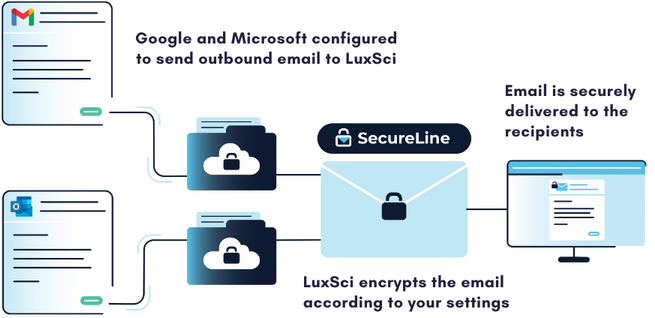
When using a secure email gateway, your messages are routed to a separate server before being sent or received. When sending an outbound message with LuxSci’s Secure Connector, it is routed through our SecureLine encryption before being securely delivered to the recipient. A copy of the message may also be sent to an independent email archive to help meet compliance requirements for message retention.
For incoming messages, the gateway can employ email filtering technology to quarantine suspicious messages. These technologies can scan incoming messages and prevent spammers and scammers from reaching employee inboxes and wreaking havoc. Just like with outbound email sending, the gateway can also capture a copy of inbound messages and retain them in an independent message archive.
The exact features of a secure email gateway will vary from vendor to vendor, but these represent some of the core functions that these tools provide. Simply put, a secure email gateway protects both incoming and outgoing messages to ensure that sensitive data is guarded from threats.
Why Choose a Secure Gateway?
There are two main reasons to implement a secure email gateway: the security and compliance benefits and their ease of use. Let’s look at each.
Compliance and Security Benefits
Many companies, like healthcare organizations, must comply with regulations for protecting patient or customer data. Many organizations grapple with the best way to secure potentially sensitive communications without interfering with or slowing down critical business workflows. Because secure email gateways layer on top of existing email accounts, they offer a speedy way to bring your organization into compliance with data security and retention guidelines.
As email continues to be an important channel for essential business communications, all organizations can benefit from protecting their employee accounts and reducing their risk and liability.
Easy to Administer and Use
Another benefit of using a secure email gateway is that your organization does not need to switch your primary email provider to enhance its security. Changing to a more secure email provider can be extremely challenging, especially if you have a lot of users with a lot of data that needs to be migrated to a new system. Add on the training time, and some organizations will find that switching email providers is a significant burden on the organization.
Installing a secure email gateway is very easy for account administrators and often does not require additional training or implementation for email users. Employees can continue to use their regular Microsoft or Google email accounts and do not need to take additional steps to learn an entirely new email program. With 73% of breaches in the healthcare industry caused by human factors, implementing tools that don’t rely on employee decision-making is essential.
Learn More About LuxSci’s Secure Connector
LuxSci’s Secure Connector is unlike other secure email gateways in that it encrypts every email automatically to reduce the risk of breaches caused by human errors. LuxSci provides the flexibility to opt-in to more secure methods of encryption for highly sensitive messages. Email filtering and archival tools are also available to reduce risk and improve resilience in the case of a cyber incident. Contact our sales team to learn more about our email security tools.
Yes, you can send protected health information (PHI) under HIPAA through email when using appropriate security measures and compliant email systems designed to protect protected health information during electronic transmission. Sending PHI through email requires encryption, access controls, audit logging, and other safeguards that meet regulatory standards for protecting patient information in digital communications. Healthcare providers, payers, and suppliers can transmit protected health information via email when they implement proper security protocols and use compliant email platforms. Understanding how to send HIPAA through email safely helps organizations maintain regulatory compliance while conducting routine business communications and patient care coordination activities.
Security Requirements for Sending HIPAA Through Email
Sending PHI through email requires end-to-end encryption that protects messages and attachments from unauthorized access during transmission and storage. Healthcare organizations cannot use standard email platforms like Gmail, Yahoo, or Outlook for transmitting protected health information without additional security measures. Encryption protocols transform readable text into coded format that only authorized recipients can decrypt and access. uthentication mechanisms verify the identity of both senders and recipients before allowing access to encrypted email content. Digital certificates provide additional verification that messages originated from legitimate healthcare organizations and have not been tampered with during transmission. Secure transmission protocols protect email communications from interception by unauthorized parties during delivery to intended recipients.
Permitted Uses When Sending HIPAA Through Email
Healthcare organizations can send HIPAA through email for treatment, payment, and healthcare operations without obtaining patient authorization. Treatment communications include sharing patient information between healthcare providers involved in care coordination, referrals, and consultation activities. Payment-related emails may include billing information, insurance claims, and financial communications with patients or payers. Healthcare operations encompass quality improvement activities, staff training materials, and administrative communications that support patient care delivery. Patient communications via secure email may include appointment reminders, lab results, and discharge instructions when appropriate safeguards are implemented. For business associate communications, HIPAA through email is permissible when vendors have signed the appropriate agreements and maintain compliant systems.
Prohibited Practices When Sending HIPAA Through Email
Regular email platforms without encryption cannot be used for sending HIPAA through email due to inadequate security protections. Healthcare organizations cannot send protected health information via text message, social media platforms, or other unsecured digital communication channels. Forwarding encrypted emails to non-compliant systems compromises security and violates HIPAA requirements. Sending protected health information to unauthorized recipients constitutes a privacy violation regardless of the security measures used. Healthcare staff cannot use personal email accounts for work-related communications involving patient information. Storing protected health information in unsecured cloud storage systems or sharing login credentials for secure email accounts creates compliance risks and potential security breaches.
Technical Implementation for HIPAA Through Email
Healthcare organizations implementing systems for sending PHI through email need secure email gateways that integrate with existing IT infrastructure. These systems automatically encrypt outgoing messages containing protected health information and provide secure delivery mechanisms for recipients. Message encryption occurs before transmission, ensuring that sensitive content remains protected throughout the delivery process. Recipient verification systems confirm that emails reach intended recipients and prevent unauthorized access to protected health information. Secure message retrieval processes may require recipients to authenticate their identity before accessing encrypted content. Audit logging capabilities track all email activities, including message transmission, recipient access, and any forwarding or reply activities involving protected health information.
Staff Training for HIPAA Through Email Compliance
Healthcare organizations must train staff on proper procedures for sending HIPAA through email and recognizing when additional security measures are needed. Training programs cover identification of protected health information, appropriate use of secure email systems, and policies for handling patient communications. Staff members learn to distinguish between communications that require encryption and those that can use standard email platforms. Policy education includes guidelines for password management, secure login procedures, and incident reporting requirements when security concerns arise. Regular refresher training keeps staff updated on changing regulations and organizational policies for email security. Competency assessments verify that staff members understand their responsibilities when handling protected health information in email communications.
Compliance Monitoring and Risk Management
Healthcare organizations need ongoing monitoring programs to ensure that practices for sending HIPAA through email remain compliant with regulatory requirements. Regular audits review email security configurations, user access controls, and compliance with organizational policies. Risk assessments identify potential vulnerabilities in email systems and communication processes that could lead to privacy violations. Incident response procedures address potential security breaches or unauthorized disclosures involving email communications. Documentation requirements include maintaining records of security training, policy updates, and compliance monitoring activities. Organizations benefit from establishing clear accountability structures and regular review processes that demonstrate ongoing commitment to protecting patient privacy in all email communications involving protected health information.
So – you’ve just been told that your email marketing program is putting your company at risk of violating HIPAA.
Ok. What now?
If you want to continue your email-based patient engagement efforts – without the risk of the financial, operational, and reputational risk that accompanies the exposure of sensitive patient data, you must implement HIPAA compliant email marketing practices.
This is comprised of two components: becoming HIPAA-compliant, setting up the required systems and procedures to ensure your PHI (PHI) and EPHI (EPHI) are protected, and your marketing objectives, who you want to reach and what to communicate.
However, you don’t have to let your marketing objectives suffer for the sake of security.
Implementing a HIPAA-compliant marketing program can actually help you achieve better marketing results.
Asking yourself these 12 questions ensures your email marketing campaigns align with your business goals and are HIPAA-compliant.
If your organization requires HIPAA-compliant email, start by using these questions to inspect your email marketing for compliance. Note that while we can’t provide legal advice, the below questions will help you identify some of the most common points of vulnerability and non-compliance.
1. Do you have security controls to protect access to your email marketing system?
Email security is an essential component of being HIPAA-compliant. As a starting point, check your internal security processes for access restrictions. This includes:
A robust password policy, i.e., changed frequently (e.g., 30 days), has to contain a mixture of characters, etc.
Multi-factor authentication (MFA), i.e., users verifying their identity in multiple ways, e.g., username/password and sent number codes (text, email, key fob, etc.), biometrics, etc.
Role-based access controls, i.e., granting access to individuals based on the responsibilities of their job role.
Zero Trust Architecture (ZTA), i.e., “never trust, always verify” – where users are required to reconfirm their identity on a case-by-case basis, as opposed to once when logging on, which mitigates session hijacking and similar threats.
2. Do you have a documented procedure to guide you HIPAA-compliant email marketing?
“Winging it” simply doesn’t cut it when it comes to HIPAA-compliant email marketing; you must develop a comprehensive documented process detailing how you intend to safeguard PHI throughout your email marketing campaigns.
This should include:
Specifying the HIPAA-compliant email delivery service you’ll use to execute your marketing campaigns
The processes and controls you’ll use to encrypt data for ePHI at rest and in transit
The access and authentication controls you have in place
How you’ll implement data minimization: only using the minimum necessary PHI in communications – and not including sensitive PHI unless it’s essential.
How you’ll securely dispose of data: Implement a process for securely deleting emails containing ePHI once they’re no longer needed, to comply with retention policies.
Staff training: educating employees involved in email marketing on how to securely handle PHI and other HIPAA requirements.
Incident response plan, i.e., an additional documented plan for how you’ll respond to data breaches and other cyber attacks; this also includes notifying any affected parties as mandated by HIPAA.
If you’re starting from scratch, the information contained in the answers to the questions in this article provides a useful starting point for creating your first procedure.
3. Can you send encrypted emails?
If you are sending highly sensitive data or PHI in your emails, be aware that HIPAA requires the data to be encrypted a rest, i.e., the storage medium where it resides, and in transit, when being sent to recipients.
To the surprise of many healthcare organizations, most major email marketing providers, such as Mailchimp and Constant Contact are unable to provide encryption for data in transit and only protect data in their systems. To avoid falling foul of HIPAA regulations, ensure that the email delivery platform you use to transmit messages containing PHI offers end-to-end encryption.
4. Do you have a complete understanding of your organization’s PHI and ePHI?
Much of the time, when we, as well as healthcare providers, talk about PHI, we’re actually referring to electronic protected health information (EPHI). While PHI is a catch-all term to account for all sensitive health information, in truth, in the digital age, the vast majority is stored electronically in data centers – and the patient data handled is EPHI.
You can discover “PHI” and “ePHI” within the context of your organization’s context by identifying and categorizing the PHI and ePHI typically handled in your business. It’s an absolutely crucial tenet of data protection that you simply can’t protect what you’re not aware of.
Comprehensive PHI categorization will help your staff navigate HIPAA-compliant email requirements.
5. Do you have a required training process in place for anyone sending HIPAA-compliant marketing emails?
Your HIPAA compliance program, as with your company’s overall cybersecurity posture, is only as strong as your weakest link. In light of this, it’s essential to educate the staff within your company who are involved in your healthcare engagement campaigns on the secure use of ePHI and HIPAA-compliant marketing practices.
Additionally, this needs to be reflected in your onboarding process, so new hires are made familiar with HIPAA regulations, should their role require it.
6. Do you have effective protection against malware?
In the unlikely event you need any further encouragement to revisit your company’s anti-malware (viruses, ransomware, Trojans, etc.) measures, there are always HIPAA compliance requirements!
To better protect your sensitive customer data against a slew of increasingly sophisticated cyber threats, start with these three key considerations:
Do you have anti-malware protection running on all of your organization’s devices? Additionally, does this extend to your employee’s personal devices on which they handle PHI?
How frequently do you update your anti-malware solution?
Does your email marketing provider have sufficient protection malware mitigation measures in place, as per HIPAA requirements?
7. Do you have valid Business Associate Agreements (BAA) in place?
It’s normal to outsource activities like email marketing to a third party, but for the service they provide to be HIPAA-compliant, you must have a business associate agreement (BAA) in place.
A BAA documents how two organizations will share PHI and under what circumstances. A BAA also details the legal responsibilities of each party in the event of a serious issue. With a BAA being a core component of HIPAA compliance, failure to have one in place with your email service provider is an immediate HIPAA violation – and one that can result in serious consequences for a healthcare company.
Getting Better Results from HIPAA-Compliant Email Marketing
Now that you’ve confirmed your systems are HIPAA-compliant, let’s move on to making sure your email marketing strategy aligns with your overall business objectives.
In pursuit of this, the following questions serve as a handy “monthly review” for refining the effectiveness of your email-based patient outreach efforts .
8. Why am I sending this email?
First and foremost, for the best results, each email you send should have a single, clearly defined purpose.
I know what you’re thinking – “my customers and patients are smart, they can handle multiple points in a single message.” And while that’s true, at whatever point your email reaches a recipient, they’re already juggling several different priorities at once. While they’re capable of juggling multiple points in a message – they’re unlikely to want to; when it comes to email marketing, a single goal is the best way to go.
Similarly, it’s important to remember that your email is one of dozens – or hundreds – received by your patient that day. So, if your message is long and overly complicated, the reader will likely skip over or delete it.
9. Is my email’s subject line standing out?
Following on the above point, is your email subject line impactful enough to stand out amidst the pile of messages that will land in the patient’s inbox that day? The email subject line is the most important part of your email because it’s responsible for persuading the reader to open your message.
Despite this, many marketers still use terrible, ineffective subject lines and wonder why their emails are failing to produce results!
For the best results, write up three to ten subject lines for your next email, step away for 5-10 minutes, and then choose the headline you determine as best.
Consider these examples to check your understanding:
Ineffective Email Subject Lines
Blank (no subject): writing nothing in the subject line
Clinic Newsletter (tell them more, e.g., the subject or theme for the month)
Overusing exclamation marks!!!
Effective Email Subject Lines (examples based on a dental practice)
BRAND-NEW Dental Product Released Today
How to Cut Down on Your Health Insurance Paperwork
[Case Study] How We Helped 3 Ex-Smokers Get White Teeth
10. What is the recipient’s brand and product awareness level?
Whether promoting medical devices, new digital solutions technology, or any healthcare product or service, understanding the prospect’s awareness level is essential.
If your email is designed to introduce a brand-new product, stick to high-level features and benefits while avoiding technical jargon and granular product details. Conversely, if you’re writing an email to experienced, highly knowledgeable readers, going into greater depth makes sense.
Advanced list management and segmentation tools, as offered by Luxsci Secure Marketing, are key for ensuring the communications you send match the reader’s awareness level.
11. Have I tested my message for readability?
Do you know one of the reasons that Hemingway was popular? He was skilled at writing short phrases and phrases. Consequently, his writing was easy to understand and appealed to a wide variety of people. When in doubt, keep your writing short and free of jargon, abbreviations and “insider” terms.
When you’re deeply involved in the details of your business, it’s so easy to overlook just how much specialized jargon and language you frequently use. However, if you want your communications to engage with patients and customers, they need to be as accessible as possible.
Fortunately, there are simple solutions to this, with tools like the Text Readability Calculator that are designed to quickly enhance the readability of your emails.
12. Have I sent my message to a test email account?
Finally, if you’ve followed all of the above advice, you’re almost ready to hit SEND…there’s just one more thing you need to check.
Determine how your email will look to recipients, including its clarity, and readability by simply sending a test email to one of your own email accounts once it is received.
In particular, pay attention to how the subject line looks and test all the links in the email to ensure they take the reader through to the intended destination, such as a product or service page. A broken link will only frustrate the recipient – who was interested enough to click through, no less – and lower your conversion rate.
Better still, send the test email to a colleague somebody and ask for their opinion about the quality of the message and whether it creates the desired impression.
Demystifying HIPAA-Compliant Email Marketing
As the most experienced HIPAA-compliant email provider, LuxSci specializes in providing secure and HIPAA-compliant solutions for companies aiming to send hundreds of thousands – or millions – of emails. Our hypersegmentation tools allow you to precisely target an unlimited number of patient sub-populations to maximize the efficacy of your messaging.
Are you interested in discovering how LuxSci’s secure email marketing platform will streamline your healthcare engagement efforts?
Contact us to learn more about our products and pricing.
The Health Insurance Portability and Accountability Act (HIPAA) is a complicated law that defines the standards for the secure collection, transmission, and storage of protected health information (PHI). When information is stored or exchanged electronically, the HIPAA Security and Privacy Rules require covered entities, i.e., organizations that handle PHI, to safeguard its integrity and confidentiality.
One of the most common ways that PHI is shared electronically is via email, so understanding HIPAA email rules is essential for achieving compliance and protecting sensitive data.
The HIPAA Email Security Rule
It’s important to note that HIPAA does not require the use of any specific technology or vendor to meet its requirements. Generally speaking, the Security Rule requirements for email fall into four categories:
Organizational requirements state the specific functions a covered entity must perform, including implementing policies, procedures and obligations concerning business associate agreements (BAAs).
Administrative requirements relate to employee training, professional development, and management of PHI.
Physical safeguards encompass the security of computer systems, servers, and networks, access to the facility and workstations, data backup and storage, and the destruction of obsolete data and HIPAA email archiving.
Technical safeguards ensure the security of email data transmitted over an open electronic network and the storage of that data.
Let’s move on to discussing some of the main requirements that apply to email and the steps you need to take to secure email accounts that transmit and store PHI.
HIPAA Email Rules: Compliance Checklist
While encryption gets most of the spotlight during discussions on email security, the HIPAA email rules, in contrast, cover a range of behaviors, controls, and services that work together to address eight key areas:
Access
Encryption
Backups and Archival
Defense
Authorization
Reporting
Reviews and Policies
Vendor Management
Let’s look at each aspect of HIPPA’s email rules in greater detail.
1. Access
Access controls help safeguard access to your email accounts and messages. Implementing access controls is essential to keep out unauthorized users and secure your data, with key steps including:
Using strong passwords that cannot be easily guessed or memorized – and changing them frequently, e.g. every 30 days.
Creating different passwords for different sites and applications.
Enabling multi-factor authentication (MFA).
Securing connections to your email service provider using TLS and a VPN.
Blocking unencrypted connections.
Pre-emptively installing software that remotely wipes sensitive email off your mobile device when it is stolen or misplaced.
Logging off from your system when it is not in use and when employees are away from workstations.
Emphasizing opt-out email encryption to minimize breaches resulting from human error.
2. Encryption
Email is inherently insecure and at risk of being read, stolen, intercepted, modified, and forged (repudiated). Covered entities should go beyond the technical safeguards of the HIPAA Security Rule and take steps that exceed what is required to futureproof their communications. Email encryption features to adopt include the following:
The ability to send secure messages to anyone with any email address.
The ability to receive secure messages from anyone.
Implementing measures to prevent the insecure transmission of sensitive data via email.
Exploring message retraction features to retrieve email messages sent to the wrong address.
Avoiding opt-in encryption to satisfy HIPAA Omnibus Rule.
3. Backups and Archival
HIPAA email rules require copies of messages containing PHI to be retained for at least six years. In light of this, organizations must consider the following:
How are email folders backed up?
Are there at least two different backups at two different geographical locations? Additionally, the processes updating these backups should be independent of each other as a measure against backup system failures.
Have you maintained separate, permanent, and searchable archives? While the emails should be tamper-proof, with no way to delete or edit them, they should be easily retrievable to facilitate discovery, comply with audit requests, and support business-critical scenarios.
4. Defense
Cyber threats against healthcare organizations are continually on the increase. Some may be surprised to learn that HIPAA compliant email rules mandate that organizations take steps to defend against possible malicious actors. With this in mind, consider implementing the following technologies:
Server-side inbound email malware and anti-virus scanning to detect phishing messages and malicious links.
Showing the sender’s email address by default on received messages.
Email filtering software to detect fraudulent messages and ensure it uses Sender Policy Framework (SPF), DomainKeys Identified Mail (DKIM), and Domain-based Message Authentication, Reporting and Conformance (DMARC) information to classify messages.
Scanning outbound email.
Scanning workstations for malware, i.e., viruses, ransomware, etc.
Using plain text previews of your messages.
5. Authorization
A critical aspect of HIPAA’s email rules is ensuring that cybercriminals cannot impersonate your company or employees. Configuring your domains with SPF and DKIM is essential to verify your identity as an authorized sender of mail from your domains. Also, ensure that users cannot send messages through your email servers without authentication and encryption.
6. Reporting
Setting accountability standards for email security is essential to establishing and strengthening your HIPAA compliance posture. Important steps to take include:
Creating login audit trails.
Receiving login failure and success alerts.
Auto-blocking known attackers.
Maintaining a log of all sent messages.
7. Reviews and Policies
Humans are the greatest vulnerability to any security and compliance plan, so creating policies and procedures that focus on plugging vulnerabilities and preventing human errors is essential. Strategies for reducing risk include:
Inviting independent third parties to review your email policies and user settings. Fresh, unbiased eyes can discover existing issues quickly.
Preventing devices that connect to sensitive email accounts from connecting to public WiFi networks.
Creating email policies prohibiting users from clicking on links or opening attachments that are not expected or requested.
8. Vendor Management
Most companies do not manage their email in-house, so it’s crucial to thoroughly research and vet whoever will be responsible for your email services. Perform an annual review of your email security and stay on top of emerging cybersecurity threats to take proactive action and for continued compliance with HIPAA email rules.
LuxSci’s secure high-volume email and marketing solutions are designed to help healthcare organizations tackle complicated HIPAA email rules and automate the compliance process. Contact us today to learn more about how our industry-leading HIPAA complaint email services can help you better secure your customer PHI and keep you in compliance.