LuxSci

What is a HIPAA Compliant Email Service?

HIPAA Emailing Patient Information

A HIPAA compliant email service is a secure email platform that meets all Health Insurance Portability and Accountability Act requirements for protecting patient health information during electronic communications. These specialized email platforms implement administrative, physical, and technical safeguards required under the HIPAA Security Rule, enabling healthcare providers, business associates, and covered entities to transmit protected health information electronically without violating federal privacy regulations. Unlike standard email services that lack encryption and access controls, a HIPAA compliant email service incorporates end-to-end encryption, audit logging, user authentication protocols, and business associate agreements to ensure that all electronic communications containing individually identifiable health information remain secure throughout transmission and storage.

Why a HIPAA Compliant Email Service is Necessary

Healthcare organizations that handle protected health information must comply with stringent regulatory requirements when using electronic communication systems. The HIPAA Security Rule mandates that covered entities implement appropriate administrative, physical, and operational safeguards to protect the confidentiality, integrity, and availability of electronic protected health information. When healthcare providers use email to communicate about patients, discuss treatment plans, or transmit medical records, these communications become subject to HIPAA regulations because they contain individually identifiable health information. Standard consumer email services like Gmail, Yahoo, or Outlook do not provide the necessary security controls required for healthcare communications, creating potential compliance violations that can result in substantial penalties from the Office for Civil Rights.

A HIPAA compliant email service handles these regulatory challenges by implementing encryption protocols, access controls, and audit mechanisms required under federal law. These specialized platforms ensure that all email communications are encrypted both in transit and at rest, preventing unauthorized access to protected health information even if messages are intercepted during transmission. Healthcare organizations using a HIPAA compliant email service can establish proper business associate agreements with their email provider, creating the legal framework required for third-party handling of protected health information.

Safeguards in Healthcare Email Systems

The administrative safeguards required for a HIPAA compliant email service involves policies, procedures, and controls governing how healthcare organizations manage email communications containing protected health information. Healthcare entities implementing secure email systems need to establish clear protocols for user access management, ensuring that only authorized workforce members can send, receive, or access emails containing patient information. These administrative controls include implementing role-based access permissions, establishing procedures for granting and revoking email access when employees join or leave the organization, and maintaining detailed documentation of all email-related policies and training programs.

Workforce training is another important aspect of safeguards for healthcare email communications. Organizations using a HIPAA compliant email service need to educate their staff about proper email usage, including guidelines for when it is appropriate to include protected health information in electronic communications, how to properly send secure emails, and procedures for reporting potential security incidents or unauthorized access attempts. This training ensures that healthcare workers understand their responsibilities when using secure email systems and helps prevent inadvertent disclosure of protected health information through improper email practices. Refresher training and updates to email policies help maintain compliance as technology and regulations evolve, while documented training records provide evidence of organizational commitment to protecting patient privacy.

Encryption Standards

Operational safeguards are the core of any HIPAA compliant email service, delivering the security controls necessary to protect electronic protected health information during transmission and storage. End-to-end encryption represents the most important technical safeguard, ensuring that email messages containing patient information are encrypted using strong cryptographic algorithms before transmission and can only be decrypted by authorized recipients. Modern secure email platforms implement Advanced Encryption Standard (AES) with 256-bit keys or similar encryption methods that meet current industry standards for protecting sensitive healthcare data. This encryption protects against unauthorized interception of email communications, even if messages are captured while traveling across public internet networks.

Access control mechanisms within a HIPAA compliant email service prevent unauthorized users from accessing protected health information stored in email systems. Multi-factor authentication requirements ensure that users must provide multiple forms of verification before accessing their secure email accounts, adding additional protection beyond simple username and password combinations. Automated audit logging captures detailed records of all email activities, including message sending and receiving times, user login attempts, and any administrative actions performed within the system. These audit logs provide healthcare organizations with the documentation necessary to demonstrate compliance during regulatory audits while also enabling detection of potential security incidents or unauthorized access attempts.

Digital certificates and secure email gateways provide additional technical safeguards by verifying the identity of email senders and recipients while ensuring that messages can only be transmitted between properly authenticated parties. Message integrity controls detect any unauthorized modifications to email content during transmission, while secure backup and disaster recovery systems protect against data loss while maintaining encryption standards for stored communications.

Physical Safeguards for Email Infrastructure

Physical safeguards protect the computer systems, workstations, and electronic media used to store and process emails containing protected health information. A HIPAA compliant email service provider maintains secure data centers with appropriate physical access controls, environmental protections, and equipment safeguards to prevent unauthorized access to servers hosting healthcare communications. These data centers implement multiple layers of physical security, including biometric access controls, security cameras, environmental monitoring systems, and redundant power supplies to ensure continuous protection of stored email data.

Healthcare organizations using secure email services also need to implement appropriate physical safeguards at their own facilities. Workstations used to access a HIPAA compliant email service need proper positioning to prevent unauthorized viewing of email content, automatic screen locks when users step away from their computers, and secure disposal procedures for any printed email communications containing protected health information. Mobile devices accessing secure email systems require additional protection through device encryption, remote wipe capabilities, and secure container technologies that separate healthcare communications from personal data on employee smartphones or tablets.

Environmental controls within healthcare facilities help protect against physical threats to email security, including proper climate control for computer equipment, fire suppression systems that won’t damage electronic devices, and backup power systems to maintain email availability during emergencies. Regular maintenance and monitoring of physical infrastructure ensure that protective measures remain effective while documentation of physical safeguards provides evidence of organizational commitment to protecting patient information stored in electronic communications.

Business Associate Agreements & Vendor Management

Healthcare organizations selecting a HIPAA compliant email service need to establish proper business associate agreements that define the legal responsibilities and obligations of both parties regarding protected health information. These agreements specify how the email service provider will protect patient data, what uses and disclosures are permitted, how security incidents will be reported, and what happens to protected health information when the business relationship ends. A comprehensive business associate agreement for email services addresses encryption requirements, audit logging standards, employee training obligations for the service provider, and procedures for responding to regulatory inquiries or patient requests for information.

Vendor due diligence processes help healthcare organizations evaluate potential email service providers to ensure they can meet HIPAA compliance requirements. This evaluation includes reviewing the provider’s security certifications, examining their data center facilities and security controls, assessing their incident response capabilities, and verifying their experience with healthcare industry regulations. Ongoing vendor management activities include regular security assessments, review of audit reports and compliance documentation, monitoring of service level agreements, and periodic evaluation of the email provider’s ability to adapt to changing regulatory requirements.

Healthcare organizations also need to consider the geographic location of email servers and data processing facilities when selecting a HIPAA compliant email service provider. Some providers offer options for maintaining all protected health information within United States borders, while others may provide additional privacy protections through international data processing agreements. Contract negotiations address liability allocation, insurance requirements, termination procedures, and dispute resolution mechanisms to protect healthcare organizations from potential compliance violations or security incidents related to their email communications.

Implementation and Migration

Healthcare organizations transitioning to a HIPAA compliant email service need careful planning to ensure seamless migration while maintaining security throughout the process. Implementation strategies address user training requirements, data migration procedures, integration with existing healthcare information systems, and testing protocols to verify proper security controls before going live with the new email system. Organizations need to develop detailed project timelines that account for user adoption challenges, potential technical issues, and regulatory compliance verification activities while minimizing disruption to patient care activities.

Migration planning includes inventory of existing email communications containing protected health information, assessment of integration requirements with electronic health record systems and practice management software, and development of backup procedures to protect against data loss during the transition process. Healthcare organizations need to coordinate with their chosen email service provider to establish proper configuration settings, implement appropriate security controls, and conduct thorough testing of encryption, access controls, and audit logging capabilities. User acceptance testing ensures that healthcare workers can effectively use the new secure email system while maintaining productivity and patient care quality.

Post-implementation activities include monitoring of email security controls, regular review of audit logs and compliance reports, periodic security assessments to identify potential vulnerabilities, and continuous training programs to help users adapt to new email features and security requirements. Healthcare organizations benefit from establishing internal email governance committees that oversee compliance activities, evaluate new email features or capabilities, and coordinate responses to security incidents or regulatory changes affecting electronic communications.

Picture of Erik Kangas

Erik Kangas

With 30 years engaged in to both academic research and software architecture, Erik Kangas is the founder and Chief Technology Officer of LuxSci, playing a core role in building the company into the market leader for HIPAA compliant, secure healthcare communications solutions that it is today. An international lecturer on messaging security, Erik also advises and consults on email technology strategies and best practices, secure architectures, and HIPAA compliance. Erik holds undergraduate degrees in physics and mathematics from Case Western Reserve University, and a doctoral degree in computational biophysics from MIT. Erik Kangas — LinkedIn

Get in touch

Find The Best Solution For Your Organization

Talk To An Expert & Get A Quote


A member of our staff will reach out to you

Get Your Free E-Book!

LuxSci High Email Deliverability Best Practices Paper

What you’ll learn:

Related Posts

HIPAA compliant email

Most Popular LuxSci Blog Posts of 2025

As we close out 2025, healthcare communicators, IT and compliance leaders, and digital marketers face an ever-changing landscape of security threats, regulatory updates, and technology innovations. At LuxSci, we’re committed to helping you with continuous updates and guidance on the future of secure healthcare communications.

In case you missed it, or need a refresh, below are some of our most popular blog posts from 2025. Enjoy!

1. Improve Email Engagement and Marketing Results with Automated Workflows

Automated workflows are transforming how healthcare organizations engage patients and customers — enabling dynamic, event-driven campaigns that easily scale your outreach and keep you HIPAA compliant. In this post, we introduce LuxSci’s Automated Workflows capability for our Secure Marketing healthcare solution. Learn how sequence-based journeys can personalize outreach and optimize engagement with behavior-based triggers that improve campaign performance — without sacrificing data security.

Read the full post: LuxSci Enhances Secure Marketing with Automated Workflows

2. Healthcare Email Threat Readiness Strategies

Email remains a frontline channel for healthcare communications, and a prime target for cyber threats and criminals. This deep-dive into email threat readiness strategies covers essential practices like continuous monitoring, business continuity planning, and workforce training to mitigate email-borne security risks. Whether you’re responsible for clinical systems, marketing, or enterprise IT, this post provides a strategic playbook to strengthen your defenses, while maximizing your results.

Read the full post: Healthcare Email Threat Readiness Strategies

3. HIPAA Compliant Email — 20 Tips in 20 Minutes

For practical guidance you can apply right now, this on-demand webinar distills 20 key tips for HIPAA-compliant email across technical, legal, and operational domains. Whether you’re refining your infrastructure, improving deliverability, or modernizing your data security posture in 2026, this resource is a time-efficient way to elevate your compliance and security.

Read the post and watch the webinar on demand: HIPAA Compliant Email: 20 Tips in 20 Minutes

4. Is SendGrid HIPAA-Compliant? What You Should Know

Choosing the right email provider matters, especially when Protected Health Information (PHI) is at stake. In this post, we examine SendGrid’s capabilities in the context of HIPAA compliance, outline what it takes to send PHI securely, and offer guidance on evaluating third-party services for secure healthcare email and communication needs.

Read the full post: Is SendGrid HIPAA-Compliant?

5. LuxSci Shines in G2 Winter 2026 Reports

Customer feedback matters to LuxSci. In this post, we share the most recent news about LuxSci’s performance in the G2 Winter 2026 Reports, where we earned 20 badges across categories like Email Security, Encryption, Gateway, and HIPAA-Compliant Messaging. These reviews reflect not just product excellence, but trust from real users, which we work hard to build every day!

Read the full post: LuxSci Shines in G2 Winter 2026 Reports

Looking Ahead to 2026

We look forward to providing more information and insights on secure healthcare communications in the coming year, including the latest on HIPAA compliant email, PHI security, healthcare marketing, threat readiness, and personalized engagement. In the meantime, if you’re not already, follow us on LinkedIn below, and we’ll see you here in 2026!

Follow LuxSci on LinkedIn

HIPAA compliant email

LuxSci Welcomes Angel Mazariegos as Head of Finance

LuxSci, a leader in secure healthcare communications and HIPAA compliant email, is pleased to announce the appointment of Angel Marie Mazariegos as the company’s new Head of Finance. With over 25 years of experience in financial management, accounting, and human resources, Angel will play a central role in advancing LuxSci’s operational excellence and supporting the company’s rapid growth in 2026 and beyond.

Angel brings a wealth of expertise to LuxSci, having held senior leadership positions at organizations focused on financial services, language and access services for healthcare, and human resources. In these roles, Angel has led multi-department Finance and HR teams, spearheading critical initiatives, including ERP implementations, streamlined employee onboarding, and financial process optimization.

In her role at LuxSci, Angel will oversee all aspects of the company’s finance operations, including budgeting, forecasting and reporting. Additionally, Angel will manage the company’s HR function, ensuring that LuxSci continues to foster a strong, people-driven culture based on its Secure, Trust, Responsible and Smart company values.

“Angel’s blend of financial and HR leadership makes her an invaluable addition to the LuxSci executive team and a real asset for our people,” said Mark Leonard, CEO of LuxSci. “We look forward to working with Angel to build the high-performing teams that will be critical to our future growth and serving the evolving needs of our customers.”

Angel holds dual MBA degrees in Accounting and Human Resource Management from Cappella University, as well as dual BS degrees in Business Administration (Accounting and CIS Business Systems) from California State University, Los Angeles.

“I am honored to join the LuxSci team at such an exciting time for the company,” said Mazariegos. “I look forward to working with the team and helping build on LuxSci’s reputation for excellence and reliability in secure healthcare communications.”

HIPAA Compliant Email

LuxSci Shines in G2 Winter 2026 Reports, Underscoring Commitment to Product Leadership and Trusted Relationships

We’re pleased to announce that LuxSci has been recognized for excellence and leadership for HIPAA compliant email and messaging in the just-released G2 Winter 2026 Reports!

Based on verified customer reviews, LuxSci earned 20 G2 badges as part of the most recent G2 reports, including top honors such as Grid Leader, Highest User Adoption, Best Support, and Best Estimated ROI.

This recognition further validates what we’ve always believed: our customers don’t just choose a great product — they choose a great partner. At LuxSci, we build long-term, trusted relationships with our customers, anchored in product reliability, industry-leading email deliverability and performance, and the best customer support in the business.

Why G2 Matters

G2 is a globally trusted peer‑review platform that aggregates verified user feedback and real‑world usage data to rank software and service providers. G2’s seasonal reports like the Winter 2026 editions shine a spotlight on latest tools and vendors that deliver consistent value and satisfaction to real customers.

Earning 20 badges this quarter signals a strong vote of confidence from our customers and community, helping affirm that LuxSci is a leading, highly adopted secure email solutions provider.

What We Earned in Winter 2026

Among the 20 badges awarded to LuxSci across Email Security, Email Encryption, Email Gateway and HIPAA Compliant Messaging are:

  • Grid Leader
  • Highest User
  • Best Support
  • Best Estimated ROI

This broad range of accolades spanning leadership, adoption, support and return on investment underscores the reliability of our solutions and the trust our customers place in us.

Awards Reflect Our Commitment to Customer Success

Reliable. Winning Grid Leader and Highest User Adoption demonstrates that thousands of users are depending on LuxSci, securely delivering emails to today’s most popular platforms, including Gmail, Apple Mail, Yahoo Mail and AOL, to name a few.

Proven. With Best Estimated ROI, customers are saying that LuxSci delivers tangible results, whether in secure email delivery, regulatory compliance, or operational efficiency.

Long‑Term Trust. Best Support is perhaps the most telling because for us, success isn’t just about features, it’s about being there for our customers every step of the way.

Thank you to all of our customers. We remain committed to your success — today and in the future.

Want to learn more about LuxSci? Reach out and connect with us today!

HIPAA Compliant Email

Here’s What HIPAA Compliant Email Salespeople Don’t Tell You

With email security threats continuously increasing in number and sophistication, as well as healthcare companies requiring secure solutions to communicate with patients and customers, the need for HIPAA compliant email solutions has never been greater. 

However, when looking for the right secure email services provider (ESP), healthcare organizations run the risk of making inaccurate assumptions about HIPAA compliance via what they learn from prospective vendors. This is due to the tendency for sales materials for HIPAA compliant email services, such as web pages or promotional videos, to highlight the strengths of the platform, while downplaying a healthcare company’s own role and responsibilities in securing protected health information (PHI). 

With this firmly in mind, here are six key things that HIPAA compliant email salespeople don’t tell you about securing communications and achieving compliance. 

1. The Shared Responsibility Model

Firstly, HIPAA compliant email salespeople are unlikely to emphasize the idea of shared responsibility when it comes to data security. This is the idea that two entities that share access to data, e.g., a healthcare company and their ESP, have a shared responsibility to preserve the privacy of that data.

In reality, most sales pitches explain the benefits and features of the solution, as opposed to stressing that compliance truly depends on how it’s configured and used. Now, that’s not to say that a salesperson is trying to hide this fact, as they’ll probably allude to training and configuration requirements. But, they’ll be less likely to make light of this and, more broadly, how shared responsibility factors into compliance.

2. A BAA Doesn’t Automatically Make You HIPAA Compliant

A business associate agreement (BAA) is essential for HIPAA compliance, but signing one doesn’t automatically make you compliant. Your organization still has to use the email delivery solution in a way that aligns with HIPAA regulations, which involves proper configuration, training, oversight, and reporting.

The misconception among some healthcare companies that a BAA equals compliance may be perpetuated by the term “HIPAA compliant email services provider”.  This could give some the impression that the vendor is fully HIPAA compliant and, subsequently, in signing a BAA with them, the use of their services is fully compliant.

But, it’s not that simple.

Simply signing a BAA obscures the real effort involved in achieving compliance. There’s no official HIPAA seal of approval, and HIPAA compliant means that the solution is capable of being configured for compliant use, which is a shared responsibility. HIPAA compliant email salespeople are unlikely to volunteer this nuance, especially if their email solution requires considerable configuration or has a steep learning curve to use it securely.

3. Not All Solutions or Features Are HIPAA Compliant

Another key detail often underplayed by vendor sales materials of HIPAA compliant email solutions is that some of their features, or even entire services, aren’t covered by their BAAs, so they can’t be used to handle PHI. 

These tools are referred to as “out of scope” and may include tools capable of integration with the email service, such as analytics or AI capabilities, but they don’t possess the cyber risk mitigation measures that align with HIPAA regulations. Perhaps the main reason for this is that many mass-market email delivery solutions, such as Microsoft 365 or Google Workspace, are designed for companies across all sectors. Consequently, while they can be HIPAA compliant, they weren’t developed from the ground up with the stringent regulatory demands of the healthcare industry in mind.

4. Solutions Are Not HIPAA Compliant “Out of The Box”

HIPAA compliant email salespeople may suggest that compliance is built into their platform, and healthcare organizations can use it to transmit PHI straight away, but this isn’t the case. Healthcare companies must still configure the email platform accordingly, as per the security requirements determined by their risk assessment, e.g., applying the right level of encryption. 

Also, if the email service is difficult to configure for HIPAA compliance or if the vendor’s configuration documentation lacks detail, that presents another obstacle to its compliant use. 

In addition to configuration, healthcare companies also have to implement access management controls and policies, establishing the extent to which each employee can access PHI in respect to their roles and responsibilities. From there, they will have to train their workforce on how to use the HIPAA compliant email solution securely, which may include those tools that fall outside the scope of your BAA with the vendor, and must not be used for the disclosure of patient data.

5. Essential Security Features Cost Extra 

Another more egregious version of an ESP not being HIPAA compliant out of the box is having features required for compliance, such as encryption or audit logging, as premium add-ons and not included in the solution’s base pricing. 

A vendor’s sales materials for its email service might list the necessary safeguards, but underemphasize the fact that only some versions of their platform are truly HIPAA compliant. Consequently, healthcare companies must confirm that the features required for HIPAA compliant email communications are included in the plan they’re purchasing. 

6. The Importance of Staff Training on HIPAA

HIPAA compliant email salespeople are often remiss in stressing the need for additional workforce training alongside the deployment of their platform. A healthcare company’s employees must be trained on how to securely use the email client, how to ID potential threats, and best practices for including PHI in email communications, as well as the regulations tied to HIPAA and data security.

This includes educating users on the differences between regular and secure email, and what they must do to safeguard patient and customer data. Fortunately, secure email solutions from providers like LuxSci enable automated email encryption, and users do not need to take any additional actions to ensure encryption when sending emails.

Additionally, in some cases, employees will need to be trained on which tools or features do not align with HIPAA guidelines and must not be used to process PHI.

LuxSci: Fully HIPAA Compliant – No Hidden Surprises

LuxSci specializes in solutions that enable companies to carry out secure, personalized, and HIPAA compliant email communications and campaigns. With more than 20 years of experience and billions of emails sent for companies including Athenahealth, 1 800 Contacts, Lucerna Health and Rotech Healthcare, we’ve acquired invaluable experience in helping healthcare organizations enhance their engagement efforts, all while adhering to HIPAA regulations. In addition, LuxSci’s secure high-volume and marketing email solutions feature HIPAA-required security controls, including encryption, audit logging, and multi-factor authentication (MFA) by default, not as optional, hidden extras.

Contact us today to learn more about how LuxSci’s secure email solutions can help increase the ROI on your patient and customer outreach efforts, while safeguarding PHI in line with HIPAA requirements.

You Might Also Like

HIPAA Compliant Email Marketing Software

Do You Need a VPN to Be HIPAA Compliant?

A VPN (Virtual Private Network) is not explicitly required by HIPAA regulations, but many healthcare organizations use VPNs as part of their security strategy to become HIPAA compliant. The HIPAA Security Rule requires appropriate protections for electronic protected health information without mandating particular technologies. VPNs help meet these requirements by encrypting data transmission, establishing secure remote access, and creating access controls that protect patient information from unauthorized disclosure.

HIPAA Network Protection Standards

The HIPAA Security Rule sets standards for protecting electronic health information without prescribing exact technical implementations. Healthcare organizations must implement safeguards that protect data integrity, confidentiality, and availability. Network protection measures matter when transmitting patient information across public networks. To become HIPAA Compliant, organizations must verify that transmitted information remains unaltered during transfer. Only authorized personnel should view sensitive data, regardless of whether access occurs within healthcare facilities or from remote locations. Many healthcare providers use VPNs to address these requirements, especially for staff working outside main facilities.

VPN Encryption Benefits

VPNs establish encrypted connections between devices and healthcare systems, creating protected pathways for data movement. When staff use public WiFi or home networks, this encryption prevents interception of patient information. Most VPN systems include authentication protocols that confirm user identity before granting system access. Access limitations can be configured to restrict which systems and information each user can view through VPN connections. Healthcare organizations often include VPN implementation details in their documentation during compliance audits or assessments, demonstrating how they protect data during transmission.

Securing Off-Site Healthcare Access

Medical professionals increasingly need access to patient records from various locations outside traditional facilities. Remote clinical work, telehealth appointments, and home-based administration all require secure handling of protected health information. Regardless of work location, HIPAA compliance demands consistent data protection standards. VPNs create secure connection tunnels that help maintain this protection across various networks and locations. For remote work to succeed, organizations develop clear guidelines about when VPN use becomes mandatory and how staff should establish secure connections. Mobile device management typically works alongside VPN protocols to ensure all endpoints meet security standards.

Exploring Security Alternatives

Healthcare organizations can meet HIPAA requirements without VPNs through several alternative approaches. Applications with built-in end-to-end encryption create secure channels for data transfer without full network encryption. Many cloud platforms designed for healthcare include sufficient authentication and security features for certain workflows. Some organizations implement zero trust architectures that verify every access request rather than relying on perimeter security. In practice, many healthcare systems use multiple security technologies rather than depending on any single solution. What matters for HIPAA compliance isn’t the technology chosen, but whether patient information remains properly protected throughout its lifecycle.

Technical VPN Deployment Factors

When implementing VPNs for healthcare environments, several technical elements require attention. Encryption must meet current standards like AES-256 to adequately protect healthcare data. Authentication should involve multiple verification factors beyond passwords alone. Usage monitoring helps identify unusual patterns that might indicate security problems. Staff need training on correct VPN procedures and potential security risks. IT support must address connection difficulties promptly, as frustrated users might otherwise bypass security measures. How these elements work together determines whether VPN deployment strengthens or weakens overall security posture.

Compliance Documentation Practices

HIPAA requires thorough documentation of all security measures and risk evaluations. Security policies should describe VPN usage requirements, configuration standards, and monitoring practices. System architecture documentation must show how VPN connections fit within the overall network design. Regular risk assessment examines potential vulnerabilities in VPN implementations. Response plans outline steps to address potential VPN security incidents. Well-organized documentation helps organizations demonstrate reasonable security efforts during regulatory reviews. During audits or investigations, clear records of security implementation decisions provide evidence of due diligence in protecting patient information

HIPAA secure email

What Is HIPAA Email Archiving Compliance?

HIPAA email archiving compliance involves the policies, procedures, and technology controls that healthcare organizations implement to ensure archived email communications meet regulatory requirements for PHI protection, record retention, and audit support. Compliant archiving systems must preserve email integrity, maintain security protections, provide controlled access, and support legal discovery while demonstrating adherence to Privacy and Security Rule obligations.

Healthcare organizations must demonstrate compliance with email archiving requirements as regulatory enforcement intensifies. Understanding all relevant compliance elements helps organizations develop archiving strategies that meet regulatory expectations while supporting operational efficiency and cost management.

Regulatory Requirements of HIPAA Email Archiving Compliance

Privacy Rule compliance requires healthcare organizations to maintain archived emails in ways that support patient rights including access, amendment, and accounting of disclosures. Archived communications that contain PHI must remain accessible to fulfill these patient rights throughout required retention periods. Security Rule adherence mandates that archived emails receive the same protections as active communications including access controls, audit logging, and encryption measures. Healthcare organizations cannot reduce security standards for archived PHI simply because communications are no longer actively used. Breach notification obligations extend to archived email systems, requiring healthcare organizations to monitor archived communications for unauthorized access and report incidents that meet breach criteria. All archiving systems must include security monitoring and incident detection capabilities.

Documentation of HIPAA Email Archiving Compliance

Written procedures must govern HIPAA email archiving compliance operations, including capture methods, retention schedules, access controls, and disposal processes. These procedures should align with broader organizational policies while addressing the unique aspects of archived communication management. Training documentation demonstrates that personnel responsible for archiving operations understand their compliance obligations and know how to properly handle archived communications containing PHI. This training should cover both system operations and regulatory requirements. Risk assessment integration ensures that email archiving practices are evaluated as part of broader organizational risk management programs. These assessments should identify potential vulnerabilities in archiving systems and document mitigation strategies.

Access Control Implementation

User authentication systems verify the identity of individuals requesting access to archived emails before granting permissions to view PHI. These systems should integrate with organizational identity management platforms while providing additional security for archived communications. Authorization procedures define who can access different types of archived emails and under what circumstances. Healthcare organizations should implement role-based access that limits archived PHI exposure to personnel with legitimate business needs. Activity monitoring tracks all access to archived emails including search queries, document retrieval, and export activities.

Data Integrity and Preservation Standards

Immutable storage protections prevent archived emails from being altered or deleted inappropriately, ensuring that communications remain authentic and complete throughout their retention periods. These protections support legal discovery requirements and regulatory audit activities. Chain of custody documentation tracks archived emails from initial capture through disposal, providing evidence that communications have not been tampered with or lost. This documentation helps establish the reliability of archived communications for HIPAA email archiving compliance. Version control systems maintain records of any authorized changes to archived email metadata or indexing information while preserving original message content. These systems help distinguish between legitimate administrative updates and unauthorized modifications.

Audit Support and Reporting Capabilities

Compliance reporting features provide regular summaries of archiving activities including capture rates, storage utilization, access patterns, and retention compliance. These reports help healthcare organizations demonstrate ongoing compliance while identifying potential issues. Audit trail generation creates detailed logs of all archiving system activities including user access, search queries, data exports, and administrative actions. These trails must be preserved and protected to support regulatory reviews and internal compliance assessments. Discovery support tools enable healthcare organizations to efficiently locate and produce archived emails during legal proceedings or regulatory investigations. These tools should provide precise search capabilities while maintaining audit trails of discovery activities.

Technology and Infrastructure Compliance

Encryption requirements ensure that archived emails containing PHI receive appropriate protection during storage and transmission. Healthcare organizations must evaluate their archiving systems to confirm that encryption meets current regulatory standards and organizational risk tolerance. Backup and recovery procedures maintain additional copies of archived emails while preserving security protections and access controls. These procedures should include regular testing to ensure that archived communications can be restored without compromising compliance. Vendor management processes ensure that third-party archiving service providers meet HIPAA email archiving compliance requirements and maintain appropriate business associate agreements. Healthcare organizations must monitor vendor performance and security practices throughout the relationship.

Retention Schedule Compliance

Policy implementation ensures that archived emails are preserved for appropriate periods based on content type, business purpose, and the requirements of HIPAA email archiving compliance. Automated HIPAA email retention schedules help maintain consistency while reducing manual administrative burden. Disposition procedures govern how archived emails are disposed of when retention periods expire, ensuring that PHI is properly destroyed and disposal activities are documented. These procedures should prevent unauthorized recovery of disposed communications. Exception management addresses situations requiring deviation from standard retention schedules such as litigation holds or ongoing investigations. These exceptions must be properly authorized, documented, and monitored to ensure appropriate resolution.

Performance and Quality Assurance

System reliability measures ensure that archiving operations continue functioning properly without gaps in email capture or unexpected data loss. Healthcare organizations should establish performance standards and monitoring procedures that detect potential system failures. Quality control procedures verify that archived emails are complete, accurate, and properly indexed to support retrieval requirements. Regular quality assessments help identify system issues that could compromise compliance or operational effectiveness. All processes should incorporate lessons learned from audits, incidents, and industry best practices.

HIPAA email laws

How To Overcome Email Encryption Challenges in Healthcare

Encryption is a critical security measure for protecting electronic protected health information (ePHI) included within email communications, and a key technical safeguard under the HIPAA Security Rule. However, despite its efficacy in helping protect sensitive patient data from malicious actors, encryption can be difficult to successfully implement. 

Technical complexity, user resistance, and compatibility issues across different email systems can emerge as persistent problems, leading to frustration, risky workarounds, and, ultimately, increased risk of ePHI exposure and compliance violations. Without thoughtful deployment and support, encryption can become a barrier to successful secure email communication in healthcare, as opposed to a measure that underpins it.

To help you ensure secure, HIPAA compliant email communication, this post discusses the main encryption challenges you’re likely to encounter, how they can diminish your email security posture, and the measures you can take to overcome them. 

What Is Email Encryption?

Before we discuss the most frequent email encryption challenges faced by healthcare organizations, here’s a quick refresher on what email encryption is and why it’s so important for securing sensitive patient data.  

Email encryption is the process of scrambling the content of a message to make it unreadable as it’s sent to recipients or stored in a database. Only the intended recipient, who has the encryption key, can decrypt the email and access the data within. 

Consequently, in the event an encrypted message is intercepted by malicious actors in transit or exfiltrated from a data store during a security breach, they won’t be able to make sense of it. This renders any ePHI included in the message unintelligible and, therefore, worthless, adding another layer of security that preserves patient privacy – and keeps your business safe.

Common Email Encryption Challenges 

Let’s move on to detailing some of the most frequent encryption challenges that must be overcome by healthcare organizations to ensure secure email communication and HIPAA compliance. 

Decrypting Messages Is Too Difficult

The more difficult or drawn out it is for recipients to decrypt their email messages, the more likely they’ll simply go unread or end up deleted. If the decryption process is too cumbersome, which could include requiring a user to log into a separate site (i.e., a web portal), verify their identity multiple times, create a new account, or install additional software, it adds complexity. This can drive users to seek workarounds or cut corners, such as having information sent to them through unsecured channels, which puts your company at risk.  

Similarly, email clients, browsers, and security settings may impact the decryption process, causing compatibility issues that prevent users from accessing their messages. Within a healthcare setting, where timely communication is crucial, such obstacles can disrupt workflows, slow down patient care, and lead to HIPAA compliance violations if users resort to unencrypted alternatives. 

Encryption that Requires Manual Intervention 

Some email encryption tools require users to manually encrypt messages. If users forget to apply encryption or misconfigure settings, sensitive patient data could be exposed, leading to compliance violations and ePHI exfiltration. 

For employees who handle ePHI and need to send encrypted emails, remembering to enable encryption (vs. automated encryption) is an extra step that introduces the risk of human error into the process. To offer a related, and more relatable, example: how many times have you forgotten to include an attachment when sending an email, even when referencing the attachment in the message? It’s all too easily done. In the same way, an inexperienced, tired, or distracted user could simply neglect to turn on or correctly configure encryption before sending an email, putting patient data at risk. 

Increased IT and Administrative Overhead

The two email encryption challenges outlined above contribute to a third overarching difficulty for healthcare organizations: an increased workload for its IT, security and operations teams. 

First of all, IT, security and operations must establish and continuously enforce encryption policies, configuring rules that ensure sensitive patient data is encrypted while non-sensitive, business communication continues to flow unobstructed. Misconfigured policies can cause over-encryption, resulting in user inaccessibility and disruptions, or under-encryption, leading to exposure of ePHI and HIPAA compliance violations.

Second, IT support teams must troubleshoot user issues: namely employees and external recipients who are unfamiliar with encryption protocols and need support in overcoming difficulties in message decryption. These could be caused by compatibility issues between different email clients or systems, expired or missing digital certificates, incorrect key exchanges, or confusion surrounding accessing encrypted messages through portals or attachments.

Lastly, IT and governance teams must keep up-to-date with changing regulatory updates and email security threats. As compliance requirements evolve, healthcare organizations must reassess encryption standards, upgrade outdated protocols, and ensure that their workforce adheres to best practices. Without an adequate strategy and the right systems in place, managing encryption can become a constant drain on IT bandwidth, taking personnel away from other aspects of their work that contribute to patient care. 

Effective Strategies For Email Encryption

Having discussed the most common encryption challenges and how they can impact a company’s email security posture, let’s look at some of the most powerful mitigation strategies, which will improve the email encryption experience for both senders and recipients.

Balance Security With Ease of Use

To overcome the challenges of user inaccessibility, human error, and excessive administrative overhead, healthcare organizations must balance the ease of use of their encryption solutions with the level of security they provide. 

While opting for the most secure encryption protocols intuitively seems like the best option, extra security often comes at the expense of usability, which can render the encryption irrelevant if users decide to circumvent it altogether, as outlined earlier. Instead, it’s essential to evaluate the sensitivity of message content and select a corresponding level of encryption. 

Moving onto practical technical examples, Transport Layer Security (TLS) is a widely used email encryption standard, thanks to its ease of implementation and use, i.e., once activated, no further action is required by the user to encrypt the message content. However, TLS only encrypts ePHI in transit, i.e., when being sent to recipients, which may prove insufficient for highly sensitive patient data.

In contrast, encryption protocols such as Secure/Multipurpose Internet Mail Extensions (S/MIME),  AES-256 and Pretty Good Privacy (PGP) provide more comprehensive encryption, safeguarding the ePHI contained in email communications both in transit and at rest, i.e., when stored in a database. Now, while this makes them more effective at securing patient data and achieving HIPAA compliance, these standards are more complicated to implement and to use than TLS encryption. 

S/MIME requires users to obtain and install digital certificates from a Certificate Authority (CA), which verifies their respective identities and provides the public key for encryption. Consequently, both the sender and recipient must have valid certificates; if either party’s certificate is revoked or expires, they won’t be able to encrypt or decrypt the message, respectively.

With PGP, meanwhile, users must manually generate and exchange public/private keys. This offers greater flexibility than S/MIME but requires careful key management, which can be confusing for non-technical users. If a recipient doesn’t have the sender’s public key, they won’t be able to decrypt the message. Additionally, both S/MIME and PGP require a public key infrastructure (PKI), which can add considerable administrative overhead, particularly in regards to the management of certificates, public keys, and user credentials. 

Accounting for this, healthcare organizations can balance security with accessibility by employing a tiered encryption strategy: using TLS for lower-risk communication while opting for S/MIME or PGP for more sensitive communications.  

Enable Automatic Encryption 

Subsequently, the challenge of balancing security with accessibility can be remediated by deploying an email delivery platform that not only removes the need for manual user intervention but also automatically applies the appropriate encryption standard based on message content and delivery conditions. Rather than relying on users to choose the correct method—or worse, bypass encryption altogether—modern email solutions like LuxSci can intelligently enforce encryption without affecting the user experience.

Many healthcare companies rely on TLS encryption because it eliminates the need for encryption keys or certificates, additional log-ins, etc. For this reason, it’s often referred to as  ‘invisible encryption’ for its lack of effect on the user experience. 

However, to be most effective, both the sender’s and recipient’s email servers must support enforced TLS (i.e., TLS 1.2 and above). In the event the recipient’s email server doesn’t support TLS, the email message will be delivered unencrypted or fail to send altogether, depending on the server configurations. Additionally, once the email is delivered to the recipient’s inbox, unless the recipient’s email infrastructure encrypts messages at rest, it will be stored in an unencrypted format. 

Consequently, while TLS is ideal for email messaging that doesn’t contain highly sensitive ePHI, it’s insufficient for all healthcare communication. To ensure the secure and HIPAA compliant inclusion of patient data in emails, healthcare organizations should opt for an email solution that supports automated, policy-based encryption, which can upgrade to S/MIME or PGP when necessary. This offers the combined benefits of optimal ePHI security, minimal administrative burden, and removing the need for staff intervention.

Invest in Employee Education

While a flexible encryption policy and deploying email solutions that support automation will go a long way towards overcoming email encryption challenges, these efforts can still be undermined if users aren’t sufficiently educated on their benefits and use. For this reason, it’s crucial that healthcare companies take the time to educate their employees on both the how and why of email encryption.  

Even the most advanced encryption systems can fail if employees don’t understand how to use them properly, as well as what to look out for in their day-to-day email use. Some aspects of email encryption, such as recognizing secure message formats or troubleshooting delivery issues, may still require user awareness. With this in mind, employee training programs should focus on recognizing when additional encryption measures are necessary, how to ask for assistance, the dangers of unsecured channels, and how to report suspicious activity in addition to the practical aspects of using your email delivery platform. 

Overcome Email Encryption Challenges with LuxSci

LuxSci is a leader in secure healthcare communication, offering HIPAA compliant solutions that empower organizations to connect with patients securely and effectively. With over 20 years of expertise, we’ve facilitated the delivery of billions of encrypted emails for healthcare providers, payers, and suppliers.

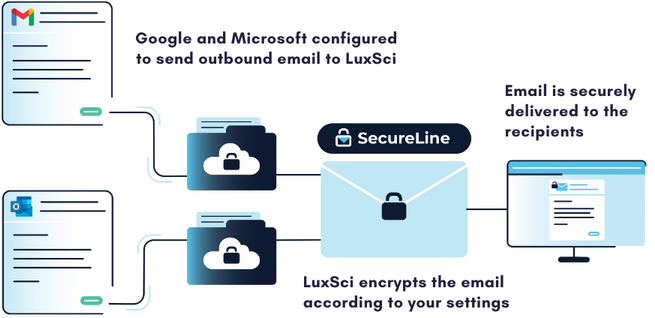
Luxsci’s proprietary SecureLine encryption technology is specially designed to help healthcare organizations overcome frequent encryption challenges and better ensure HIPAA compliance with powerful, flexible encryption capabilities. Its features include: 

  • Comprehensive email encryption: ensuring the encryption of patient data in transit and at rest. 
  • Automated encryption: “set it and forget it” email encryption guarantees security and HIPAA compliance – with no action required on the part of users once configured. 
  • Flexible encryption: dynamically determining the optimal level of email encryption, as per the recipient’s security posture, job role and supported encryption methods. This makes sure messages are delivered securely while maintaining HIPAA compliance.

Ready to take your healthcare email engagement to the next level? Contact LuxSci today!

LuxSci Email EOBs

How Insurers Can Save Millions Per Month with Secure Email EOBs

Have you looked into what it’s costing your company to snail mail EOBs these days?

EOBs give an individual an increased understanding of their insurance coverage, the cost of care, and their out of pocket expenses. As a result, it’s absolutely critical that health insurers deliver EOBs quickly and effectively.

However, the most commonly used method for sending out EOBs, traditional mail or snail mail, has several drawbacks that can prevent important information about healthcare coverage from reaching people in a timely manner – not to mention the high cost insurers take on to send them. This can leave policyholders in the dark about their healthcare coverage, which can lead to confusion and dissatisfaction with their insurance provider when they receive an unexpected medical bill. 

Furthermore, because EOBs contain the protected health information (PHI) of policyholders or members, insurers are bound by HIPAA (the Health Insurance Portability and Accountability Act) regulations to ensure their secure delivery. Consequently, the risks inherent to sending paper EOB statements in the mail not only have security implications but also potential consequences for non-compliance.  

With all this in mind, this post discusses why healthcare insurers should send EOBs to their policyholders via secure email instead of traditional mail. We detail the various benefits of making the switch to email EOBs, which include enhanced security, better adherence to compliance regulations, higher deliverability rates, and significant cost savings. 

Security Benefits

Insurance companies that send out EOBs via email as opposed to traditional mail are less likely to be at risk for a data breach or leak of PHI.  Firstly, sending an EOB via email drastically decreases the risk of interception. When sent in paper form, an EOB could be:

  • Lost, stolen or damaged in transit
  • Delivered to the wrong address
  • Not properly deposited in a letter or mailbox, then stolen
  • Intercepted within the intended address by another individual who lives at or has access to the residence. 

Conversely, as detailed later in this post, email allows for various controls and processes, which mitigate the risks of unsuccessful message delivery.

Additionally, secure, HIPAA compliant email provides data encryption, which safeguards the sensitive patient data within EOBs during transmission and at rest by rendering it unreadable to malicious actors who might intercept it or gain access to it. Physical mail, in contrast, offers no such protection, as someone who intercepts a paper EOB notice can simply open it and freely read its contents. 

Finally, secure email delivery platforms, such as LuxSci, feature identity verification and access controls that enable healthcare insurers to restrict access to PHI, limiting its exposure. Similarly, HIPAA compliant email also provides auditing logging capabilities to track access to patient data, to quickly identify the source of security breaches.

Increased Delivery

Once a person opts-in, sending an EOB by email greatly increases its deliverability, up to 98% or more – almost instantly. By better ensuring a policyholder receives their EOBs, healthcare insurers increase the chance of successfully communicating the intended information they contain, namely, the cost of a service and how much they’re required to cover.

Additionally, the ability to track secure email in near real-time also enhances its deliverability, as it allows organizations to determine the cause of delivery failure and make subsequent attempts to get the EOB delivered. At the same time, the process of determining the reason for the message failure may also reveal security concerns; a process that is very difficult, if not impossible, to achieve with traditional physical mail.

Radical Cost Savings 

Simply put, sending EOBs via email instead of traditional mail can save health insurers massive amounts of money. By saving a dollar or more per EOB, the cost savings can quickly add up to millions of dollars per month in savings.

If you’re curious about just how much you can save with email EOBs, try our just-released email EOB ROI calculator. You can see how much your company can save with just a 30 percent shift from physical mail EOBs to email, in a few seconds.

Try the EOB Calculator here

The most significant cost reduction is the money saved on printing and mailing paper EOB statements. Additionally, the cost of administering the delivery of EOB notices is lowered when it’s done electronically. Resending EOBs in the event of their non-delivery also is much easier, faster and cheaper via email.

Compliance Benefits

Because sending an EOB via email requires HIPAA compliance, your communications are encrypted by default, protecting patient privacy and keeping PHI out of the hands of malicious actors, all while reducing the risk of HIPAA compliance violations. The security features built into HIPAA compliant email platforms, such as encryption, access control, and audit logs, help insurers satisfy the requirements of HIPAA’s Privacy and Security Rules in their compliance efforts.  

Another considerable benefit of using secure email to send policyholders their EoBs, or, in fact, any communication containing PHI, is that it’s far easier to implement breach notification protocols. HIPAA compliant email delivery platforms provide real-time tracking, so companies can pinpoint email message failures quickly and act accordingly. Similarly, intrusion detection systems and other cybersecurity measures that support email systems enable the faster detection and containment of data breaches. 

In stark contrast, physical mail is far more difficult to track. Consequently, security breaches via mail could go unnoticed for days or even weeks. If you’re unaware of a data breach, let alone have not yet contained or mitigated it, you’re unable to inform all affected parties, resulting in further HIPAA violations and a loss of customer trust. 

Reduced Carbon Footprint

It’s difficult to highlight the cost benefits of sending EOBs to policyholders by email without recognizing the positive environmental impact, too. Email EOBs cuts down on paper usage, for both the notices themselves and the envelopes they’re mailed in. Then there’s the matter of the electricity and ink involved in printing them, the emissions produced in their delivery, etc.  Opting to send EOBs via email reduces all these factors, which enables healthcare organizations to lower their carbon footprint and, where applicable, meet their sustainability obligations. 

Now’s the Time to Move to Email EOBs

LuxSci’s HIPAA compliant Secure High Volume Email solution enables healthcare insurers to instantly send EOBs to policyholders securely and at scale, extending into hundreds of thousands and millions of messages a month. 

Our HIPAA compliant email delivery platform features:  

  • Dedicated IPs that isolate critical transactional messages, such as EOBs, from other email traffic, allowing our clients to reach deliverability rates of 98% or more. 
  • Real-time tracking for determining the delivery status of EOBs, as well as troubleshooting unsuccessful delivery attempts.
  • Flexible encryption through LuxSci’s proprietary SecureLine Technology, which automatically adjusts encryption according to the recipient to better ensure the protection of sensitive data, including for EOBs or any sensitive healthcare communication.

Contact us today to learn more about how your organization can begin the transition to electronic EoBs, reducing costs and improving the customer experience.