A HIPAA secure email is a specialized communication system that protects protected health information during electronic transmission through encryption, access controls, audit logging, and other security features required for regulatory compliance. HIPAA secure email platforms enable healthcare organizations to send sensitive patient information while meeting privacy and security standards established by federal healthcare regulations. Healthcare providers, payers, and suppliers use HIPAA secure email to communicate with patients, business partners, and other healthcare organizations without risking privacy violations or security breaches. Understanding what makes HIPAA secure email different from standard email helps organizations select appropriate communication tools and maintain compliance with healthcare privacy regulations.
Core Security Features of HIPAA Secure Email
HIPAA secure email systems include end-to-end encryption that transforms readable messages into coded format during transmission and storage. This encryption ensures that only authorized recipients with proper decryption keys can access message content and attachments. Transport Layer Security protocols protect email communications during transmission between servers, while message-level encryption secures content even when stored on email servers. Multi-factor authentication verifies user identities before granting access to email systems, requiring additional verification beyond standard passwords. Access controls limit which users can send emails to external recipients and specify what types of information can be included in different message categories. Automatic session timeouts prevent unauthorized access when users leave workstations unattended, while secure password requirements protect user accounts from unauthorized access.
Administrative Controls and User Management
HIPAA secure email platforms provide centralized administration tools that allow IT teams to manage user accounts, configure security policies, and monitor compliance across the organization. Role-based permissions ensure that staff members can only access email functions appropriate to their job responsibilities and organizational roles. User provisioning and deprovisioning processes control access to email systems when staff members join or leave the organization. Policy enforcement mechanisms automatically apply security settings based on message content, recipient types, and organizational rules. Administrative dashboards provide real-time visibility into email security metrics, user activity patterns, and potential policy violations. Centralized logging captures all administrative activities, creating audit trails that demonstrate compliance with regulatory requirements and organizational policies.
Audit and Compliance Tracking Capabilities
Comprehensive audit logging tracks all activities within HIPAA secure email systems, creating detailed records of message transmission, recipient access, and user behavior patterns. These logs include information about who sent messages, when they were transmitted, what attachments were included, and how recipients accessed the content. Audit trails help organizations demonstrate compliance during regulatory reviews and investigate potential security incidents. Log retention policies ensure that audit information remains available for required periods while protecting stored data from unauthorized modification or deletion. Automated reporting features generate compliance reports and alert administrators to unusual email patterns or potential security concerns. Regular audit log reviews help identify training needs and process improvements for email security practices across the organization.
Integration with Healthcare Systems and Workflows
HIPAA secure email solutions integrate with electronic health record systems, practice management platforms, and other healthcare applications to streamline communication workflows. These integrations allow users to send secure messages directly from patient records or billing systems without switching between multiple applications. Automated triggers generate secure email notifications for appointment reminders, lab results, billing communications, and other routine patient interactions. Application programming interfaces enable custom integrations with specialized healthcare software used by different types of organizations. Single sign-on capabilities allow users to access email functions using their existing healthcare system credentials, reducing password management burden and improving user experience. Integration features help maintain productivity while ensuring that all communications involving protected health information remain secure.
Patient Communication and External Messaging
HIPAA secure email platforms include patient portal functionality that enables secure two-way communication between healthcare organizations and their patients. Patients can access secure portals to read messages, respond to communications, and download documents without requiring special software installations. Portal notifications alert patients when new messages arrive while maintaining privacy protections throughout the communication process. External messaging capabilities allow secure communication with business partners, referring physicians, and other healthcare organizations that may use different email systems. Message delivery confirmation and read receipts provide verification that important communications reached intended recipients and were accessed appropriately. Secure message forwarding ensures that communications can be shared with authorized parties while maintaining encryption and audit trail integrity.
Implementation and Deployment Considerations
Healthcare organizations implementing HIPAA secure email need to consider data migration from existing email systems, staff training requirements, and integration with current technology infrastructure. Planning processes should include security risk assessments, workflow analysis, and stakeholder input to ensure selected solutions meet organizational communication needs. Pilot deployments allow organizations to test functionality and identify potential issues before full implementation across all departments. Change management strategies help staff adapt to new email security procedures and software interfaces while maintaining productivity and patient care quality. Technical support during implementation ensures that integration challenges are resolved quickly and security configurations meet organizational requirements. Post-deployment monitoring verifies that HIPAA secure email systems perform as expected and continue meeting compliance obligations as organizational needs change over time.
Erik Kangas
With 30 years engaged in to both academic research and software architecture, Erik Kangas is the founder and Chief Technology Officer of LuxSci, playing a core role in building the company into the market leader for HIPAA compliant, secure healthcare communications solutions that it is today. An international lecturer on messaging security, Erik also advises and consults on email technology strategies and best practices, secure architectures, and HIPAA compliance. Erik holds undergraduate degrees in physics and mathematics from Case Western Reserve University, and a doctoral degree in computational biophysics from MIT.
Erik Kangas — LinkedIn
Few terms in healthcare get thrown around as loosely as “HIPAA violation.” It gets invoked when a nurse mentions a patient’s diagnosis to a friend outside of work, when a technician talks about a well-known patient who came through the clinic, or when a physician casually brings up a person’s rare diagnosos at a backyard barbecue — situations that sound like violations but often have nothing to do with the actual law. That confusion isn’t just an oversight, but rather, it points to a gap in understanding what HIPAA covers, who it applies to, and what genuinely puts an organization at risk.
For health care providers, compliance officers and IT professionals, the stakes behind that confusion are anything but casual. The Department of Health and Human Services (HHS) Office for Civil Rights (OCR) has issued settlements ranging from a few thousand dollars to over $16 million for the same underlying failures, such as a missed risk assessment, an unencrypted laptop, a chart accessed by the wrong person. This guide breaks down what actually constitutes a HIPAA violation, the most common ways organizations end up on OCR’s radar, what genuinely falls outside HIPAA’s scope, and what to do if you’re managing risk or responding to an incident right now.
If your organization handles PHI over email — one of the highest-risk channels for exactly this kind of violation — our HIPAA Compliant Email guide is a useful next read once you’ve worked through this one.
What Is a HIPAA Violation?
A HIPAA violation occurs when a covered entity, business associate, or a member of either’s workforce fails to comply with a standard set out in the HIPAA Privacy Rule, Security Rule, or Breach Notification Rule — or fails to follow an internal policy implemented to support HIPAA compliance.
That definition matters because it draws a hard boundary around who can actually commit one. HIPAA applies to:
Covered entities — healthcare providers, health plans, healthcare suppliers, payers, and healthcare clearinghouses
Business associates — vendors and contractors that create, receive, maintain, or transmit protected health information (PHI) on a covered entity’s behalf
Workforce members — employees, volunteers, and contractors of either of the above
HIPAA does not apply to private individuals acting outside of a covered role — a distinction that trips up far more people than you’d expect, and one we’ll come back to later in this guide.
The Health Insurance Portability and Accountability Act (HIPAA) was designed to protect the confidentiality of medical records and patient data while still allowing healthcare organizations to function and share information when appropriate. A violation happens when that balance breaks down — when PHI is accessed, used, or disclosed in a way the law doesn’t permit, or when required safeguards simply aren’t in place.
The Three HIPAA Rules a Violation Can Break
Every HIPAA violation traces back to one (or more) of three core rules. Understanding which rule is in play helps clarify what actually went wrong — and what needs to be fixed.
Rule
What It Governs
Example Violation
Privacy Rule
Who can access, use, and disclose PHI, and under what circumstances
Sharing a patient’s diagnosis with someone outside their care team without authorization
Security Rule
Administrative, physical, and technical safeguards for electronic PHI (ePHI)
Failing to encrypt emails in transit or a laptop that stores patient information
Breach Notification Rule
Requirements for notifying affected individuals and HHS after a breach of unsecured PHI
Missing the 60-day deadline to notify patients after a data breach
Most real-world violations involve more than one rule at once, such as a stolen, unencrypted laptop is a Security Rule failure that can also trigger Breach Notification Rule obligations. Keeping the three rules distinct in your own documentation, though, makes it much easier to identify exactly where a gap exists.
Most Common Types of HIPAA Violations
These are the violation categories that show up most often in OCR settlements, and the ones every provider, payer, and supplier organization should actively guard against.
Unauthorized Access / Snooping
This is the violation most people have actually heard about, usually because of a celebrity or high-profile patient case that made headlines. A staff member accesses a patient’s medical record without a legitimate, job-related reason — often out of curiosity, not malice — and it still counts as a serious violation.
What’s easy to miss here: the violation is about the access itself, not just what happens to the information afterward. Looking at a chart you have no clinical reason to view is a violation the moment it happens, even if you never repeat, share, or act on what you saw. Hospitals take this seriously enough to flag high-profile patient charts automatically and audit access in real time — which is exactly why staff who snoop tend to get caught quickly, and why termination is the near-universal outcome when they do.
A useful way to think about it: the sensitivity of the underlying information isn’t what determines whether accessing it was a violation — the authorization to access it through that specific system is and if a job role requires it. Pulling PHI through a restricted system without a legitimate reason is a violation even in cases where the same information might, in theory, be available through some other, non-restricted channel. Improper access through the wrong door is still improper access.
Example: Dr. Huping Zhou was sentenced to four months in federal prison after accessing celebrity medical records 323 times with no legitimate reason. UCLA Health System was separately fined $865,000 related to similar unauthorized access incidents.
Failure to Conduct a Risk Analysis
The Security Rule requires covered entities and business associates to conduct an organization-wide risk analysis identifying vulnerabilities to the confidentiality, integrity, and availability of ePHI. Skipping this step — or doing a superficial version of it — is one of the single most commonly cited failures in OCR settlements, because it’s foundational: nearly every other safeguard depends on knowing where your actual risks are.
Example: Premera Blue Cross paid $6,850,000, and Excellus Health Plan paid $5,100,000, both tied in part to failures to conduct adequate risk analyses before major breaches occurred.
Insufficient Access Controls
Access controls determine who can view or modify ePHI, and they need to be granular enough that staff can only access the minimum information necessary for their role. When access controls are too loose, such as shared logins, no role-based restrictions, no automatic logoff, organizations lose the ability to actually enforce the “minimum necessary” standard HIPAA requires.
Example: Anthem Inc. paid $16,000,000, the largest HIPAA settlement to date, following a breach connected in part to access control failures affecting nearly 79 million individuals.
Failure to Encrypt ePHI on Portable Devices
Laptops, phones, and USB drives leave the building. When they’re lost or stolen without encryption, an isolated incident becomes a reportable breach — because unencrypted PHI on a missing device is, by definition, unsecured PHI.
Example: Children’s Medical Center of Dallas paid $3.2 million after multiple incidents involving lost, unencrypted mobile devices containing ePHI.
Missing or Incomplete Business Associate Agreements
Any vendor that creates, receives, maintains, or transmits PHI on a covered entity’s behalf — from a billing company to an email provider — is a business associate under HIPAA, and business associates are legally required to sign a Business Associate Agreement (BAA) before handling that data. Skipping this step, or using a vendor without one, is a violation regardless of whether anything actually goes wrong with the data itself.
Example: North Memorial Health Care of Minnesota paid $1.55 million after failing to enter into a BAA with a business associate that later experienced a breach.
Impermissible Disclosures of PHI
This category covers PHI shared with someone who wasn’t authorized to receive it — a press release naming a patient, a social media post, filming patients without consent, or telling family or coworkers more than they’re entitled to know.
Example: New York Presbyterian Hospital paid $2,200,000 after filming patients for a documentary without proper consent.
Improper Disposal of PHI
Paper records tossed in regular trash instead of being shredded, or old hard drives discarded without being wiped, both count as impermissible disclosures — PHI doesn’t stop being protected just because someone’s done using it.
Example: Parkview Health paid $800,000 after leaving patient medical records unattended in a driveway during a records transfer.
Exceeding Breach Notification Deadlines
Once a breach of unsecured PHI is discovered, the Breach Notification Rule sets a hard 60-day deadline to notify affected individuals (and HHS, for breaches involving 500+ records). Missing that window turns a bad situation into a compounding one.
Example: Presence Health paid $475,000 for failing to notify affected individuals within the required timeframe following a breach.
Denying Patient Access to Records
Patients have a right to access their own medical records, generally within 30 days of a request, without excessive fees or unreasonable barriers. Denying or delaying that access is one of the more consistently enforced violation categories in recent years.
Example: Cignet Health of Prince George’s County paid $4,300,000 for denying 41 patients access to their own medical records.
Every one of these categories comes back to the same underlying question: does your organization actually have documented, enforced processes for who can touch PHI, how it’s protected, and what happens when something goes wrong? If email is part of that picture — and for nearly every healthcare organization, it is — our HIPAA Compliance Checklist walks through exactly what needs to be in place.
What Is Not a HIPAA Violation (Common Misconceptions)
HIPAA gets invoked constantly in situations it has nothing to do with — and clearing up that confusion matters, because it helps healthcare professionals, IT and compliance teams focus their actual attention where it belongs.
A family member discussing your health isn’t a HIPAA violation. HIPAA governs covered entities, business associates, and their workforces — not private individuals speaking in a personal capacity. Your mother telling a relative about your diagnosis might be a breach of your trust, but it’s not a HIPAA violation, because she isn’t bound by HIPAA in the first place.
Confusing HIPAA with FERPA or the ADA is common, and usually incorrect. Educational records fall under FERPA (the Family Educational Rights and Privacy Act), not HIPAA — a teacher discussing a student’s grades or attendance isn’t a HIPAA issue. Similarly, questions about a disability accommodation, like a mask exemption or a service animal, generally fall under the Americans with Disabilities Act (ADA), not HIPAA.
Asking about someone’s health isn’t the same as disclosing it. HIPAA restricts what covered entities and their workforces can disclose, it doesn’t restrict what any individual, including a coworker, cashier, or stranger, can ask. Someone asking why you’re wearing a mask or requesting proof of a medical condition might be inappropriate or even illegal under a different law, but it isn’t itself a HIPAA violation.
Vague references aren’t the same as identifiable disclosures. HIPAA violations require that protected health information (PHI) be tied to an identifiable individual. Referring to “a patient” or “a young adult male” in casual conversation is too vague to trigger a violation. Naming a specific person — “my patient, Mike, who lives on Oak Street” — alongside health information crosses that line.
A simple way to keep the distinction clear:
A nurse telling friends a specific patient’s name, date of birth, and diagnosis → HIPAA violation.
A pharmacist telling a customer their prescription refill is delayed → not a HIPAA violation.
The line isn’t about whether something feels private. It’s about whether protected health information tied to an identifiable person was disclosed by someone bound by HIPAA in the first place.
HIPAA Violation Penalties: The 4-Tier Structure
OCR calculates civil penalties based on the violator’s level of culpability, not just the severity of the incident. Understanding which tier applies matters, because the same underlying mistake can result in wildly different consequences depending on whether it was a one-off oversight or a known, ignored risk.
Tier
Culpability Level
Fine Range (Per Violation)
Annual Cap
Example Scenario
Tier 1
No Knowledge
$100 – $50,000
$25,000
The organization could not have reasonably known about the violation
Tier 2
Reasonable Cause
$1,000 – $50,000
$100,000
The organization should have known, but the violation wasn’t due to willful neglect
Tier 3
Willful Neglect (Corrected)
$10,000 – $50,000
$250,000
Willful neglect occurred, but the issue was corrected within 30 days
Tier 4
Willful Neglect (Not Corrected)
$50,000 (fixed)
$1.5 million+
Willful neglect occurred and was not corrected in time
Penalty amounts are periodically adjusted for inflation, and current maximum penalties can exceed $2 million annually per violation category — figures worth confirming against HHS’s current published rates before citing specific numbers internally.
Criminal penalties sit outside this civil tier structure entirely. Knowing or willful violations can result in criminal fines ranging from $50,000 to $250,000, plus up to 10 years in prison for the most serious offenses — typically reserved for cases involving intent to sell, transfer, or use PHI for personal gain or malicious harm.
How Are HIPAA Violations Discovered?
Violations don’t usually surface because someone confesses. They’re found through a handful of consistent channels:
Audit logs and automated access-flagging. Most modern EHR systems automatically flag unusual access patterns — a chart accessed by someone outside the care team, or a spike in access to a high-profile patient’s record. This is precisely how most unauthorized-access violations come to light; systems are built to catch exactly this pattern.
Patient complaints. Patients can, and do, file complaints directly with HHS when they believe their information was mishandled.
Breach self-reporting. Covered entities and business associates are required to self-report breaches meeting certain thresholds.
OCR compliance audits. HHS periodically conducts proactive audits of covered entities and business associates, independent of any specific complaint or breach.
One nuance worth understanding: not every violation escalates the same way. A single, isolated mistake, such as an email sent to the wrong recipient or a chart accidentally opened, is often handled through internal correction and documentation. A repeated pattern of the same behavior is a different story entirely, and is far more likely to become something an organization is required to report to HHS. This is one of the most important distinctions for healthcare organizations and compliance teams to build into internal escalation policies: document every incident, but treat repetition as a signal that internal correction alone is no longer sufficient.
How to Report a HIPAA Violation
If you’re a patient, employee, or compliance officer who has identified a potential violation, there are two established paths ti report a violation, and they aren’t mutually exclusive.
Step 1: Report it to the employer or covered entity directly. Most healthcare organizations have an internal compliance officer or reporting process specifically for this purpose. Internal reporting is often the fastest way to get a genuine mistake corrected before it escalates.
Step 2: File a complaint with HHS’s Office for Civil Rights. If internal reporting isn’t appropriate, isn’t effective, or the violation is serious enough to warrant it, complaints can be filed directly through HHS’s official complaint portal. Complaints generally must be filed within 180 days of when the violation was discovered, though extensions are sometimes granted for good cause.
A few practical notes:
Anonymous reporting is possible, but limited. OCR accepts anonymous complaints, but the lack of contact information can restrict how thoroughly they’re able to investigate.
Retaliation against someone who reports in good faith is itself prohibited under HIPAA.
Not every complaint results in a formal investigation — OCR reviews each complaint to determine whether it falls within HIPAA’s scope before proceeding.
How to Avoid HIPAA Violations & Fines
For Organizations
Conduct — and document — a genuine risk assessment. This isn’t a one-time checkbox; risk assessments should be revisited whenever systems, vendors, or workflows change.
Sign a BAA with every vendor that touches PHI, including email, billing, and IT service providers — no exceptions.
Implement role-based access controls so staff can only access the minimum PHI necessary for their specific role.
Encrypt ePHI in transit and at rest, especially on portable devices and email, where enforced encryption remains one of the most consistently under-implemented safeguards.
Train staff regularly, not just at onboarding. A single training session at hire rarely holds up against years of evolving risk.
For Individual Staff Members
Only access patient records tied to a legitimate, job-related reason — never out of curiosity, even for patients you know personally.
Never discuss identifiable patient information outside of your care team, including with family, friends, or on social media.
Report suspected violations, including your own mistakes, immediately rather than waiting to see if anyone notices.
Treat every device and email containing PHI as if it could be lost, stolen, or misdirected tomorrow, because eventually, statistically, one will be.
Since email remains one of the highest-volume channels for exactly this kind of accidental exposure, secure, HIPPA compliant solutions, such as LuxSci’s SecureLine encryption technology, are built specifically to remove the guesswork — enforcing encryption automatically rather than relying on staff to remember to apply it correctly every time.
HIPAA vs. State Privacy Laws
HIPAA sets a federal floor, not a ceiling. States are free to enact privacy laws that are stricter than HIPAA, and when they do, the stricter standard generally governs. This matters for multi-state healthcare organizations especially, such as a provider, payer, or supplier operating across state lines may need to comply with HIPAA everywhere, plus additional, more stringent requirements in specific states.
This guide focuses on federal HIPAA requirements, but compliance officers should treat HIPAA as the baseline, not the finish line, when evaluating their organization’s full regulatory exposure.
What Should I Do Now?
Understanding what counts as a HIPAA violation is the first step. Actually closing the gaps that lead to one is the harder, ongoing work — and email is one of the most common places that work quietly falls through the cracks.
Here are three ways to keep moving forward:
Read our HIPAA Compliant Email guide to understand exactly what makes an email platform compliant — and where standard email tools like Gmail and Microsoft 365 fall short.
Work through our HIPAA Compliance Checklist to audit your organization’s current safeguards against what HIPAA actually requires.
Explore LuxSci’s SecureLine encryption technology to see how enforced encryption and a signed BAA work together to close the exact gaps that show up most often in OCR settlements.
The most common violations include unauthorized access to patient records, failure to conduct a risk analysis, insufficient access controls, failure to encrypt ePHI on portable devices, missing Business Associate Agreements, impermissible disclosures of PHI, improper disposal of records, and exceeding breach notification deadlines.
2. What’s the difference between a HIPAA violation and a FERPA or ADA issue?
HIPAA governs protected health information handled by covered entities and business associates in healthcare settings. FERPA governs education records, and the ADA governs disability discrimination and accommodation. A teacher discussing grades falls under FERPA, not HIPAA. A question about a disability accommodation typically falls under the ADA, not HIPAA.
3. How do I report a HIPAA violation?
Report it directly to the employer or covered entity first, if appropriate. If that isn’t effective or the violation is serious, file a complaint with HHS’s Office for Civil Rights within 180 days of discovering the violation, using the official HHS complaint portal.
4. Can I sue someone for violating HIPAA?
No. HIPAA does not provide a private right of action, meaning individuals cannot sue directly under HIPAA. Patients can file a complaint with HHS/OCR, and in some cases may have separate legal remedies under state privacy or negligence laws.
5. Is looking up a patient’s chart without a work reason a HIPAA violation, even if I don’t share the information?
Yes. Accessing a patient’s record without a legitimate, job-related reason is a violation the moment it happens — it doesn’t require sharing, saving, or acting on the information afterward. This is one of the most consistently enforced categories, particularly for high-profile or celebrity patients whose charts are routinely audited.
In healthcare IT, the term “secure email” gets thrown around loosely. Vendors slap the label on anything with a padlock icon, and internal teams often assume that because their provider offers TLS, they’re covered. They’re not, and the gap between what’s assumed and what’s actually required is where data breaches occur and HIPAA violations happen.
This guide breaks down exactly what secure email means from a technical and regulatory standpoint, why the email platform your staff uses every day probably isn’t compliant out of the box, and what to look for when evaluating a provider that needs to protect PHI at scale. If you want the full picture of what compliance requires beyond email specifically, our HIPAA Compliance Checklist is a useful companion read.
What Is Secure Email?
Secure email refers to an email system that protects the confidentiality, integrity, and availability of message content — specifically PHI — through a combination of technical safeguards and contractual protections. It’s not a single feature. It’s a stack of controls working together.
At minimum, secure email in a healthcare context includes:
Enforced encryption in transit, so messages can’t fall back to plaintext delivery
Encryption at rest, so stored messages remain protected on the server
Authentication protocols (SPF, DKIM, DMARC) that prevent spoofing and impersonation
Access controls and audit logs that track who accessed what, and when
A signed Business Associate Agreement (BAA) with the email provider
The distinction that trips up most organizations is this: encryption is a component of secure email, not the whole picture. A provider can offer encryption and still fail to meet HIPAA requirements if that encryption isn’t enforced, if there’s no BAA in place, or if audit logging doesn’t exist. Secure email is the combination of all these pieces functioning as a system, which is why it needs to be evaluated holistically rather than checked off feature by feature.
For healthcare provider, payer, and supplier organizations, this matters because email remains one of the highest-volume channels for PHI exposure, from clinical referrals to patient billing statements to routine staff communication. Getting the definition right is the first step toward closing the compliance gap.
Why Standard Email Is Not HIPAA-Compliant
Many healthcare organizations run on Gmail (Google Workspace) or Microsoft 365, and most assume they’re protected because encryption exists somewhere in the stack. That assumption is the single most common — and most dangerous — misconception in healthcare email security.
Here’s the problem: standard email services use opportunistic TLS by default. TLS is attempted between mail servers, but if the receiving server doesn’t support it, the message is delivered anyway — unencrypted, in plaintext. Neither the sender nor the recipient typically sees a warning. The email just goes through.
This isn’t a hypothetical edge case. IT professionals managing healthcare email infrastructure have flagged this exact issue directly: opportunistic TLS is often enabled by default and creates a false sense of security, since it offers no guarantee that a given message, including one containing PHI, won’t be transmitted in plaintext if the recipient’s mail server doesn’t support encryption. Organizations assume they’re protected simply because TLS is technically “on,” without realizing it isn’t enforced.
That gap has real consequences under HIPAA. The Security Rule currently treats transmission encryption as an “addressable” safeguard, meaning covered entities can, in theory, implement an equivalent alternative measure instead. In practice, regulators and auditors from the Office for Civil Rights (OCR) expect enforced encryption as the standard of care. “Addressable” has never meant optional — it means an organization needs a documented, defensible reason if it isn’t doing enforced encryption, and few reasons hold up under scrutiny. Finally, under OCR’s proposed changes to the HIPAA Security Rule for ePHI, scheduled for final publication in July 2027, email encryption moves from addressable to mandatory.
Beyond the encryption gap, standard consumer and even most business email plans typically lack:
A BAA that’s actually offered and signed (available on some enterprise tiers, but not automatic)
Audit logging sufficient to meet HIPAA Security Rule requirements
Built-in encryption at rest guarantees for stored messages
None of this means Gmail or Microsoft 365 are inherently insecure products. It means their default configuration is built for general business use, not for an environment where every misrouted or intercepted message carries breach notification liability. Making either platform HIPAA-appropriate requires layering on additional tools, policies, and critically, a provider relationship that includes a signed BAA covering the exact services in use.
The Technical Components of Secure Email
Secure email is built upon five technical layers. Understanding each one, and where it fails in standard email, clarifies exactly what a compliant solution needs to deliver.
Encryption in Transit (TLS)
Transport Layer Security (TLS) encrypts the connection between mail servers as a message travels from sender to recipient. There are two flavors, and the difference between them is the crux of most healthcare email compliance failures:
Opportunistic TLS attempts an encrypted connection but falls back to unencrypted delivery if the receiving server doesn’t support it. This is the default across most consumer and business email platforms.
Enforced TLS requires an encrypted connection for delivery to succeed. If encryption can’t be established, the message fails to send rather than going out in plaintext, or a link to secure portal can be sent to securely access the information.
HIPAA’s Security Rule lists encryption as addressable, but enforced TLS has become the de facto standard that auditors and OCR expect from covered entities and business associates handling PHI over email. As one healthcare IT professional put it while debating this exact tradeoff internally: the goal is to require TLS for all outbound email and then document the remaining controls around it, treating enforced TLS as the technical baseline, with policy and process built on top.
Encryption at Rest
Transit encryption only protects a message while it’s moving. Once it lands on a mail server — sender’s outbox, recipient’s inbox, backups, archives — it needs to remain encrypted in storage. This is encryption at rest, and it’s where many organizations underestimate their exposure.
Encryption in transit alone offers zero control over a message after it’s been delivered. If the destination server isn’t itself encrypting stored data, or if a backup snapshot is taken without encryption, PHI sitting in an inbox is exposed regardless of how securely it arrived. HIPAA’s Security Rule requires safeguards for ePHI both in transit and at rest, a compliant secure email provider needs to guarantee both, not just one.
End-to-End Encryption (S/MIME, PGP)
End-to-end encryption (E2EE) encrypts message content itself, not just the connection it travels over — meaning even the email provider can’t read the content. Two standards dominate here:
S/MIME uses certificate-based encryption and is common in enterprise environments, such as healthcare, particularly where organizations already manage a public key infrastructure.
PGP (Pretty Good Privacy) uses a public/private key model and is more common in technical or security-conscious communities, though it’s less frequently deployed at scale in healthcare due to key management complexity.
E2EE isn’t a baseline requirement for every PHI-containing email, enforced TLS plus encryption at rest satisfies most use cases. But it becomes necessary for especially sensitive communications, cross-organization data sharing where you don’t control the recipient’s infrastructure, or when a business associate agreement specifically requires it.
Authentication (SPF, DKIM, DMARC)
These three protocols work together to prevent domain spoofing and email impersonation, a growing attack vector against healthcare organizations specifically, given how often phishing campaigns impersonate providers, payers, or patients.
SPF (Sender Policy Framework) specifies which mail servers are authorized to send email on behalf of a domain.
DKIM (DomainKeys Identified Mail) adds a cryptographic signature verifying a message wasn’t altered in transit.
DMARC (Domain-based Message Authentication, Reporting & Conformance) tells receiving servers what to do when SPF or DKIM checks fail, and provides reporting visibility.
Without these configured correctly, an organization’s domain can be spoofed to send convincing phishing emails to patients or staff, creating a security failure that compounds the compliance risk of email interception.
Digital Signatures
Digital signatures verify sender identity and confirm a message hasn’t been tampered with between sending and receipt. Paired with encryption, they close the loop on message integrity, confirming not just that content was protected, but that it came from who it claims to have come from and arrived unaltered.
Standard Email vs. Secure Email: Feature Comparison
Feature
Standard Email
Secure Email (HIPAA-Compliant)
Encryption in Transit
Opportunistic TLS — attempted but not enforced
Enforced TLS — connection fails if encryption unavailable, can include delivery via secure portal option
Encryption at Rest
Not guaranteed; provider-dependent
Required — server-side encryption of stored messages
End-to-End Encryption
Not available
Supported via S/MIME and/or PGP
Digital Signatures
Not available
Included — verifies sender identity and message integrity
Authentication (SPF / DKIM / DMARC)
Optional, rarely enforced
Required — spoofing and impersonation protection
Business Associate Agreement (BAA)
Not provided on standard plans
Required — must be signed before sending PHI
Audit Logs
Basic or none
Full audit trail — required under HIPAA Security Rule
Access Controls
Basic password only
Role-based access, MFA, admin controls
Misdirected Email
Reportable HIPAA breach
Non-reportable if properly encrypted (safe harbor)
HIPAA Compliant by Default
No
Yes
What Makes Email HIPAA-Compliant Specifically
Technical safeguards alone don’t make email HIPAA-compliant. Compliance is a combination of technology, contracts, and documented processes — all four need to be in place simultaneously. This includes:
A signed BAA with your email provider – Any vendor that transmits, processes, or stores PHI on your behalf is a business associate under HIPAA, and business associates are legally required to sign a BAA before handling that data. Email providers have persistent access to ePHI — even end-to-end encrypted messages pass through their infrastructure at some point — which makes this requirement absolute, not situational. If a provider won’t sign a BAA, using them to send or store PHI isn’t a compliance risk you can mitigate; it’s a violation from the start.
Encryption as an addressable safeguard – Under 45 CFR §164.312(e)(2)(ii), the HIPAA Security Rule lists encryption of ePHI in transit as “addressable” rather than strictly “required.” In practice, this doesn’t mean optional, it means an organization must implement it, or document and justify an equivalent alternative safeguard. Enforced encryption has become the expected standard, and with the newly proposed HIPAA Security Rule planned for July 2027 publication, NPRM would formalize that expectation by making encryption of ePHI in transit and at rest mandatory rather than addressable. Organizations still relying on opportunistic TLS as their “equivalent alternative” should treat this as a closing window.
Access controls and audit logs – HIPAA requires the ability to track who accessed PHI, when, and what they did with it. This means role-based access permissions, multi-factor authentication, and a complete, retained audit trail — not just for compliance reporting, but for identifying and responding to incidents quickly.
The encryption safe harbor – This is one of the most consequential, and most underused, provisions in HIPAA. If PHI is sent via properly encrypted email and ends up misdirected to the wrong recipient, it is not a reportable breach under the Breach Notification Rule, because the encrypted content is considered unreadable and therefore not “unsecured PHI.” The exact same misdirection with unencrypted email is a reportable breach, triggering notification obligations to the individual and to HHS/OCR. Encryption isn’t just a security best practice here, it’s the line between a non-event and a formal breach investigation.
HITRUST certification as a trust signal – When evaluating vendors, HITRUST CSF certification is a strong external indicator that a provider’s security controls have been independently assessed against a recognized healthcare-specific framework. It’s not a HIPAA requirement in itself, but it meaningfully reduces the diligence burden on your side when vetting a provider.
Types of Healthcare Email That Must Be Secure
Not all internal debate here is about “should we secure email” — it’s about scope. Which specific email flows actually carry PHI, and therefore need to run through a compliant channel? In practice, the answer is broader than most teams initially assume.
The common thread: if a message references anything that could identify a patient in connection with health information — a name next to a diagnosis, an account number tied to a service date, an annual test reminder — it needs to move through a secure channel, regardless of whether it’s clinical, financial, or administrative in nature.
How to Evaluate a Secure Email Provider for Healthcare
Vendor evaluation in this category tends to go one of two ways: teams either take a provider’s “HIPAA-compliant” label at face value, or they get buried in RFP questions without knowing which answers actually matter. Ask these key questiosn to focus the evaluation on what’s operationally and legally significant.
“Does the provider sign a BAA? This is the first filter, not the last. If a vendor won’t sign a BAA — or offers a heavily limited one — everything else is irrelevant. Some organizations go a step further and negotiate indemnity or make-whole clauses into the BAA itself, seeking financial protection beyond the baseline liability allocation.
What encryption methods are supported? Confirm specifically whether the provider offers TLS only, or also supports S/MIME and/or PGP for end-to-end encryption where needed. TLS-only coverage is sufficient for most standard PHI communication; organizations with cross-border data sharing or especially sensitive use cases may need E2EE options available.
Is encryption enforced or opportunistic? This is the single most important technical question to ask directly, in those terms. A vendor that describes its encryption vaguely, without distinguishing enforced from opportunistic delivery, hasn’t answered the question. Push for specifics.
How are large attachments handled? Lab results, imaging files, and clinical documents often exceed standard attachment size limits. Confirm the provider has a secure, compliant method for large file transfer that doesn’t force users onto an unencrypted workaround.
What audit logging and reporting capabilities exist? You need visibility into delivery, access, and any failed encryption attempts, not just a generic sent/received log. Ask whether logs are retained for a period consistent with your organization’s HIPAA documentation requirements.
Do they support high-volume transactional email? Appointment reminders, billing notices, and patient communications at scale require infrastructure built for volume without sacrificing per-message compliance. Confirm the provider’s platform is built for this your specific pattern, not just person-to-person messaging.
Is the platform US-based with US data residency? For many healthcare organizations, where data physically resides — and under which jurisdiction — is a material factor in vendor risk assessment, particularly for payers and larger provider organizations with strict data governance policies.”
One operational factor worth weighing alongside these questions: secure email portals — the kind that require recipients to click through to a separate web page to read a message — solve the encryption problem but often create a real adoption problem. IT teams have reported a direct conflict between phishing-awareness training and portal-based workflows: staff and patients trained not to click suspicious links in emails are, understandably, reluctant to click the “secure link” a portal email contains. This is a legitimate reason many organizations increasingly prefer platforms that enforce encryption transparently in the background — like LuxSci’s SecureLine encryption technology — rather than routing every message through a separate portal experience.
Secure Email Checklist for Healthcare Organizations
Every safeguard covered in this guide comes down to a handful of concrete, verifiable actions. Use the checklist below as a working reference for what needs to be in place across your legal agreements, technical controls, and internal processes. This is not a one-time setup task, but something worth revisiting as your email volume, vendors, and regulations evolve. Share it across your compliance and IT teams as a starting point for an internal audit.
Legal and Contractual – BAA signed with email provider and all third-party vendors handling PHI.
Encryption – Forced TLS, not opportunistic only for emails in transit and all stored data encrypted with AES-256 bit encryption.
Access and Audit – Unique user IDs, role-based access, and login monitoring with advanced MFA enabled for all email accounts; audit logs active and maintained.
People and Processes – Staff trained in PHI handling, established breach response plan, annual email security policy review.
What Should I Do Now?
Secure email isn’t a single setting you switch on — it’s a combination of enforced encryption, a signed BAA, access controls, and documented process working together. Get any one piece wrong, and the rest doesn’t hold up under an OCR audit or a breach investigation.
If your organization is still relying on opportunistic TLS, an unsigned or incomplete BAA, or a patchwork of workarounds to move PHI through email, now is the time to close that gap, especially with the proposed 2025 HIPAA Security Rule update poised to make encryption a mandatory requirement rather than an addressable one in 2027.
Below are three ways you can continue your journey to securing your healthcare email:
Email can be HIPAA compliant, but only when the right safeguards are in place — enforced encryption, a signed BAA with your email provider, access controls, audit logs, and staff training on PHI handling. Standard email without these safeguards is not compliant.
2. Do I need to sign a BAA with my email provider?
Yes. Email providers have persistent access to ePHI — even encrypted messages pass through their servers — making them Business Associates under HIPAA. A signed BAA is required. If your provider won’t sign one, you cannot legally use them to send or store PHI.
3. What is the difference between opportunistic TLS and enforced TLS — and which does HIPAA require?
Opportunistic TLS attempts encryption but falls back to plaintext if the recipient’s server doesn’t support it. Enforced TLS stops delivery rather than sending unencrypted. HIPAA’s Security Rule treats transmission encryption as an addressable specification, in practice, enforced TLS is the standard auditors and OCR expect. The proposed 2025 HIPAA Security Rule NPRM would make encryption of ePHI in transit a mandatory requirement in 2027.
4. What happens if I send PHI in an unencrypted email?
It is an impermissible disclosure under HIPAA’s Privacy Rule and triggers the Breach Notification Rule, requiring you to notify the individual and HHS/OCR within 60 days. Penalties range from $100 to $50,000 per violation. Had the email been properly encrypted, the same incident would qualify for HIPAA’s encryption safe harbor, meaning no notification required.
5. Is Gmail or Microsoft 365 HIPAA compliant for sending patient emails?
Neither is compliant in their default configuration. Both use opportunistic TLS, meaning PHI can be sent in plaintext if the recipient’s server doesn’t support encryption. A signed BAA is available on enterprise plans but doesn’t close the technical gap alone. A purpose-built HIPAA-compliant email platform is the reliable solution.
If you’ve been waiting for the final word on the new HIPAA Security Rule before you touch your email encryption strategy, you now have an official reason to keep waiting.
Our advice: Don’t do it.
What is the new HIPAA Security Rule for ePHI?
The Department of Health and Human Services’ Office for Civil Rights had targeted May 2026 for a final rule implementing the most significant update to the HIPAA Security Rule in over two decades. The proposal eliminates the “addressable” standard and makes encryption of ePHI in transit and at rest mandatory for every covered entity and business associate. That deadline came and went quietly. Now we know why: an updated federal regulatory agenda shows OCR’s timeline has moved to July 2027, with the rule-making downgraded from “final rule stage” to “long-term action.” OCR is still working through more than 4,700 public comments on the January 2025 proposal.
For an industry that had been expecting a tighter deadline, a year-plus delay is the kind of news that invites a collective exhale — and a shelved project plan. At LuxSci, we think that would be a mistake, for three reasons:
The current rule already requires you to address encryption. “Addressable” was never “optional.” It has always meant you must implement the safeguard, implement an equivalent alternative, or document in writing why neither is reasonable for your organization. Most healthcare organizations have never done that documentation rigorously, and OCR’s existing enforcement authority applies today, not in 2027.
Breach costs haven’t waited for the rule.IBM’s 2025 Cost of a Data Breach Report puts the average healthcare breach at $7.42 million, still the highest of any industry. At the same time, email remains the number one attack vector into healthcare organizations. None of that risk is paused by a regulatory delay.
Delay is not withdrawal.OCR has not signaled it’s abandoning the encryption mandate, only that it’s taking longer to finalize it. Organizations that build now toward the standard already proposed will be ahead (and more secure) regardless of exactly when, or in what final form, the rule lands. Organizations that wait risk a compressed scramble once it does.
What should healthcare IT and compliance leaders actually do with this news?
Reevaluate your ePHI security posture, recalibrate its urgency, and use the extra runway to do the job right, instead of racing against a deadline. This includes:
Getting a real inventory of where ePHI moves by email today, inbound and outbound, and where encryption is inconsistent or absent.
Closing the documentation gap on “addressable” now, while you have time to do it well rather than defensively.
Pushing your email vendor for concrete answers on encryption standards, MFA enforcement, audit logging, and breach notification — the same technical controls the proposed rule would make mandatory.
Building (or updating) a written, enforcement-ready posture: policies, vendor agreements, certifications and verifications, test results, and training records that would hold up under an OCR investigation today, not just in a future compliance deadline.
Get LuxSci’s new Definitive Guide on the new HIPAA Security Rule
From Addressable to Mandatory: Email Encryption Under the New HIPAA Security Rule provides the latest update on the rule, what it means for healthcare email encryption, and what you can do now to properly prepare for what’s coming in 2027. The guide also includes an interactive scorecard that lets you evaluate your current email set up and vendor across seven security and compliance dimensions in under two minutes, no email address required.
If you want a second set of eyes on where your organization stands, our team offers a free 30-minute compliance assessment of your current email environment against the proposed rule’s requirements.
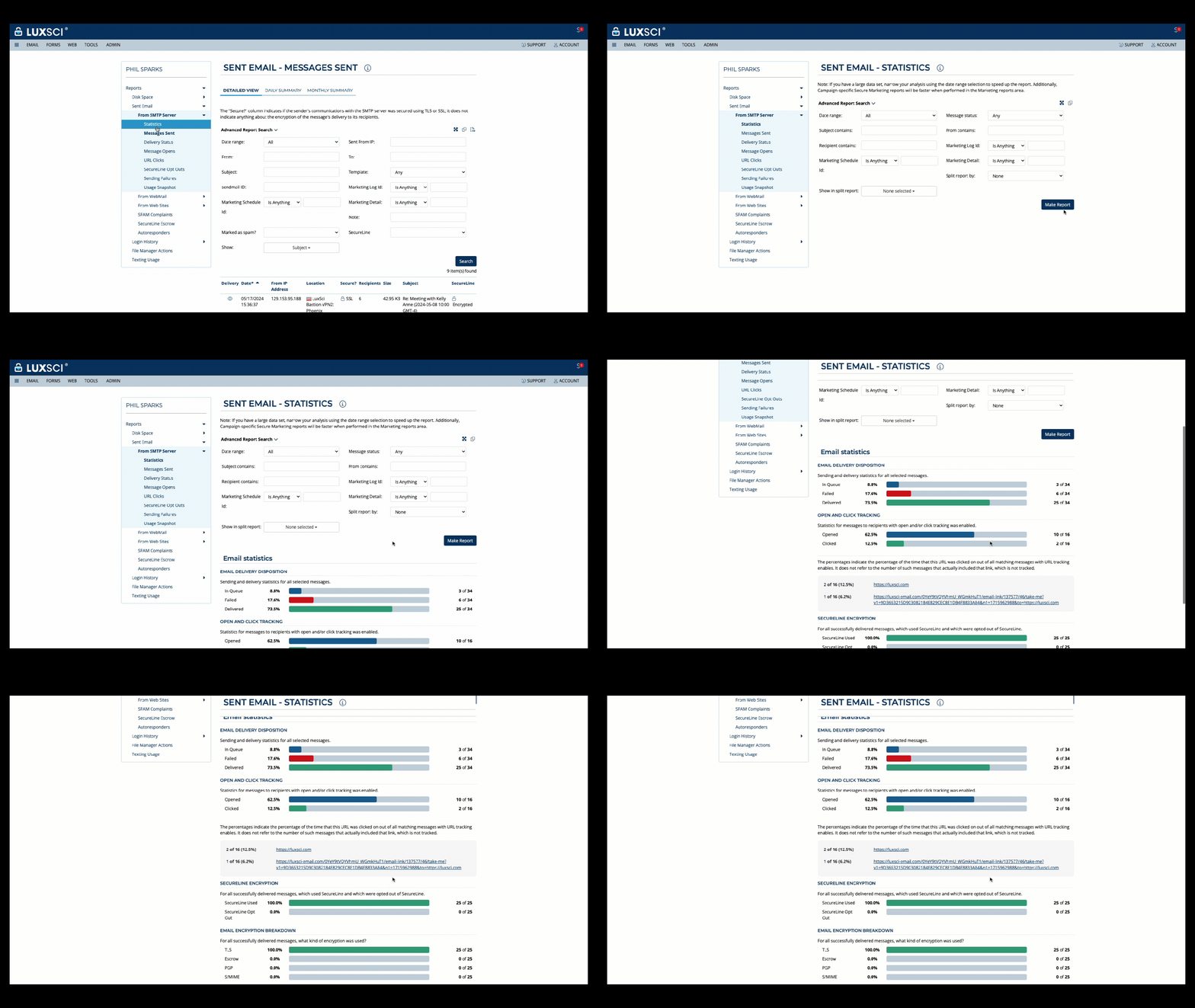
We recently rolled out new email reporting features, taking deliverability depth and analysis to new levels. If you’re a current LuxSci customer and haven’t checked them out, now’s the time. If you’re new to LuxSci, learn more below, and don’t hesitate to reach out for more info – or a demo.
LuxSci secure communications solutions have always featured rich reporting on email deliverability, including volumes and percentages for emails:
in queue
opened
clicked
failed
secured
With our latest release, we made these powerful statistics easier to consume and analyze with an improved user interface for more efficiency and greater ease-of-use. Users can simply select the type of report they’d like and customize it using a range of filtering selections. This is great for diving deeper into your email performance to make adjustments on-the-fly, and to spot trends or opportunities for better engagement that you may have missed before.
New UI – Email Deliverability Statistics
Get more granular, ID trends in real time with Split Reporting
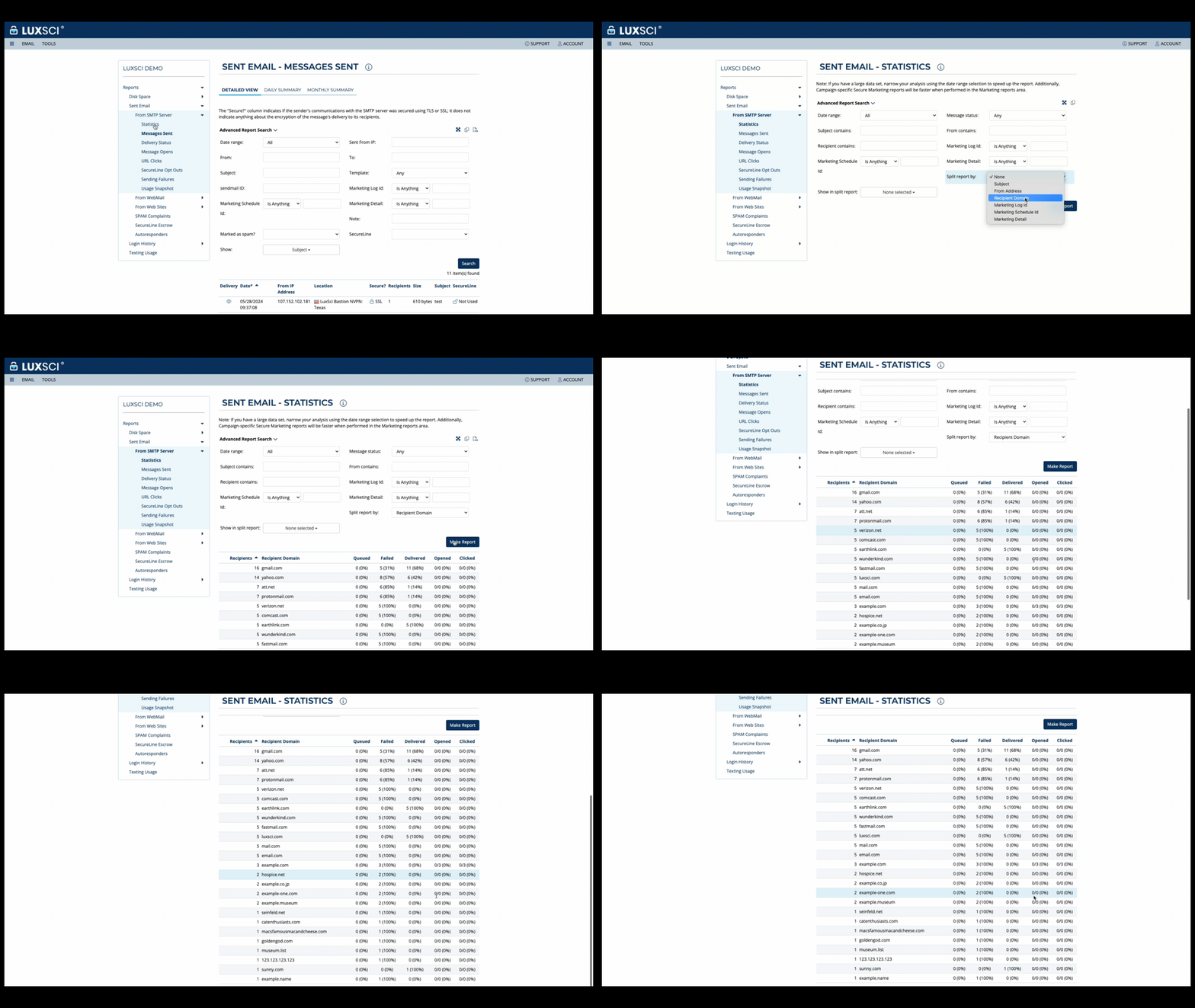
As part of this release, we are pleased to introduce our Split Reporting feature, which empowers users to drill down on email deliverability statistics across a range of parameters, including:
subject
from address
recipient domains
marketing ID or campaign
custom field
For example, users can analyze email deliverability statistics by subject to determine which ones are performing best, by use case to track results by campaign, or to track performance by recipient email domains. With split reporting, users also can analyze email volumes across queued, delivered, opened, failed and clicked parameters, and determine click-through rates (CTR) to measure effectiveness and ROI of campaigns.
New Feature Example – Split Reporting by Recipient Domain
If you’d like to learn more, reach out and connect with us today!
HIPAA compliant hosting services provide secure infrastructure for healthcare applications and data storage while meeting regulatory requirements for protecting electronic protected health information. These services include cloud hosting, dedicated servers, managed services, and hybrid solutions that implement encryption, access controls, audit logging, and business associate agreements to support healthcare organizations’ compliance obligations. Healthcare organizations need reliable hosting solutions that can handle the security and compliance requirements of medical applications while providing scalability and cost-effectiveness. Standard hosting services lack the features necessary for healthcare applications involving protected health information.
Cloud Infrastructure and Platform Services
Infrastructure as a Service (IaaS) platforms provide virtualized computing resources including servers, storage, and networking that healthcare organizations can configure for their specific applications while maintaining HIPAA compliant hosting. These platforms offer scalability and flexibility while implementing appropriate security controls. Platform as a Service (PaaS) solutions provide development and deployment environments for healthcare applications with built-in compliance features including encryption, access controls, and audit capabilities. These platforms enable healthcare organizations to focus on application development while leveraging provider expertise in compliance management. Software as a Service (SaaS) applications designed for healthcare provide complete solutions including electronic health records, practice management systems, and patient engagement tools with integrated HIPAA compliance features. These applications reduce internal IT requirements while maintaining regulatory adherence.
Private Cloud Options for HIPAA Compliant Hosting Services
Single-tenant environments provide healthcare organizations with dedicated computing resources that are not shared with other clients, offering enhanced security and performance isolation. These environments help address concerns about data co-location while providing predictable performance characteristics. Private cloud deployments combine the scalability benefits of cloud computing with the security advantages of dedicated infrastructure through isolated virtual environments. Healthcare organizations can achieve cloud flexibility while maintaining greater control over their computing environment. Hybrid cloud solutions enable healthcare organizations to combine on-premises infrastructure with cloud services based on specific application requirements and compliance needs. Architectures provide flexibility for different workloads while maintaining appropriate security controls.
Support Options for HIPAA Compliant Hosting Services
HIPAA compliant hosting services provide specialized expertise for healthcare data storage including backup, recovery, performance optimization, and security monitoring. These services help healthcare organizations maintain database security while reducing internal administrative burden. Application hosting services manage the complete technology stack for healthcare applications including operating systems, middleware, and application software while maintaining HIPAA compliance. These services enable healthcare organizations to focus on patient care rather than infrastructure management. Security monitoring services provide oversight of hosting infrastructure including threat detection, incident response, and compliance monitoring.
Data Protection and Backup Solutions
Encryption services protect healthcare data during storage and transmission through automated key management and policy enforcement. These services ensure that PHI receives appropriate protection without requiring healthcare organizations to develop internal encryption expertise. Backup and disaster recovery services maintain additional copies of healthcare data while preserving security protections and enabling rapid restoration after system failures or security incidents. These services help ensure business continuity while maintaining compliance obligations. Data loss prevention tools monitor healthcare data movement and usage to identify potential unauthorized disclosures or policy violations. Data tools help hosting providers and healthcare clients maintain awareness of data handling activities while preventing compliance incidents.
Network Security and Access Management
Virtual private network services provide secure communication channels between healthcare organizations and hosting infrastructure while protecting data transmission from interception or modification. These HIPAA compliant hosting services enable remote access while maintaining appropriate security controls. Identity and access management services help healthcare organizations control user permissions and authentication for hosted applications while maintaining audit trails and compliance documentation. These services integrate with existing healthcare systems while providing centralized access control. Network segmentation services isolate healthcare applications and data from other hosted services while maintaining necessary connectivity for operations and patient care. These services help reduce security risks while enabling efficient resource utilization.
Compliance and Audit Support Services
Risk assessment services help healthcare organizations evaluate their hosting environment for potential vulnerabilities and compliance gaps while providing recommendations for improvement. HIPAA compliant hosting services use specialized expertise in healthcare security and regulatory requirements. Audit preparation services assist healthcare organizations in responding to regulatory reviews or compliance assessments by organizing documentation and providing evidence of security controls. These services help reduce the burden of compliance demonstrations while ensuring thoroughness. Compliance monitoring services provide ongoing oversight of hosting environment security and regulatory adherence through automated tools and expert analysis. HIPAA compliant hosting services help healthcare organizations maintain awareness of their compliance status while identifying potential issues before they become violations.
Vendor Selection and Evaluation Criteria
Security certification assessment helps healthcare organizations evaluate hosting providers based on their compliance with industry standards including SOC 2, HITRUST, and ISO 27001. These certifications provide objective evidence of provider security capabilities and commitment to best practices. Business associate agreement evaluation ensures that hosting providers accept appropriate liability and compliance obligations when handling PHI on behalf of healthcare organizations. These agreements must include specific provisions about data protection, breach notification, and audit rights. Service level agreement analysis helps healthcare organizations understand hosting provider performance commitments including uptime guarantees, response times, and support availability.
Subscription-based pricing provides predictable monthly or annual costs for HIPAA compliant hosting services while including compliance features and support services. Healthcare organizations can budget effectively while ensuring that compliance capabilities are included in base pricing rather than additional fees. Usage-based billing scales hosting costs with actual resource consumption while maintaining compliance features regardless of utilization levels. This pricing model helps healthcare organizations manage costs during growth or seasonal variations while preserving security protections. Implementation and migration services help healthcare organizations transition to compliant hosting solutions while minimizing disruption to patient care and business operations. Services do well to include project management, data transfer, and staff training to ensure successful deployment.
Email HIPAA compliance is the privacy and security standards that healthcare organizations must implement when using electronic mail to transmit, store, or discuss protected health information. These requirements include encryption protocols, access controls, audit logging, and administrative safeguards that protect patient data during email communications. Healthcare providers, payers, and suppliers must understand email HIPAA compliance obligations to avoid costly violations while maintaining effective communication with patients, business partners, and other healthcare organizations. Understanding email HIPAA compliance helps organizations select appropriate email platforms, train staff on proper procedures, and implement policies that protect patient information while supporting clinical and administrative workflows.
Privacy Rule Requirements For Email HIPAA Compliance
The Privacy Rule establishes how healthcare organizations can use and disclose protected health information in email communications without violating patient privacy rights. Email HIPAA compliance permits healthcare organizations to use patient information for treatment, payment, and healthcare operations without obtaining individual patient authorization. Clinical communications between providers, billing discussions with payers, and care coordination activities fall under these permitted uses when proper safeguards are implemented.
Healthcare organizations must provide privacy notices to patients explaining how their information may be used in email communications and their rights regarding this information. Patients have the right to request restrictions on how their information is shared via email, though organizations are not always required to agree to these limitations. Email HIPAA compliance requires organizations to honor reasonable requests and provide mechanisms for patients to file complaints about email privacy practices.
Minimum necessary standards require healthcare organizations to limit email communications to the smallest amount of protected health information needed for the specific purpose. This means that diagnosis details, treatment notes, and other sensitive information should only be included when necessary for patient care or business operations. Organizations must evaluate their email practices to ensure compliance with minimum necessary requirements across different communication types.
Security Rule Standards For Email HIPAA Compliance
The Security Rule requires healthcare organizations to implement administrative, physical, and technical safeguards to protect electronic protected health information transmitted via email. Administrative safeguards include appointing security officers responsible for email systems, conducting workforce training on email privacy requirements, and establishing procedures for granting and revoking email access. These safeguards ensure that only authorized personnel can access patient information during email communications.
Technical safeguards focus on access controls, encryption, audit logging, and transmission security for email systems. Email HIPAA compliance requires user authentication systems that verify the identity of individuals accessing email containing patient information. Encryption protects email content during transmission and storage, while audit logs track who accesses patient information and when these access events occur.
Physical safeguards protect computer systems, mobile devices, and facilities where email containing patient information is accessed or stored. Organizations must implement workstation security controls, device controls for mobile email access, and media disposal procedures for devices containing patient communications. These protections prevent unauthorized individuals from accessing patient information through physical security breaches.
Regular security assessments evaluate email systems for vulnerabilities that could lead to data breaches or unauthorized disclosures. Email HIPAA compliance requires organizations to address identified weaknesses and maintain documentation of security measures. Penetration testing and vulnerability scanning help identify potential problems before they result in privacy violations.
Business Associate Requirements For Email HIPAA Compliance
Third-party email service providers that handle protected health information on behalf of healthcare organizations must operate as business associates under HIPAA regulations. Business associate agreements must specify how email providers will protect patient information, limit data use to authorized purposes, and report security incidents or unauthorized disclosures. Email HIPAA compliance requires healthcare organizations to verify that their email providers have appropriate security measures in place.
Common email business associates include cloud email providers, managed email services, and email security vendors. Each relationship requires careful evaluation of privacy and security risks along with appropriate contractual protections. Organizations must verify that business associates maintain their own HIPAA compliance programs and provide documentation of security measures.
Business associates must implement administrative, physical, and technical safeguards for email systems and ensure that subcontractors also comply with HIPAA requirements. This includes providing security training to their workforce, maintaining audit logs, and reporting security incidents to healthcare organizations. When business associate relationships end, email providers must return or destroy patient information as specified in their agreements.
Staff Training And Policy Development
Healthcare organizations must train staff on email HIPAA compliance requirements and organizational policies for handling patient information in electronic communications. Training programs should cover identification of protected health information, appropriate use of email systems, and procedures for reporting potential privacy violations. Staff members need to understand when email communications require additional security measures and how to use secure email platforms correctly.
Policy development includes establishing procedures for email encryption, recipient verification, and incident reporting when security concerns arise. Organizations should develop different policies for various types of email communications, including patient care coordination, billing discussions, and business partner communications. Regular policy updates address changing regulations and technology developments that affect email security.
Competency assessments verify that staff understand their responsibilities when handling patient information in email communications. Organizations should document training activities and maintain records of staff compliance with email privacy policies. Regular refresher training keeps staff updated on changing requirements and reinforces proper email security practices.
Monitoring And Incident Response For Email HIPAA Compliance
Healthcare organizations need ongoing monitoring programs to ensure that email practices remain compliant with HIPAA requirements and identify potential issues before they result in violations. Regular audits should examine email content for appropriate privacy protections, verify that security safeguards function correctly, and assess whether staff follow established policies. These audits help demonstrate ongoing commitment to protecting patient information.
Incident response procedures specifically address email-related security breaches or privacy violations, including notification requirements and remediation steps. Organizations must have clear procedures for investigating potential breaches involving email communications, determining whether notification is required, and implementing corrective actions to prevent future incidents. Training on incident response helps staff recognize and respond appropriately to email security issues.
Documentation requirements include maintaining records of email policies, training activities, security assessments, and compliance monitoring efforts. This documentation helps demonstrate compliance efforts during regulatory investigations and supports continuous improvement of email practices. Organizations should retain documentation for required periods and ensure records are complete and accessible when regulatory authorities request information about email HIPAA compliance practices.
To learn more, set up a meeting with LuxSci today.
Healthcare providers, payers, and suppliers: are you confident your email practices are fully HIPAA compliant—especially with major HIPAA Security Rule updates on the horizon?
HIPAA compliance is complex, and email remains one of the biggest areas of risk when it comes to protecting electronic Protected Health Information (ePHI). To help keep you up to date and on top of the latest threats, we’re pleased to share a quick on-demand webinar – HIPAA Compliant Email: 20 Tips in 20 Minutes – designed to give you the latest practical information and insider tips on HIPAA compliant email.
Why You Should Watch
Whether you’re a seasoned security, infrastructure or compliance pro or just beginning your journey into HIPAA compliant email communications, this webinar provides an easy-to-consume way to get up to speed on what matters most—without a massive time commitment.
LuxSci’s expert team breaks down 20 tips across the technical, legal and operational aspects of HIPAA compliant email to help healthcare organizations of all sizes get it right, and avoid the consequences of non-compliance. The webinar is packed with immediately useful guidance to help you tackle compliance with confidence, even as new HIPAA Security Rule updates loom in 2025.
What You’ll Learn
Here’s a sneak peek at just a few of the topics covered:
How to build a HIPAA compliant email infrastructure From cyber risk assessments to data encryption in transit and at rest to secure portals, LuxSci walks you through the essentials of securing ePHI in your infrastructure.
The must-have email settings and policies Understand why SPF, DKIM, DMARC, email archiving, retention rules, and secure gateways aren’t optional—they’re critical.
Empowering your staff as the first line of defense Staff training, social engineering awareness, and multi-factor authentication go a long way toward compliance and peace of mind.
Upcoming changes to the HIPAA Security Rule Get a preview of what’s coming later in 2025 and how you can prepare now to avoid scrambling later.
Why non-compliance is non-negotiable Learn the real-world consequences of HIPAA violations—from steep fines and data breaches to loss of patient trust.
Why LuxSci?
LuxSci has more than 20 years of experience securing healthcare communications. With 20+ billion emails sent, 98% deliverability rates, and nearly 2,000 customers served, LuxSci is trusted by leading healthcare providers, payers, and suppliers for high performance, scalable, and flexible HIPAA compliant marketing solutions. Customers include Athenahealth, 1800 Contacts, Delta Dental, Lucerna Health, Rotech Medical Equipment, and Eurofins.
Click here to watch the free on-demand webinar now.