LuxSci

How to Send HIPAA Compliant Emails

HIPAA compliant email services

Learning how to send HIPAA compliant emails requires understanding encryption standards, authentication protocols, and business associate agreements that protect patient health information during electronic transmission. Healthcare providers must implement safeguards when communicating electronically about patients, ensuring that all email communications meet HIPAA Security Rule requirements for protecting electronic protected health information. Standard consumer email services like Gmail or Outlook cannot guarantee the security measures necessary for healthcare communications, making specialized secure email platforms essential for organizations handling patient data.

Encryption Requirements for Healthcare Email

End-to-end encryption is the foundation for secure healthcare email communications, protecting patient information from unauthorized access during transmission and storage. Healthcare organizations learning how to send HIPAA compliant emails need email systems that encrypt messages using Advanced Encryption Standard (AES) 256-bit encryption or equivalent security protocols before sending communications across public internet networks. The encryption process must protect both the email content and any attachments containing protected health information, ensuring that even if messages are intercepted, the patient data remains unreadable to unauthorized parties.

Message encryption should activate automatically for all healthcare communications rather than requiring manual activation by individual users. This automatic encryption prevents inadvertent transmission of unprotected patient information when staff members forget to activate security features manually. Healthcare email systems also need secure key management protocols that protect encryption keys from unauthorized access while ensuring that legitimate recipients can decrypt and read necessary patient communications.

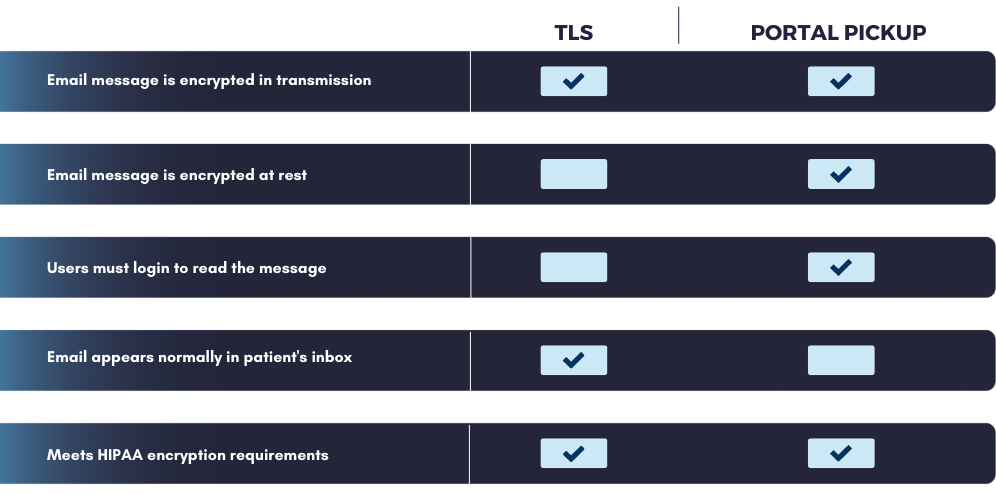
Transport layer security protocols provide protection during email transmission, creating secure connections between email servers and preventing message interception during delivery. Healthcare organizations should verify that their email providers use TLS 1.2 or higher encryption standards for all message transmissions. Certificate-based authentication adds another security layer by verifying the identity of email recipients before allowing message delivery, preventing misdirected emails containing patient information from reaching incorrect recipients.

Authentication and Access Controls

Multi-factor authentication is a security requirement for healthcare email systems, ensuring that only authorized users can access accounts containing patient communications. Healthcare staff need to provide at least two forms of identification before accessing secure email accounts, combining passwords with mobile device codes, biometric verification, or hardware security tokens. This authentication process protects against unauthorized account access even if passwords are compromised through data breaches or social engineering attacks.

User access controls must reflect the principle of least privilege, granting healthcare staff access only to email communications necessary for their job functions. Physicians need different access levels compared to administrative staff, with role-based permissions preventing unauthorized viewing of patient information outside individual staff members’ care responsibilities. Email systems should maintain detailed audit logs tracking who accesses patient communications, when access occurs, and what actions users perform with protected health information.

Automatic session timeouts provide security by logging users out of email systems after predetermined periods of inactivity. These timeouts prevent unauthorized access when staff members step away from their workstations without properly securing their accounts. Password complexity requirements and password updates strengthen authentication security, though healthcare organizations must balance security requirements with usability to prevent staff from circumventing security measures due to overly complex requirements.

Session management protocols should track concurrent login attempts and prevent multiple simultaneous access sessions for individual user accounts. This monitoring helps detect potential account compromises when unusual access patterns occur, such as logins from multiple geographic locations within short time periods. Email systems need clear protocols for immediately revoking access when staff members leave the organization or when security breaches are detected.

Business Associate Agreements and Compliance

Healthcare organizations must establish comprehensive business associate agreements with their email service providers before transmitting any patient information through electronic communications. These legal agreements define the responsibilities and obligations of both parties regarding protected health information, specifying how the email provider will protect patient data, what uses and disclosures are permitted, and how security incidents will be reported to the healthcare organization. The agreements must cover encryption requirements, data retention policies, and procedures for returning or destroying patient information when business relationships end.

Vendor due diligence processes help healthcare organizations evaluate email service providers to ensure they understand how to send HIPAA compliant emails while meeting all regulatory requirements. This evaluation includes reviewing security certifications, examining data center facilities and security controls, and verifying the provider’s experience with healthcare industry regulations. Healthcare organizations should require proof of cyber liability insurance, incident response capabilities, and security auditing from their email service providers.

Compliance monitoring requires healthcare organizations to conduct periodic assessments of their email security measures and vendor performance. These assessments verify that encryption standards remain current, access controls function properly, and audit logging captures all necessary security events. Healthcare organizations must maintain documentation demonstrating their compliance efforts, including training records, security policies, and incident response procedures related to email communications.

Risk assessments help identify potential vulnerabilities in email security systems and guide updates to security measures as threats evolve. Healthcare organizations should review their email compliance programs annually or whenever changes occur to their operations, technology systems, or regulatory requirements. Documentation of these assessments provides evidence of due diligence in protecting patient information during regulatory audits or security investigations.

Implementation Best Practices

Staff training programs must educate healthcare workers about proper email security practices and when it is appropriate to include patient information in electronic communications. Healthcare staff learning how to send HIPAA compliant emails need clear guidelines about what patient information can be discussed via email versus what requires telephone calls or in-person meetings. Training should cover how to recognize secure email platforms, how to verify recipient identities before sending patient information, and what types of patient data require protection beyond standard email security measures.

Email policy development requires healthcare organizations to establish clear protocols governing patient communication via electronic means. These policies should specify which staff members can send patient information via email, what approval processes are required for sharing sensitive patient data, and how to handle requests from patients who want to receive their health information via email. Policies must also cover how to respond when staff accidentally send patient information to incorrect recipients or when security breaches involving email communications occur.

Testing procedures should verify that email security measures function correctly before implementing systems organization-wide. Healthcare organizations learning how to send HIPAA compliant emails need to conduct penetration testing of their email security systems, verify that encryption activates properly, and confirm that access controls prevent unauthorized viewing of patient information. Testing schedules help identify security vulnerabilities before they can be exploited by malicious actors.

Incident response planning prepares healthcare organizations to handle security breaches involving email communications containing patient information. Response plans should include procedures for containing security incidents, assessing the scope of potential patient information exposure, and notifying affected patients and regulatory authorities when breaches occur. Healthcare organizations must practice their incident response procedures to ensure staff can respond effectively during actual security emergencies.

Patient Communication Considerations

Patient consent requirements vary depending on the type of health information being transmitted and the communication method requested by patients. While healthcare providers can generally communicate with patients about treatment, payment, and healthcare operations without authorization, organizations should obtain written consent before sending detailed medical information via email. Consent forms should explain the security measures in place while acknowledging that email communication carries inherent privacy risks despite protective measures.

Email content guidelines help healthcare staff understand what patient information is appropriate for electronic transmission versus what requires more secure communication methods. Those mastering how to send HIPAA compliant emails recognize that laboratory results, medication changes, andappointment reminders may be suitable for secure email communication, while detailed psychiatric notes, HIV test results, or substance abuse treatment information may require protections or alternative communication methods. Staff need clear decision-making frameworks for evaluating the appropriateness of email communication for different types of patient information.

Alternative communication methods should remain available for patients who prefer not to receive health information via email or who lack secure email access. Understanding how to send HIPAA compliant emails includes recognizing when alternative methods like telephone calls, patient portals, and postal mail provide more appropriate secure alternatives for patient communication while ensuring that lack of email access does not create barriers to necessary healthcare information sharing. Healthcare organizations must accommodate patient preferences while maintaining appropriate security measures for all communication methods.

Picture of Erik Kangas

Erik Kangas

With 30 years engaged in to both academic research and software architecture, Erik Kangas is the founder and Chief Technology Officer of LuxSci, playing a core role in building the company into the market leader for HIPAA compliant, secure healthcare communications solutions that it is today. An international lecturer on messaging security, Erik also advises and consults on email technology strategies and best practices, secure architectures, and HIPAA compliance. Erik holds undergraduate degrees in physics and mathematics from Case Western Reserve University, and a doctoral degree in computational biophysics from MIT. Erik Kangas — LinkedIn

Get in touch

Find The Best Solution For Your Organization

Talk To An Expert & Get A Quote


A member of our staff will reach out to you

Get Your Free E-Book!

LuxSci High Email Deliverability Best Practices Paper

What you’ll learn:

Related Posts

HIPAA Compliant Email

Rethinking HIPAA Compliant Email – Not Just a Checkbox

The compliance-only mentality is outdated.

Let’s be honest—when most healthcare organizations think about HIPAA compliant email, it’s usually in the context of avoiding fines or satisfying checklists. And while yes, compliance is critical, viewing it only through the lens of risk management is a missed opportunity.

In reality, HIPAA compliant email, when implemented properly, is one of the most powerful tools for patient and customer engagement. Why? Because it unlocks the ability to leverage protected health information (PHI) safely, enabling personalized, timely, and high-impact email communication that drives better engagement, satisfaction, and outcomes.

What Makes Email Truly HIPAA Compliant?

As a reminder, HIPAA compliant email requires that protected health information (PHI) is safeguarded both in transit and at rest. That means your email provider must:

  • Use encryption at all times
  • Be access-controlled
  • Include audit logs
  • Be stored and transmitted in a secure manner
  • Provide a Business Associate Agreement

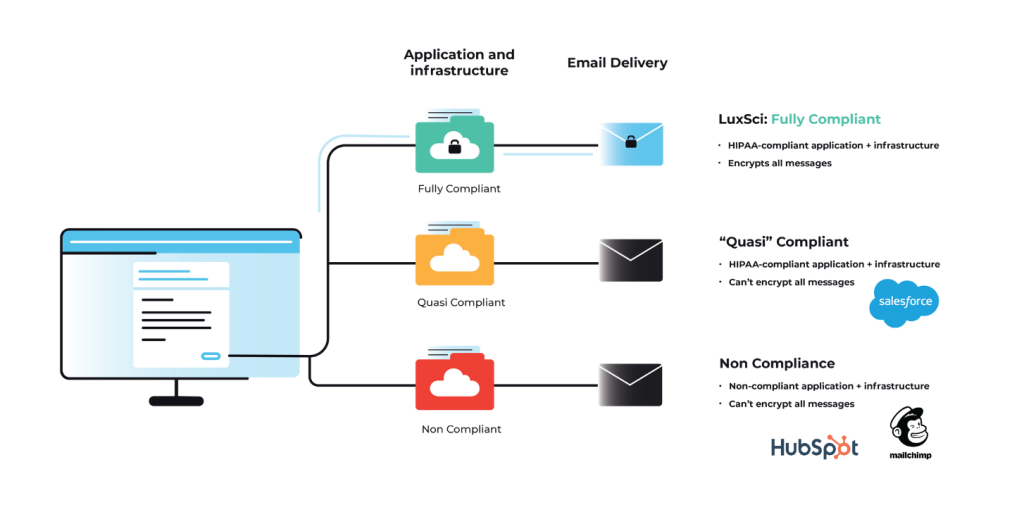
Regular email services just don’t cut it. In fact, most consumer or marketing email platforms like Sendgrid or Constant Contact, while great at sending email, are not HIPAA compliant or have limitations when it comes to using PHI in your messages. Even when bolted-on encryption solutions are used, they often lack the flexibility, scalability, and automation needed for safe and effective healthcare email engagement.

LuxSci goes beyond the basics with policy-based encryption, secure TLS, PKI encryption and escrow/secure portal options. LuxSci’s SecureLine™ encryption technology dynamically selects the appropriate encryption method based on recipient capabilities and messaging context and can be configured to enforce secure delivery automatically according to organizational policies. LuxSci also provides the ability to enforce advanced multi-factor authentication. Every message is tracked with full audit trails—no guesswork, no loose ends.

The Real Opportunity – Secure, Personalized Email with PHI

Using PHI to Drive Personalized Messaging
Imagine sending a personalized reminder to a diabetic patient about an upcoming check-up. Or reaching out to new mothers with postnatal care resources tailored to their needs. Or sending automated email workflows to all your members to accelerate and increase new plan enrollments. Or email customer and prospects about a new product upgrade or new service offering. The list goes on. That’s the power of PHI-personalized email—when done securely.

Targeted Segmentation with Sensitive Data
With HIPAA compliant email solutions like LuxSci, you can segment your audience based on real health data with high levels of precision, such as chronic conditions, appointment history, insurance status, health risks, and more, without compromising patient trust or security.

Breaking the One-Size-Fits-All Approach in Healthcare Email
Generic email blasts are over. Modern patients expect personalization. With LuxSci, you can deliver highly targeted, highly secure emails with encrypted content, while staying HIPAA compliant.

Real Business Results from Secure Email

Here’s how secure, personalized email can drive improved results across a range of healthcare communications, including:

  • Increased Patient Appointments and Follow-ups – Sending encrypted, personalized appointment reminders and follow-up notices can reduce no-shows and boost overall appointment volume.
  • Boosting Preventative Care with Outreach Campaigns – Preventative campaigns (think flu shots or cancer screenings) sent securely to the right segments can lead to higher response rates, better health outcomes, and a lower cost of care.
  • Improving Health Plan Enrollments – Targeted email outreach during open enrollment, tailored by eligibility or plan type, and powered by automated workflows leads to higher enrollments and lower call center costs.
  • Driving Awareness and Sales of New Services or Products – Have a product upgrade offer, new wellness program or telehealth service? Send secure, PHI-informed HIPAA compliant email to the right audience for increased sales and faster adoption.
  • Optimize Explanation of Benefits NoticesReplace snail mail with email that’s fast, reliable and trackable, ensuring customers are informed and compliance is met.

The Healthcare Marketer’s Secret Weapon: Using PHI Responsibly

In a world moving away from third-party cookies, first-party data is more valuable than ever, and PHI is the most powerful form of it in healthcare. With secure HIPAA compliant email, PHI doesn’t have to be locked away. Marketers can safely use it to understand patient needs and send relevant, timely messages. PHI-driven segmentation lets you build hyper-targeted campaigns that speak to relevant conditions, unique needs and timely topics, increasing open rates, clicks throughs, and campaign conversions.

Meeting the Personalization Demands of Today’s Patients and Customers

HIPAA-compliant email is no longer just about checking a box. It’s about unlocking the full potential of your patient and customer data to drive better engagement, healthier outcomes, and measurable business results.

In closing, below are some final thoughts on how secure, HIPAA compliant email delivers long-term value for your organization and better connections with your patients and customers, including:

    • Future-Proofing Healthcare Engagement – Patients expect Amazon-level personalization. HIPAA-compliant tools let you meet those expectations securely.

    • Adapting to Data Privacy Regulations Beyond HIPAA – From GDPR to state-level privacy laws, secure communication is no longer optional, it’s foundational.

    • Building Trust Through Secure Communication – Each secure, personalized message sent is a trust-building moment with your patients and customers.

Why LuxSci? The Infrastructure Behind the Performance

With LuxSci’s secure email infrastructure and email marketing solutions, healthcare organizations can confidently personalize communication, reach patients more effectively, and fuel growth with PHI-safe segmentation, messaging, and email automation.

LuxSci takes data security and email performance to the next level by offering dedicated cloud infrastructure for each customer, which means your email campaigns aren’t slowed down by other vendors on shared cloud services and your attack footprint is much smaller. In short, you get higher delivery rates and throughput with proven HIPAA compliance and data security.

The future of healthcare engagement is personal, secure, and performance-driven—and it starts with HIPAA compliant email done right.

Reach out today with any questions or to learn more about LuxSci.


FAQs

1. Is HIPAA-compliant email necessary for marketing communications?
Yes—if your emails include or are based on PHI (like appointment reminders, condition-based messaging, or insurance info), you need HIPAA-compliant email and recipient consent to avoid legal risk and preserve patient trust.

2. Can PHI be used in marketing emails under HIPAA?
Yes, with proper consent and secure, HIPAA compliant infrastructure like LuxSci’s, PHI can be safely used in emails for personalized, segmented campaigns.

3. How does LuxSci ensure high email deliverability for healthcare messages?
LuxSci uses dedicated cloud servers for each customer, active email reputation monitoring, and best-practice configurations to ensure high deliverability rates for sensitive emails.

4. Is LuxSci only for marketing teams?
No—LuxSci supports marketing, clinical, operations, and IT teams by enabling secure, compliant email communication across the entire organization.

5. What types of PHI can I use to segment campaigns using LuxSci?
You can segment based on chronic conditions, visit history, insurance status, provider details, age, gender, location, and more—all while staying fully compliant.

HIPAA compliant email

Most Popular LuxSci Blog Posts of 2025

As we close out 2025, healthcare communicators, IT and compliance leaders, and digital marketers face an ever-changing landscape of security threats, regulatory updates, and technology innovations. At LuxSci, we’re committed to helping you with continuous updates and guidance on the future of secure healthcare communications.

In case you missed it, or need a refresh, below are some of our most popular blog posts from 2025. Enjoy!

1. Improve Email Engagement and Marketing Results with Automated Workflows

Automated workflows are transforming how healthcare organizations engage patients and customers — enabling dynamic, event-driven campaigns that easily scale your outreach and keep you HIPAA compliant. In this post, we introduce LuxSci’s Automated Workflows capability for our Secure Marketing healthcare solution. Learn how sequence-based journeys can personalize outreach and optimize engagement with behavior-based triggers that improve campaign performance — without sacrificing data security.

Read the full post: LuxSci Enhances Secure Marketing with Automated Workflows

2. Healthcare Email Threat Readiness Strategies

Email remains a frontline channel for healthcare communications, and a prime target for cyber threats and criminals. This deep-dive into email threat readiness strategies covers essential practices like continuous monitoring, business continuity planning, and workforce training to mitigate email-borne security risks. Whether you’re responsible for clinical systems, marketing, or enterprise IT, this post provides a strategic playbook to strengthen your defenses, while maximizing your results.

Read the full post: Healthcare Email Threat Readiness Strategies

3. HIPAA Compliant Email — 20 Tips in 20 Minutes

For practical guidance you can apply right now, this on-demand webinar distills 20 key tips for HIPAA-compliant email across technical, legal, and operational domains. Whether you’re refining your infrastructure, improving deliverability, or modernizing your data security posture in 2026, this resource is a time-efficient way to elevate your compliance and security.

Read the post and watch the webinar on demand: HIPAA Compliant Email: 20 Tips in 20 Minutes

4. Is SendGrid HIPAA-Compliant? What You Should Know

Choosing the right email provider matters, especially when Protected Health Information (PHI) is at stake. In this post, we examine SendGrid’s capabilities in the context of HIPAA compliance, outline what it takes to send PHI securely, and offer guidance on evaluating third-party services for secure healthcare email and communication needs.

Read the full post: Is SendGrid HIPAA-Compliant?

5. LuxSci Shines in G2 Winter 2026 Reports

Customer feedback matters to LuxSci. In this post, we share the most recent news about LuxSci’s performance in the G2 Winter 2026 Reports, where we earned 20 badges across categories like Email Security, Encryption, Gateway, and HIPAA-Compliant Messaging. These reviews reflect not just product excellence, but trust from real users, which we work hard to build every day!

Read the full post: LuxSci Shines in G2 Winter 2026 Reports

Looking Ahead to 2026

We look forward to providing more information and insights on secure healthcare communications in the coming year, including the latest on HIPAA compliant email, PHI security, healthcare marketing, threat readiness, and personalized engagement. In the meantime, if you’re not already, follow us on LinkedIn below, and we’ll see you here in 2026!

Follow LuxSci on LinkedIn

HIPAA compliant email

LuxSci Welcomes Angel Mazariegos as Head of Finance

LuxSci, a leader in secure healthcare communications and HIPAA compliant email, is pleased to announce the appointment of Angel Marie Mazariegos as the company’s new Head of Finance. With over 25 years of experience in financial management, accounting, and human resources, Angel will play a central role in advancing LuxSci’s operational excellence and supporting the company’s rapid growth in 2026 and beyond.

Angel brings a wealth of expertise to LuxSci, having held senior leadership positions at organizations focused on financial services, language and access services for healthcare, and human resources. In these roles, Angel has led multi-department Finance and HR teams, spearheading critical initiatives, including ERP implementations, streamlined employee onboarding, and financial process optimization.

In her role at LuxSci, Angel will oversee all aspects of the company’s finance operations, including budgeting, forecasting and reporting. Additionally, Angel will manage the company’s HR function, ensuring that LuxSci continues to foster a strong, people-driven culture based on its Secure, Trust, Responsible and Smart company values.

“Angel’s blend of financial and HR leadership makes her an invaluable addition to the LuxSci executive team and a real asset for our people,” said Mark Leonard, CEO of LuxSci. “We look forward to working with Angel to build the high-performing teams that will be critical to our future growth and serving the evolving needs of our customers.”

Angel holds dual MBA degrees in Accounting and Human Resource Management from Cappella University, as well as dual BS degrees in Business Administration (Accounting and CIS Business Systems) from California State University, Los Angeles.

“I am honored to join the LuxSci team at such an exciting time for the company,” said Mazariegos. “I look forward to working with the team and helping build on LuxSci’s reputation for excellence and reliability in secure healthcare communications.”

HIPAA Compliant Email

LuxSci Shines in G2 Winter 2026 Reports, Underscoring Commitment to Product Leadership and Trusted Relationships

We’re pleased to announce that LuxSci has been recognized for excellence and leadership for HIPAA compliant email and messaging in the just-released G2 Winter 2026 Reports!

Based on verified customer reviews, LuxSci earned 20 G2 badges as part of the most recent G2 reports, including top honors such as Grid Leader, Highest User Adoption, Best Support, and Best Estimated ROI.

This recognition further validates what we’ve always believed: our customers don’t just choose a great product — they choose a great partner. At LuxSci, we build long-term, trusted relationships with our customers, anchored in product reliability, industry-leading email deliverability and performance, and the best customer support in the business.

Why G2 Matters

G2 is a globally trusted peer‑review platform that aggregates verified user feedback and real‑world usage data to rank software and service providers. G2’s seasonal reports like the Winter 2026 editions shine a spotlight on latest tools and vendors that deliver consistent value and satisfaction to real customers.

Earning 20 badges this quarter signals a strong vote of confidence from our customers and community, helping affirm that LuxSci is a leading, highly adopted secure email solutions provider.

What We Earned in Winter 2026

Among the 20 badges awarded to LuxSci across Email Security, Email Encryption, Email Gateway and HIPAA Compliant Messaging are:

  • Grid Leader
  • Highest User
  • Best Support
  • Best Estimated ROI

This broad range of accolades spanning leadership, adoption, support and return on investment underscores the reliability of our solutions and the trust our customers place in us.

Awards Reflect Our Commitment to Customer Success

Reliable. Winning Grid Leader and Highest User Adoption demonstrates that thousands of users are depending on LuxSci, securely delivering emails to today’s most popular platforms, including Gmail, Apple Mail, Yahoo Mail and AOL, to name a few.

Proven. With Best Estimated ROI, customers are saying that LuxSci delivers tangible results, whether in secure email delivery, regulatory compliance, or operational efficiency.

Long‑Term Trust. Best Support is perhaps the most telling because for us, success isn’t just about features, it’s about being there for our customers every step of the way.

Thank you to all of our customers. We remain committed to your success — today and in the future.

Want to learn more about LuxSci? Reach out and connect with us today!

You Might Also Like

HIPAA Marketing Guidelines

What is HIPAA Compliant Software?

HIPAA compliant software includes applications designed to protect patient information according to the requirements established in the HIPAA Security Rule. This specialized software incorporates encryption, access controls, audit logging, and other security features that safeguard electronic protected health information. While no software is inherently HIPAA compliant without proper implementation, these programs provide the necessary functionality for healthcare organizations to maintain regulatory compliance while using digital tools for patient care and administration.

HIPAA Compliant Software Security Requirements

HIPAA compliant software must incorporate several fundamental security capabilities to protect patient information. Strong encryption should secure data both at rest and during transmission between systems, preventing unauthorized access to sensitive details. Authentication systems should verify user identities through robust password requirements, and ideally incorporate multi-factor verification for additional protection. Access controls must restrict which users can view specific information based on their job responsibilities and legitimate need to know. When properly configured, these security elements establish the foundation for maintaining patient data confidentiality in digital healthcare environments.

User Authentication and Access Management

HIPAA compliant software implements sophisticated user controls that maintain accountability for patient data access. Role-based permissions allow administrators to assign appropriate access levels that match staff job functions while preventing unnecessary exposure to sensitive information. Automatic timeout features terminate sessions after periods of inactivity to prevent unauthorized access on unattended devices. Password management enforces complexity requirements, regular changes, and account lockout after failed attempts. Many healthcare applications now include single sign-on capabilities that maintain security while reducing the burden of managing multiple credentials across different systems.

Audit Trail Functionality

HIPAA regulations require maintaining detailed records of who accesses protected health information and when these interactions occur. HIPAA compliant software creates comprehensive audit trails documenting user activities, including logins, information viewing, modifications, and data exports. These logs record the user identity, timestamp, and specific actions performed on patient records. Administrators can generate reports showing access patterns and investigate unusual activities that might indicate privacy violations. The software preserves these audit logs for extended periods, typically several years, to support compliance verification during audits or investigations of potential security incidents.

Data Transmission for HIPAA Compliant Software

HIPAA compliant software safeguards patient information throughout its lifecycle using various protection mechanisms. Transport Layer Security (TLS) encrypts data during network transmission, preventing interception by unauthorized parties. Secure storage utilizes encryption algorithms that render information unreadable without proper decryption keys. Backup processes maintain data availability while preserving security protections. Many applications include data loss prevention features that identify and block potential unauthorized transfers of patient information. These protections ensure patient data remains secure whether actively used, stored in databases, or moving between healthcare systems.

Breach Notification Support

HIPAA compliant software should include tools that help organizations meet their breach notification obligations under the HIPAA Breach Notification Rule. Monitoring capabilities detect potential unauthorized access or data exfiltration attempts. Reporting features help document the scope and impact of possible breaches. Some applications incorporate risk assessment tools that evaluate whether detected incidents meet regulatory thresholds for reportable breaches. These capabilities allow healthcare organizations to respond appropriately to potential security incidents, including notifying affected individuals and regulatory authorities when required by law.

Vendor Agreement and Documentation

Beyond technical features, HIPAA compliant software vendors should provide appropriate documentation and contractual support. Business Associate Agreements establish the vendor’s responsibilities for protecting healthcare information under HIPAA regulations. Compliance documentation explains how the software meets security requirements and recommended configuration settings. Implementation guides outline proper setup procedures to maintain compliance. Support services include assistance with security-related questions and updates addressing emerging vulnerabilities. When evaluating software, healthcare organizations should consider both technical capabilities and vendor support for maintaining long-term compliance.

How to Set Up HIPAA Compliant Email

How to Set Up HIPAA Compliant Email

Learning how to set up HIPAA compliant email involves selecting appropriate secure email platforms, configuring encryption settings, implementing access controls, and establishing proper business associate agreements with service providers. Healthcare organizations must ensure their email systems meet all HIPAA Security Rule requirements before transmitting any protected health information electronically. The setup process requires careful planning of security configurations, user authentication protocols, and audit logging capabilities that protect patient data throughout transmission and storage.

Platform Selection and Service Provider Evaluation

Choosing the right email service provider is the first step in establishing how to set up HIPAA compliant email. Healthcare organizations evaluating providers must verify their ability to sign comprehensive business associate agreements that specify exactly how patient information will be protected during transmission and storage. The provider’s data centers should maintain appropriate physical security measures, including biometric access controls, environmental monitoring, and redundant power systems that ensure continuous email availability without compromising security.

Service provider certifications provide valuable insight into their security capabilities and compliance experience. SOC 2 Type II audits demonstrate that providers maintain appropriate controls for security, availability, and confidentiality of customer data. HITRUST certification specifically addresses healthcare security requirements and indicates that the provider understands the unique compliance challenges facing healthcare organizations. These certifications should be current and available for review during the vendor selection process.

Geographic data residency requirements may influence provider selection depending on organizational policies and patient preferences. Some healthcare organizations prefer email providers that maintain all servers within United States borders to simplify compliance with various state privacy laws. International providers may offer cost advantages but require additional due diligence to ensure their data handling practices meet American healthcare privacy standards.

Scalability considerations affect long-term success when healthcare organizations experience growth or changes in email usage patterns. Email systems should accommodate increasing numbers of users, higher message volumes, and integration with additional healthcare applications without requiring complete system replacements. Healthcare organizations benefit from understanding how to set up HIPAA compliant email systems that can adapt to changing operational needs while maintaining security standards.

Security Configuration and Encryption Setup

Encryption configuration forms the cornerstone of secure healthcare email systems. Advanced Encryption Standard (AES) 256-bit encryption should activate automatically for all outgoing messages containing patient information, eliminating the risk of staff forgetting to enable security features manually. Transport Layer Security (TLS) 1.2 or higher protocols must secure all connections between email servers, preventing message interception during transmission across public internet networks.

Digital certificate management ensures that email recipients can verify sender authenticity while maintaining message integrity during transmission. Healthcare organizations learning how to set up HIPAA compliant email need certificate authorities that provide reliable identity verification services for their email communications. Certificate renewal processes should operate automatically to prevent service interruptions that could compromise email security or availability.

Key management protocols protect encryption keys from unauthorized access while ensuring legitimate users can decrypt necessary patient communications. Encryption keys should rotate automatically at predetermined intervals, with secure backup procedures that prevent data loss if primary key storage systems fail. Healthcare organizations must maintain documented procedures for key recovery that balance security requirements with operational necessity.

Message archiving configurations must preserve encrypted email communications for required retention periods while maintaining searchability for audit and legal discovery purposes. Archive systems need the same encryption protections as active email systems, with access controls that limit retrieval to authorized personnel. Backup procedures should test data recovery capabilities while ensuring archived communications remain encrypted throughout the backup and restoration process.

User Access Controls and Authentication

Multi-factor authentication provides essential protection for healthcare email accounts containing patient information. Users should provide at least two forms of identification before accessing their email accounts, typically combining passwords with mobile device verification codes, biometric scans, or hardware security tokens. Authentication systems must integrate smoothly with existing healthcare information systems to avoid creating workflow disruptions that might encourage staff to circumvent security measures.

Role-based access permissions ensure that healthcare staff can only view patient communications relevant to their job responsibilities. Physicians need different access levels compared to billing staff or administrative personnel, with granular controls that prevent unauthorized viewing of patient information outside individual care relationships. Access controls should automatically adjust when staff members change roles within the organization or transfer between departments with different patient access requirements.

Session management protocols track user activities within email systems and automatically terminate inactive sessions to prevent unauthorized access from unattended workstations. Session timeout periods should balance security requirements with operational efficiency, allowing sufficient time for healthcare staff to compose thoughtful patient communications without creating security vulnerabilities. Login attempt monitoring detects potential account compromise situations and triggers appropriate security responses.

Password policies must enforce requirements while avoiding overly burdensome rules that encourage staff to write down passwords or reuse credentials across multiple systems. Password managers can help healthcare staff maintain unique, complex passwords for their email accounts while integrating with single sign-on systems that reduce authentication friction. Organizations mastering how to set up HIPAA compliant email often implement password policies that emphasize length over complexity to improve both security and usability.

Business Associate Agreements and Legal Requirements

Comprehensive business associate agreements define the legal framework for email service provider relationships with healthcare organizations. These agreements must specify exactly how the provider will protect patient information, what uses and disclosures are permitted, and detailed procedures for reporting security incidents to the healthcare organization. Agreement terms should address data retention requirements, geographic restrictions on data storage, and procedures for returning or destroying patient information when business relationships terminate.

Liability allocation clauses protect healthcare organizations from financial exposure when email security incidents occur due to provider negligence or system failures. Insurance requirements ensure that email service providers maintain adequate cyber liability coverage to address potential damages from data breaches or privacy violations. Healthcare organizations should verify that provider insurance policies specifically cover HIPAA-related claims and regulatory penalties.

Audit rights allow healthcare organizations to verify that their email providers maintain appropriate security controls and comply with business associate agreement terms. These rights should include access to security audit reports, penetration testing results, and compliance certifications relevant to healthcare data protection. Regular audit schedules help healthcare organizations demonstrate due diligence in vendor oversight during regulatory inspections or legal proceedings.

Termination procedures specify how patient information will be handled when email service relationships end, whether due to contract expiration, service dissatisfaction, or provider business closure. Data return requirements should include specific timelines for transferring patient communications to new email systems, with verification that all copies of patient information are securely destroyed from provider systems. Those understanding how to set up HIPAA compliant email recognize that termination planning prevents patient information from remaining in unsupported systems after service relationships end.

Implementation Planning and Testing

Staff training programs must prepare healthcare workers to use secure email systems effectively while maintaining patient privacy throughout all communications. Training should cover how to recognize secure email platforms, procedures for verifying recipient identities before sending patient information, and guidelines for determining what health information is appropriate for email transmission. Healthcare staff need clear decision-making frameworks that help them choose between email communication and more secure alternatives like telephone calls or encrypted patient portals.

Pilot testing allows healthcare organizations to identify potential issues before implementing email systems organization-wide. Pilot programs should include representative users from different departments and roles to ensure the email system meets diverse operational needs. Testing scenarios should verify that encryption activates properly, access controls function as designed, and audit logging captures all necessary security events for compliance monitoring.

Integration planning addresses how secure email systems will connect with existing electronic health records, practice management software, and other healthcare applications. Data flow mapping helps identify potential security gaps where patient information might transmit between systems without appropriate encryption protection. Healthcare organizations learning how to set up HIPAA compliant email must ensure that all system integrations maintain the same security standards as the primary email platform.

Rollout schedules should phase email system implementation to minimize workflow disruptions while allowing adequate time for user adaptation and troubleshooting. Support procedures must provide healthcare staff with readily available assistance during the transition period when questions about secure email usage are most frequent. Documentation requirements include maintaining records of all configuration settings, security tests, and staff training activities that show compliance with HIPAA requirements.

Monitoring and Maintenance Procedures

When learning how to set up HIPAA compliant email, it is important to know that audit logging systems must capture detailed records of all email activities, including message sending and receiving times, user login attempts, and administrative actions within the email system. Log retention policies should maintain audit records for required periods while ensuring that log storage systems have the same security protections as the primary email platform. Healthcare organizations need procedures for reviewing audit logs to identify potential security incidents or unauthorized access attempts.

Security monitoring tools should provide real-time alerts when unusual email activities occur, such as large volumes of outbound messages, login attempts from unusual locations, or repeated authentication failures. Automated monitoring reduces the burden on healthcare IT staff while ensuring that potential security incidents receive prompt attention. Alert thresholds must balance sensitivity with operational practicality to avoid overwhelming staff with false alarms.

Performance monitoring tracks email system availability, message delivery times, and user satisfaction to ensure that security measures do not create unacceptable operational barriers. Healthcare organizations mastering how to set up HIPAA compliant email balance security requirements with usability needs, recognizing that overly complex systems may encourage staff to find workarounds that compromise patient privacy. Regular performance assessments help identify opportunities to improve both security and user experience within secure email systems.

Secure Email Providers

What is the Cheapest HIPAA Compliant Email?

The cheapest HIPAA compliant email options include budget-friendly plans from Paubox, Virtru, and Google Workspace when properly configured with security add-ons. Healthcare organizations should consider total costs including implementation, training, and ongoing management expenses. While consumer email services cost less, they lack the security features and Business Associate Agreements necessary for HIPAA compliant email communications with patients.

Entry-Level HIPAA Compliant Email Services

Several providers offer affordable HIPAA compliant email options for smaller healthcare practices and organizations with limited budgets. LuxSci and Paubox provide encrypted HIPAA compliant email with a Business Associate Agreement included, including support for securing Google Workspace and Microsoft 365. Virtru also offers email encryption for small teams. ProtonMail Professional includes encryption, though healthcare organizations must verify BAA availability. Google Workspace and Microsoft 365 Business provide foundational platforms, but require additional security configurations and add-ons to achieve full HIPAA compliance. These baseline services provide encryption and security features while keeping monthly costs manageable for smaller healthcare entities.

Non Subscription Fee Budget Considerations

The true cost of HIPAA compliant email extends beyond monthly subscription prices. Implementation expenses include configuration time, security testing, and integration with existing systems. Staff training introduces both direct costs and productivity impacts during the learning period. Ongoing management requires dedicated IT resources or outsourced support services. Audit preparations and compliance documentation demand administrative attention. Organizations also face potential costs from security incidents if they choose inadequately protected budget options to save money. Many healthcare providers discover that selecting email services based solely on subscription prices leads to higher overall expenses. A thorough cost analysis should include all implementation and operational factors rather than focusing exclusively on monthly fees, and also should consider the vendor’s customer support practices and reputation.

Security Features and Compliance Trade-offs

Less expensive HIPAA compliant email services may offer fewer security features than premium alternatives. Basic plans typically provide essential encryption during transmission but might lack advanced access controls or comprehensive audit logging. Less costly options often exclude data loss prevention tools that automatically detect and secure messages containing patient information. Mobile device security features may be limited in budget-friendly plans. Archive and retention capabilities might require additional paid add-ons. Password management and multi-factor authentication options vary considerably between providers. Healthcare organizations must carefully evaluate whether security limitations in less expensive services align with their risk management requirements. Finding the right balance between cost and protection depends on each organization’s specific patient communication needs.

Provider Reliability and Support Quality

Lower-priced HIPAA compliant email providers differ substantially in reliability and customer support quality. Some lower cost services experience more frequent outages or performance issues than premium alternatives. Customer support availability ranges from 24/7 assistance to limited business hours only. Support channels vary from direct phone access to email-only communications. Implementation assistance might be comprehensive or nearly non-existent depending on the provider. Security update frequency and speed of vulnerability patching also differs between services. Healthcare organizations should investigate reliability statistics and read customer reviews about support experiences before selecting a provider. The operational impact of service disruptions or delayed support responses can quickly outweigh small differences in monthly subscription costs.

Cost-Effective HIPAA Compliant Email Implementation

Healthcare organizations can reduce HIPAA compliant email expenses through strategic implementation approaches. Tiered and role-based access limits higher-cost security features to staff who routinely handle protected health information while providing basic service to other employees. Negotiating multi-year contracts often yields substantial discounts compared to month-to-month arrangements. Starting with pilot projects allows testing services before full organizational commitment. Exploring whether existing IT infrastructure can support secure email reduces the need for completely new systems. Selecting services that integrate with existing systems minimizes implementation costs and training requirements. These practical approaches help organizations achieve HIPAA compliance while controlling email expenses.

Long-Term Value Assessment

Evaluating HIPAA compliant email options requires looking beyond initial price tags to assess long-term value. Less expensive services may lack scalability for organizational growth, necessitating costly migrations later. Budget options sometimes require more staff time for management and security monitoring, creating hidden operational costs. Cheaper services might provide fewer automation features that could otherwise reduce administrative burdens. Integration capabilities with electronic health records and practice management systems vary considerably between providers. Forward-looking healthcare organizations consider how email solutions will adapt to changing regulations and emerging security threats. While immediate budget constraints matter, the most cost-effective HIPAA compliant email solution often depends on an organization’s growth trajectory and long-term communication strategy. If you’d like to explore the different options for HIPAA compliant email, contact us today.

person filling out a secure web form on a laptop

Creating Secure Web Forms: What You Need to Know

Creating secure web forms starts with creating a secure website. This process is more complex than creating web pages and adding an SSL Certificate. A certificate is a solid first step, but it only goes so far as to protect whatever sensitive data necessitates security in the first place.

Naive attempts at security can ultimately make the data less secure and more likely to be compromised by creating an appetizing target for the unscrupulous.

So, what do you do beyond hiring a developer with significant security expertise? Start with this article. Its purpose is to shed light on many of the most significant factors in creating secure web forms and how to address them. At a minimum, reading this article will help you intelligently discuss website security with the developers you hire.

person filling out a secure web form on a laptop

(more…)