Email is an essential channel for most marketers. However, HIPAA regulations raise many questions for healthcare marketers who need to execute email marketing campaigns without violating patient privacy.
HIPAA is a complicated law that offers a lot of guidance but does not require the use of any specific technologies to protect patient privacy. The ambiguity causes a lot of confusion for marketers trying to integrate email into their marketing strategy. This article addresses some frequently asked questions about HIPAA-compliant email marketing and offers advice for securing patient data and futureproofing your marketing.
Do generic practice newsletters need to be protected?
Some marketers assume practice newsletters do not contain health information and, therefore, do not fall under HIPAA requirements. However, this assumption is often incorrect. Many are surprised to learn that protected health information can be implied from seemingly benign information.
In this way, many generic email newsletters often indirectly contain PHI because they are sent to lists of current patients. Email addresses are individually identifiable and combined with the email content; it may imply that they are patients of the practice. For example, say you send a “generic” newsletter to the patients of a dialysis clinic. An eavesdropper may be able to infer that the recipients receive dialysis. Therefore, the email reveals information about an individual’s health treatment, is PHI, and should be secured in compliance with HIPAA regulations.
In some cases, it can be complicated to determine what is PHI and what is not. Using a HIPAA-compliant marketing solution is best to avoid ambiguity and ensure security.
How Do I Find a HIPAA Compliant Email Marketing Vendor?
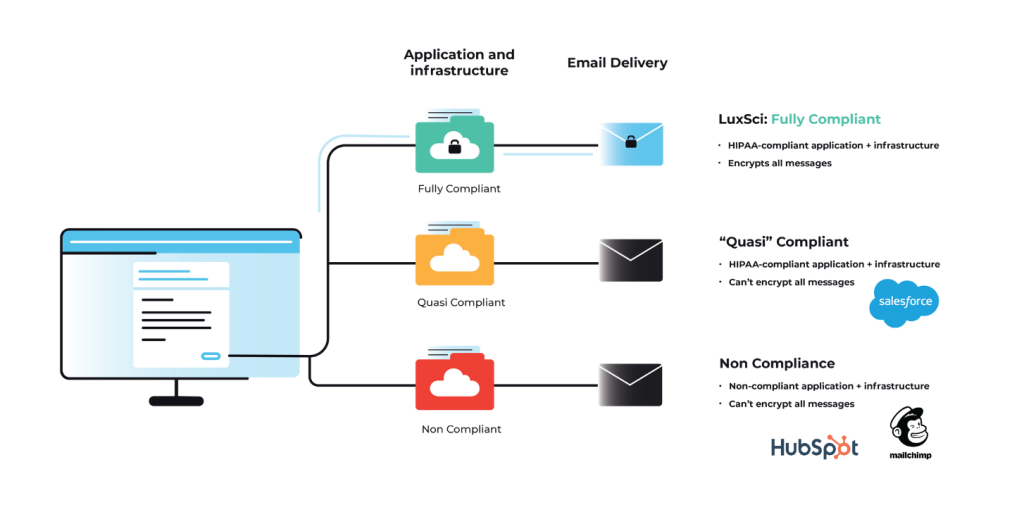
Unfortunately, using broadly popular email marketing platforms is not recommended. Many of these platforms were designed for e-commerce businesses and are not secure enough to meet HIPAA requirements. We do not recommend using a solution not specifically equipped to meet the healthcare industry’s unique security and compliance needs. To determine if your email marketing provider is compliant, they must meet three broad criteria at a minimum.
The vendor must sign a Business Associate Agreement outlining how they plan to secure your data and what they will do in the event of a breach.
Encrypt data at rest when it is stored in their systems.
Encrypt email messages and data in transit as it is sent to the recipients.
Not all vendors will be up to the task. Carefully vet your email marketing vendors to ensure they are taking steps to secure data and protect patient privacy.
What is an Email API?
API is an acronym that stands for “Application Programming Interface.” An email API gives applications (like CRMs, CDPs, or EHRs) the ability to send emails using data from the application. Email APIs also return campaign data to the platform or dashboards so you can assess the effectiveness of your marketing efforts. Trigger-based transactional or marketing emails are ideal for sending with an email API. In this situation, emails are sent when pre-determined conditions in the application are met. Healthcare organizations may use email APIs to send appointment reminders using electronic health records system data about a patient’s upcoming appointment.
Email APIs enable the automation of common email workflows. However, they are not interchangeable with email marketing platforms. Email APIs do not include the contact management systems standard in most email marketing platforms because all that data lives within the application they connect to. In addition, email API tools typically do not include drag-and-drop editor tools or other design features that help your emails stand out.
Does HIPAA permit providers to send unencrypted emails with PHI to patients?
Encryption is an addressable standard under the HIPAA Security Rule, but that does not mean it is optional. The HIPAA Privacy Rule does not explicitly forbid unencrypted email. Still, it does state that “other safeguards should be applied to protect privacy reasonably, such as limiting the amount or type of information disclosed through the unencrypted email.”
In addition, the Department of Health and Human Services also states that “covered entities are permitted to send individuals unencrypted emails if they have advised the individual of the risk, and the individual still prefers the unencrypted email.” Some organizations use waivers to inform patients of the risks and acquire permission to send unencrypted emails.
However, we do not recommend this approach for several reasons:
Keeping track of waivers over time and recording status changes and updates is challenging.
Signed waivers do not insulate you from the consequences of a HIPAA breach.
And finally, using waivers to send unencrypted emails doesn’t eliminate your other HIPAA obligations like data retention and disposal. Using a HIPAA-compliant solution is more manageable and eliminates ambiguity.
Can patients exercise their right of access by receiving PHI via unencrypted email?
Yes, but they must be fully informed of the risks and sign waivers acknowledging them. The caveats in the previous answer apply. It’s always better to utilize an encryption tool to protect patient data.
Is Microsoft 365 or Exchange 365 encryption sufficient for marketing emails?
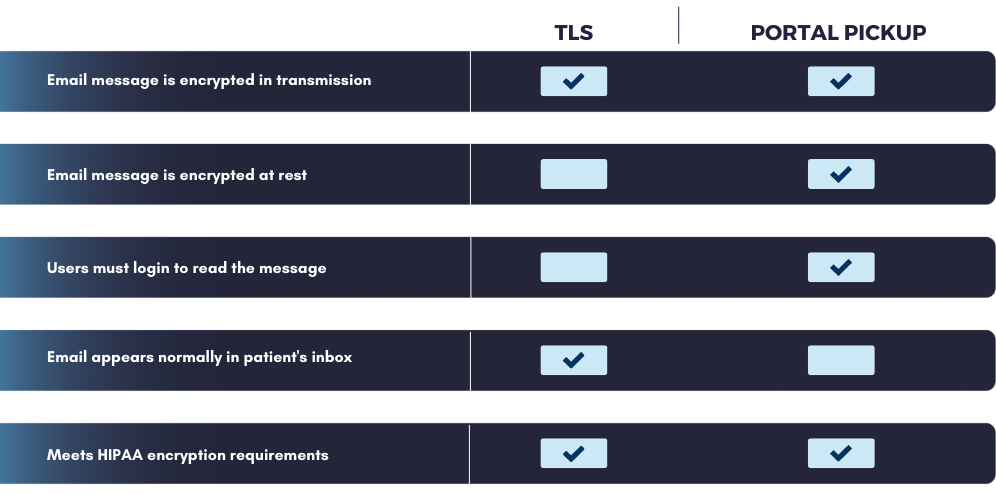
Microsoft 365 can be configured with Office Message Encryption (OME) to comply with HIPAA. However, the program is not well-suited to HIPAA email marketing. OME primarily relies on portal pickup encryption, in which the message is stored securely on a server and requires the recipient to log in to the portal to read the email. If you are a marketer trying to increase engagement, the portal adds a barrier to access that many will not cross. Light-PHI marketing messages are best sent using TLS encryption. TLS-encrypted messages arrive in the recipient’s inbox just like a regular email and do not require a user to log in to read the message.
In addition, Microsoft 365 is not configured to send high volumes of email. If you plan to send large marketing campaigns, you could unintentionally disrupt regular business communications by sending all the messages through the same infrastructure. You should separate your business and marketing email sending to protect your IP reputation and achieve your desired sending throughput.
What are common email marketing use cases for healthcare?
Email marketing in healthcare is not restricted to boring practice newsletters. When you utilize tools that enable the use of PHI in your targeting and personalization efforts, the sky is the limit. With consumer preferences shifting toward digital communications, marketers willing to utilize the email channel and tactics like segmentation and personalization can see better results.
Email is an excellent way to communicate with patients. A sampling of ways that healthcare marketers can use email include:
engaging patients in their healthcare journey
educating patients about their healthcare conditions and treatments
improving attendance and scheduling
retaining patients
increasing preventative procedures
collecting data on the patient experience
improving patient satisfaction
Conclusion
HIPAA can be difficult to understand, but choosing the right tools and adequately vetting your vendors makes it easy to execute HIPAA-compliant email marketing campaigns. If you are interested in learning more about LuxSci’s easy-to-use, Secure Marketing platform, please contact our sales team.
Most conversations about HIPAA compliant email eventually land on the same acronym: TLS. It’s the most common encryption method in use, and for good reason — it’s widely supported and relatively simple to enforce. But TLS isn’t the only encryption standard healthcare organizations should understand, and it isn’t always the right tool for securing your email address and message content.
S/MIME is the other name that comes up frequently, especially in healthcare, and usually in the same breath as PGP, along with some confusion about what it actually does differently. This guide breaks down what S/MIME is, how MIME works underneath it, how to configure it, and — just as importantly — when it’s genuinely worth the effort versus when it isn’t, based on both the technical standard and real feedback from the people who’ve actually had to manage it.
If you haven’t yet worked through the basics of what makes email HIPAA compliant in the first place, our HIPAA Compliant Email guide is a useful starting point before diving into a specific encryption standard like this one.
What Is S/MIME?
S/MIME stands for Secure Multipurpose Internet Mail Extensions (also written Secure/Multipurpose Internet Mail Extensions). It’s a security extension of MIME, the original standard introduced in 1992 that first allowed email to carry more than plain text — attachments, formatting, and different character sets. Understanding how MIME works helps explain what S/MIME adds on top: where MIME made richer content possible, S/MIME made that content secure by encrypting it and digitally signing it.
S/MIME’s roots as a security standard go back to the early 2000s, largely through work done by RSA Security, one of the earliest companies focused on computer and network security. Because it’s been around for so long, S/MIME is supported natively by most major email clients, including Outlook and Apple Mail, without requiring third-party software or plugins.
At its core, S/MIME provides three distinct protections for email security:
Encryption — ensures that only the intended recipient, using their private key, can read the email messages sent to them
Sender authentication — verifies the identity of the sender, so the recipient can trust the email actually came from who it claims to be from
Digital signing — confirms the message wasn’t altered in transit, effectively letting you digitally sign each message you send
This combination is what distinguishes S/MIME from encryption methods that only protect the connection a message travels over. S/MIME protects the message itself — a meaningful distinction for any organization handling sensitive data security requirements.
How Does S/MIME Work?
S/MIME is built on Public Key Infrastructure (PKI) and asymmetric encryption — a system that uses two mathematically linked digital certificates instead of one shared password.
Public key — shared openly, used by others to encrypt messages sent to you and to verify your digital signature
Private key — kept secret and secure, used by you to decrypt received messages and sign outgoing ones
When someone sends you an S/MIME-encrypted email, they encrypt it using your public key. Only your corresponding private key can decrypt it, meaning that even if the message is intercepted somewhere along its path, it remains unreadable without that specific private key. This is what people mean when they describe S/MIME as end-to-end encryption: the protection travels with the message itself, not just the connection carrying it.
To configure S/MIME, both the sender and recipient need:
A digital certificate, issued by a trusted certificate authority (CA), tied to their specific email address
That certificate properly installed and configured in their email client
Each other’s public key, exchanged in advance, so encryption and decryption can actually happen
If any one of these pieces is missing on either side, S/MIME simply doesn’t work for that exchange — a limitation that comes up constantly in practitioner discussions, and one worth understanding before you invest time configuring it.
What IT Practitioners Actually Say About This
One useful, if slightly humbling, reality check comes up repeatedly in IT forums when people ask whether they should bother configuring S/MIME: as one systems administrator put it plainly, most people you correspond with have no idea how to verify a digital signature and won’t even notice if one is missing. Emails from your bank or a government tax agency, they pointed out, typically aren’t S/MIME signed at all — a sign of just how limited real-world verification behavior actually is outside of specific technical or regulatory contexts.
Another common thread: several IT professionals candidly noted that email clients like Outlook can create friction by automatically trying to reply with an S/MIME signed message, which can be genuinely annoying for a recipient who has no certificate configured and no way to make sense of the added complexity. Their advice, consistently, boiled down to one clarifying question: it isn’t a question of whether you should configure S/MIME, but whether you actually need it — if none of the people you communicate with require signed email, the added configuration probably isn’t buying you anything meaningful.
That distinction — need versus want — is exactly the lens healthcare organizations should apply too, and it’s the framing this guide uses throughout.
S/MIME vs. TLS vs. PGP: How They’re Different
It’s easy to lump every encryption acronym together, but each one solves a slightly different problem.
Method
What It Protects
Identity Verified Via
Complexity
TLS
The connection between mail servers
Server-level certificates, not individual senders
Low — largely automatic, minimal user setup
S/MIME
The message content itself, end-to-end
Trusted certification authorities issue and vouch for individual certificates
High — requires certificates and key exchange for every sender/recipient pair
PGP
The message content itself, end-to-end
A decentralized “web of trust” — users vouch for each other directly
High — similar certificate/key management burden as S/MIME
TLS encryption – most people interact without realizing it — it’s what protects the connection when your email travels from your server to the recipient’s server. The tradeoff is that TLS only protects the message in transit; once it lands on a mail server, TLS’s job is done.
S/MIME and PGP both aim to close that gap by encrypting email messages themselves, so they remain protected even after delivery. The key difference, as one privacy-focused forum discussion put it well, comes down to how identity is managed: S/MIME farms identity verification out to a trusted certification authority, while PGP requires you to manage that trust relationship yourself. For most healthcare organizations, S/MIME’s centralized CA model is the more practical fit, since it aligns better with how enterprise IT departments already manage digital certificates and existing vendor relationships.
Key Benefits of S/MIME
Genuine end-to-end protection. Because the message itself is encrypted, S/MIME protects data security even if it passes through servers that don’t support encryption.
Built-in sender authentication and message integrity. Digital signatures verify both the identity of the sender and that the message hasn’t been tampered with — a layer TLS alone doesn’t provide.
Broad native support across email clients. Most major email clients support S/MIME out of the box, without requiring a separate plugin.
Flexibility to sign without encrypting. As one practitioner pointed out, you can digitally sign an outgoing message without encrypting it — useful for something like a mailing list, where you want recipients to trust the message came from you, but full encryption isn’t necessary or practical for a broad distribution list.
The Real Tradeoffs of S/MIME
Certificate management is ongoing, not one-time. Every sender and recipient needs a certificate tied to their email address, renewed and reissued as staff change roles or leave. Manageable for a small group; significant admin overhead for a whole organization.
Both parties must be configured correctly. If a recipient lacks a certificate or the sender’s public key, the message bounces or fails to send encrypted — some systems fall back to TLS, but only if configured to do so.
Most recipients can’t verify it anyway. IT practitioners consistently note that outside specific business or regulatory contexts, recipients have no practical way to check a digital signature — and default behaviors like auto-signed replies can just create friction.
It doesn’t scale to high-volume email. S/MIME suits direct correspondence between known parties, not appointment reminders, billing notices, or large mailing lists.
It can conflict with malware scanning. End-to-end encryption blocks gateway-level inspection, so scanning has to happen at the endpoint instead.
How to Configure S/MIME?
For Individuals
Obtain an S/MIME certificate from a trusted certificate authority. Certificates come in different validation levels — Basic (validates only the email address), Individual Validation (confirms personal identity), Organization Validation (confirms the business’s legitimacy), or Sponsor validation (combining both).
Install the certificate in your email client — most major email clients, including Outlook and Apple Mail, support this natively.
Configure the client to use the certificate for both encrypting outgoing messages and verifying signatures on incoming ones.
Exchange public keys with anyone you intend to correspond with securely — typically by sending them a signed (but not necessarily encrypted) email first, which shares your public key automatically.
For Organizations
Determine the validation level your organization actually needs. Higher validation levels provide stronger identity assurance but involve more verification steps and cost.
Use centralized tools to manage the certificate lifecycle. Protocols like LDAP or endpoint management platforms (such as Microsoft Intune) can significantly reduce the manual burden of distributing and renewing digital certificates at scale.
Distribute certificates and provide clear installation guidance to every employee who needs S/MIME — this is often where organizations underestimate the support burden, particularly for less technical staff.
Set clear policies on when S/MIME is required versus when other encryption methods, like enforced TLS, are sufficient. Treating S/MIME as a blanket requirement across an entire organization typically creates more friction than protection, echoing exactly what practitioners report when they configure it without a clear need.
When Does S/MIME Actually Make Sense?
Given its administrative overhead — and the recurring, practical feedback from people who’ve actually configured it — S/MIME is best reserved for specific, high-sensitivity use cases rather than applied indiscriminately:
Clinician-to-clinician communication involving particularly sensitive diagnoses or treatment details, where both parties are known and willing to maintain certificates
Cross-organization referrals where a small, defined group of specialists regularly exchanges detailed patient information and can reasonably manage the certificate relationship
Legal, compliance, or executive correspondence where verifying the sender’s identity and confirming message integrity outweighs the setup cost
For everything else — appointment reminders, billing communications, marketing outreach, or high-volume patient correspondence — enforced TLS or a managed encryption platform that automatically selects the right method per recipient is almost always the more practical choice. This mirrors exactly what experienced IT practitioners consistently conclude on their own: it’s not about whether S/MIME can work, it’s about whether your specific communication actually needs it.
A Simpler Path: Automated, Per-Recipient Encryption
The tradeoff most organizations run into with S/MIME isn’t whether it works — it’s whether staff can reliably manage digital certificates for every relevant contact without errors slipping through, and without creating the kind of recipient friction practitioners describe so consistently.
Rather than requiring every sender and recipient to individually configure S/MIME, some HIPAA compliant email platforms automatically select the appropriate encryption method per recipient — TLS when it’s sufficient, a secure portal when the recipient’s system doesn’t support TLS, and PGP or S/MIME when the situation calls for genuine end-to-end protection and sender verification. This removes the burden of manually deciding — and manually maintaining certificates — from individual staff members, while still making S/MIME available for the specific cases where it’s the right tool.
What Should I Do Now? (revised with target-keyword anchor text)
S/MIME is a legitimate, well-established way to secure your email and verify the sender — but understanding when to use it, and when a simpler method is more appropriate, matters just as much as knowing how to configure it. Most healthcare organizations don’t need S/MIME everywhere; they need the right encryption method applied automatically, based on the situation.
Here’s where to go next:
Learn more about HIPAA compliant email encryption to see how encryption standards like S/MIME fit into a broader compliance strategy.
Explore Secure High Volume Email to see how automatic, per-recipient encryption — including S/MIME and PGP where appropriate — removes the manual certificate management burden from your staff.
Talk to a LuxSci expert if you’re evaluating which encryption approach fits your organization’s specific mix of high-sensitivity and high-volume email.
FAQs
1. Is S/MIME better than TLS for email security?
Neither is universally better — they solve different problems. TLS protects the connection a message travels over and suits high-volume, everyday email. S/MIME protects the message content itself, end-to-end, and suits specific, high-sensitivity communications between known parties who can manage digital certificates.
2. What happens if I send an S/MIME encrypted email to someone who doesn’t support it?
The message typically won’t deliver as encrypted, and depending on how the sending system is configured, it may bounce back to the sender or automatically fall back to TLS.
3. Do I need a separate digital certificate for every email address, or just one for my organization?
Each individual email address needs its own certificate issued by a certificate authority. A single organizational certificate doesn’t cover every employee — certificates are tied to specific addresses, not the organization as a whole.
4. Can I digitally sign an email without encrypting it?
Yes. Signing confirms the identity of the sender and that the message wasn’t altered, without requiring the recipient to have a certificate of their own. This is useful for situations like mailing lists, where full encryption isn’t practical but sender verification still adds value.
5. Is S/MIME a good fit for HIPAA compliant marketing emails?
Generally, no. S/MIME’s certificate and key exchange requirements don’t scale well to high-volume or one-to-many communication like marketing campaigns. Enforced TLS or a platform that manages encryption automatically per recipient is typically the better fit for that use case.
Few terms in healthcare get thrown around as loosely as “HIPAA violation.” It gets invoked when a nurse mentions a patient’s diagnosis to a friend outside of work, when a technician talks about a well-known patient who came through the clinic, or when a physician casually brings up a person’s rare diagnosos at a backyard barbecue — situations that sound like violations but often have nothing to do with the actual law. That confusion isn’t just an oversight, but rather, it points to a gap in understanding what HIPAA covers, who it applies to, and what genuinely puts an organization at risk.
For health care providers, compliance officers and IT professionals, the stakes behind that confusion are anything but casual. The Department of Health and Human Services (HHS) Office for Civil Rights (OCR) has issued settlements ranging from a few thousand dollars to over $16 million for the same underlying failures, such as a missed risk assessment, an unencrypted laptop, a chart accessed by the wrong person. This guide breaks down what actually constitutes a HIPAA violation, the most common ways organizations end up on OCR’s radar, what genuinely falls outside HIPAA’s scope, and what to do if you’re managing risk or responding to an incident right now.
If your organization handles PHI over email — one of the highest-risk channels for exactly this kind of violation — our HIPAA Compliant Email guide is a useful next read once you’ve worked through this one.
What Is a HIPAA Violation?
A HIPAA violation occurs when a covered entity, business associate, or a member of either’s workforce fails to comply with a standard set out in the HIPAA Privacy Rule, Security Rule, or Breach Notification Rule — or fails to follow an internal policy implemented to support HIPAA compliance.
That definition matters because it draws a hard boundary around who can actually commit one. HIPAA applies to:
Covered entities — healthcare providers, health plans, healthcare suppliers, payers, and healthcare clearinghouses
Business associates — vendors and contractors that create, receive, maintain, or transmit protected health information (PHI) on a covered entity’s behalf
Workforce members — employees, volunteers, and contractors of either of the above
HIPAA does not apply to private individuals acting outside of a covered role — a distinction that trips up far more people than you’d expect, and one we’ll come back to later in this guide.
The Health Insurance Portability and Accountability Act (HIPAA) was designed to protect the confidentiality of medical records and patient data while still allowing healthcare organizations to function and share information when appropriate. A violation happens when that balance breaks down — when PHI is accessed, used, or disclosed in a way the law doesn’t permit, or when required safeguards simply aren’t in place.
The Three HIPAA Rules a Violation Can Break
Every HIPAA violation traces back to one (or more) of three core rules. Understanding which rule is in play helps clarify what actually went wrong — and what needs to be fixed.
Rule
What It Governs
Example Violation
Privacy Rule
Who can access, use, and disclose PHI, and under what circumstances
Sharing a patient’s diagnosis with someone outside their care team without authorization
Security Rule
Administrative, physical, and technical safeguards for electronic PHI (ePHI)
Failing to encrypt emails in transit or a laptop that stores patient information
Breach Notification Rule
Requirements for notifying affected individuals and HHS after a breach of unsecured PHI
Missing the 60-day deadline to notify patients after a data breach
Most real-world violations involve more than one rule at once, such as a stolen, unencrypted laptop is a Security Rule failure that can also trigger Breach Notification Rule obligations. Keeping the three rules distinct in your own documentation, though, makes it much easier to identify exactly where a gap exists.
Most Common Types of HIPAA Violations
These are the violation categories that show up most often in OCR settlements, and the ones every provider, payer, and supplier organization should actively guard against.
Unauthorized Access / Snooping
This is the violation most people have actually heard about, usually because of a celebrity or high-profile patient case that made headlines. A staff member accesses a patient’s medical record without a legitimate, job-related reason — often out of curiosity, not malice — and it still counts as a serious violation.
What’s easy to miss here: the violation is about the access itself, not just what happens to the information afterward. Looking at a chart you have no clinical reason to view is a violation the moment it happens, even if you never repeat, share, or act on what you saw. Hospitals take this seriously enough to flag high-profile patient charts automatically and audit access in real time — which is exactly why staff who snoop tend to get caught quickly, and why termination is the near-universal outcome when they do.
A useful way to think about it: the sensitivity of the underlying information isn’t what determines whether accessing it was a violation — the authorization to access it through that specific system is and if a job role requires it. Pulling PHI through a restricted system without a legitimate reason is a violation even in cases where the same information might, in theory, be available through some other, non-restricted channel. Improper access through the wrong door is still improper access.
Example: Dr. Huping Zhou was sentenced to four months in federal prison after accessing celebrity medical records 323 times with no legitimate reason. UCLA Health System was separately fined $865,000 related to similar unauthorized access incidents.
Failure to Conduct a Risk Analysis
The Security Rule requires covered entities and business associates to conduct an organization-wide risk analysis identifying vulnerabilities to the confidentiality, integrity, and availability of ePHI. Skipping this step — or doing a superficial version of it — is one of the single most commonly cited failures in OCR settlements, because it’s foundational: nearly every other safeguard depends on knowing where your actual risks are.
Example: Premera Blue Cross paid $6,850,000, and Excellus Health Plan paid $5,100,000, both tied in part to failures to conduct adequate risk analyses before major breaches occurred.
Insufficient Access Controls
Access controls determine who can view or modify ePHI, and they need to be granular enough that staff can only access the minimum information necessary for their role. When access controls are too loose, such as shared logins, no role-based restrictions, no automatic logoff, organizations lose the ability to actually enforce the “minimum necessary” standard HIPAA requires.
Example: Anthem Inc. paid $16,000,000, the largest HIPAA settlement to date, following a breach connected in part to access control failures affecting nearly 79 million individuals.
Failure to Encrypt ePHI on Portable Devices
Laptops, phones, and USB drives leave the building. When they’re lost or stolen without encryption, an isolated incident becomes a reportable breach — because unencrypted PHI on a missing device is, by definition, unsecured PHI.
Example: Children’s Medical Center of Dallas paid $3.2 million after multiple incidents involving lost, unencrypted mobile devices containing ePHI.
Missing or Incomplete Business Associate Agreements
Any vendor that creates, receives, maintains, or transmits PHI on a covered entity’s behalf — from a billing company to an email provider — is a business associate under HIPAA, and business associates are legally required to sign a Business Associate Agreement (BAA) before handling that data. Skipping this step, or using a vendor without one, is a violation regardless of whether anything actually goes wrong with the data itself.
Example: North Memorial Health Care of Minnesota paid $1.55 million after failing to enter into a BAA with a business associate that later experienced a breach.
Impermissible Disclosures of PHI
This category covers PHI shared with someone who wasn’t authorized to receive it — a press release naming a patient, a social media post, filming patients without consent, or telling family or coworkers more than they’re entitled to know.
Example: New York Presbyterian Hospital paid $2,200,000 after filming patients for a documentary without proper consent.
Improper Disposal of PHI
Paper records tossed in regular trash instead of being shredded, or old hard drives discarded without being wiped, both count as impermissible disclosures — PHI doesn’t stop being protected just because someone’s done using it.
Example: Parkview Health paid $800,000 after leaving patient medical records unattended in a driveway during a records transfer.
Exceeding Breach Notification Deadlines
Once a breach of unsecured PHI is discovered, the Breach Notification Rule sets a hard 60-day deadline to notify affected individuals (and HHS, for breaches involving 500+ records). Missing that window turns a bad situation into a compounding one.
Example: Presence Health paid $475,000 for failing to notify affected individuals within the required timeframe following a breach.
Denying Patient Access to Records
Patients have a right to access their own medical records, generally within 30 days of a request, without excessive fees or unreasonable barriers. Denying or delaying that access is one of the more consistently enforced violation categories in recent years.
Example: Cignet Health of Prince George’s County paid $4,300,000 for denying 41 patients access to their own medical records.
Every one of these categories comes back to the same underlying question: does your organization actually have documented, enforced processes for who can touch PHI, how it’s protected, and what happens when something goes wrong? If email is part of that picture — and for nearly every healthcare organization, it is — our HIPAA Compliance Checklist walks through exactly what needs to be in place.
What Is Not a HIPAA Violation (Common Misconceptions)
HIPAA gets invoked constantly in situations it has nothing to do with — and clearing up that confusion matters, because it helps healthcare professionals, IT and compliance teams focus their actual attention where it belongs.
A family member discussing your health isn’t a HIPAA violation. HIPAA governs covered entities, business associates, and their workforces — not private individuals speaking in a personal capacity. Your mother telling a relative about your diagnosis might be a breach of your trust, but it’s not a HIPAA violation, because she isn’t bound by HIPAA in the first place.
Confusing HIPAA with FERPA or the ADA is common, and usually incorrect. Educational records fall under FERPA (the Family Educational Rights and Privacy Act), not HIPAA — a teacher discussing a student’s grades or attendance isn’t a HIPAA issue. Similarly, questions about a disability accommodation, like a mask exemption or a service animal, generally fall under the Americans with Disabilities Act (ADA), not HIPAA.
Asking about someone’s health isn’t the same as disclosing it. HIPAA restricts what covered entities and their workforces can disclose, it doesn’t restrict what any individual, including a coworker, cashier, or stranger, can ask. Someone asking why you’re wearing a mask or requesting proof of a medical condition might be inappropriate or even illegal under a different law, but it isn’t itself a HIPAA violation.
Vague references aren’t the same as identifiable disclosures. HIPAA violations require that protected health information (PHI) be tied to an identifiable individual. Referring to “a patient” or “a young adult male” in casual conversation is too vague to trigger a violation. Naming a specific person — “my patient, Mike, who lives on Oak Street” — alongside health information crosses that line.
A simple way to keep the distinction clear:
A nurse telling friends a specific patient’s name, date of birth, and diagnosis → HIPAA violation.
A pharmacist telling a customer their prescription refill is delayed → not a HIPAA violation.
The line isn’t about whether something feels private. It’s about whether protected health information tied to an identifiable person was disclosed by someone bound by HIPAA in the first place.
HIPAA Violation Penalties: The 4-Tier Structure
OCR calculates civil penalties based on the violator’s level of culpability, not just the severity of the incident. Understanding which tier applies matters, because the same underlying mistake can result in wildly different consequences depending on whether it was a one-off oversight or a known, ignored risk.
Tier
Culpability Level
Fine Range (Per Violation)
Annual Cap
Example Scenario
Tier 1
No Knowledge
$100 – $50,000
$25,000
The organization could not have reasonably known about the violation
Tier 2
Reasonable Cause
$1,000 – $50,000
$100,000
The organization should have known, but the violation wasn’t due to willful neglect
Tier 3
Willful Neglect (Corrected)
$10,000 – $50,000
$250,000
Willful neglect occurred, but the issue was corrected within 30 days
Tier 4
Willful Neglect (Not Corrected)
$50,000 (fixed)
$1.5 million+
Willful neglect occurred and was not corrected in time
Penalty amounts are periodically adjusted for inflation, and current maximum penalties can exceed $2 million annually per violation category — figures worth confirming against HHS’s current published rates before citing specific numbers internally.
Criminal penalties sit outside this civil tier structure entirely. Knowing or willful violations can result in criminal fines ranging from $50,000 to $250,000, plus up to 10 years in prison for the most serious offenses — typically reserved for cases involving intent to sell, transfer, or use PHI for personal gain or malicious harm.
How Are HIPAA Violations Discovered?
Violations don’t usually surface because someone confesses. They’re found through a handful of consistent channels:
Audit logs and automated access-flagging. Most modern EHR systems automatically flag unusual access patterns — a chart accessed by someone outside the care team, or a spike in access to a high-profile patient’s record. This is precisely how most unauthorized-access violations come to light; systems are built to catch exactly this pattern.
Patient complaints. Patients can, and do, file complaints directly with HHS when they believe their information was mishandled.
Breach self-reporting. Covered entities and business associates are required to self-report breaches meeting certain thresholds.
OCR compliance audits. HHS periodically conducts proactive audits of covered entities and business associates, independent of any specific complaint or breach.
One nuance worth understanding: not every violation escalates the same way. A single, isolated mistake, such as an email sent to the wrong recipient or a chart accidentally opened, is often handled through internal correction and documentation. A repeated pattern of the same behavior is a different story entirely, and is far more likely to become something an organization is required to report to HHS. This is one of the most important distinctions for healthcare organizations and compliance teams to build into internal escalation policies: document every incident, but treat repetition as a signal that internal correction alone is no longer sufficient.
How to Report a HIPAA Violation
If you’re a patient, employee, or compliance officer who has identified a potential violation, there are two established paths ti report a violation, and they aren’t mutually exclusive.
Step 1: Report it to the employer or covered entity directly. Most healthcare organizations have an internal compliance officer or reporting process specifically for this purpose. Internal reporting is often the fastest way to get a genuine mistake corrected before it escalates.
Step 2: File a complaint with HHS’s Office for Civil Rights. If internal reporting isn’t appropriate, isn’t effective, or the violation is serious enough to warrant it, complaints can be filed directly through HHS’s official complaint portal. Complaints generally must be filed within 180 days of when the violation was discovered, though extensions are sometimes granted for good cause.
A few practical notes:
Anonymous reporting is possible, but limited. OCR accepts anonymous complaints, but the lack of contact information can restrict how thoroughly they’re able to investigate.
Retaliation against someone who reports in good faith is itself prohibited under HIPAA.
Not every complaint results in a formal investigation — OCR reviews each complaint to determine whether it falls within HIPAA’s scope before proceeding.
How to Avoid HIPAA Violations & Fines
For Organizations
Conduct — and document — a genuine risk assessment. This isn’t a one-time checkbox; risk assessments should be revisited whenever systems, vendors, or workflows change.
Sign a BAA with every vendor that touches PHI, including email, billing, and IT service providers — no exceptions.
Implement role-based access controls so staff can only access the minimum PHI necessary for their specific role.
Encrypt ePHI in transit and at rest, especially on portable devices and email, where enforced encryption remains one of the most consistently under-implemented safeguards.
Train staff regularly, not just at onboarding. A single training session at hire rarely holds up against years of evolving risk.
For Individual Staff Members
Only access patient records tied to a legitimate, job-related reason — never out of curiosity, even for patients you know personally.
Never discuss identifiable patient information outside of your care team, including with family, friends, or on social media.
Report suspected violations, including your own mistakes, immediately rather than waiting to see if anyone notices.
Treat every device and email containing PHI as if it could be lost, stolen, or misdirected tomorrow, because eventually, statistically, one will be.
Since email remains one of the highest-volume channels for exactly this kind of accidental exposure, secure, HIPPA compliant solutions, such as LuxSci’s SecureLine encryption technology, are built specifically to remove the guesswork — enforcing encryption automatically rather than relying on staff to remember to apply it correctly every time.
HIPAA vs. State Privacy Laws
HIPAA sets a federal floor, not a ceiling. States are free to enact privacy laws that are stricter than HIPAA, and when they do, the stricter standard generally governs. This matters for multi-state healthcare organizations especially, such as a provider, payer, or supplier operating across state lines may need to comply with HIPAA everywhere, plus additional, more stringent requirements in specific states.
This guide focuses on federal HIPAA requirements, but compliance officers should treat HIPAA as the baseline, not the finish line, when evaluating their organization’s full regulatory exposure.
What Should I Do Now?
Understanding what counts as a HIPAA violation is the first step. Actually closing the gaps that lead to one is the harder, ongoing work — and email is one of the most common places that work quietly falls through the cracks.
Here are three ways to keep moving forward:
Read our HIPAA Compliant Email guide to understand exactly what makes an email platform compliant — and where standard email tools like Gmail and Microsoft 365 fall short.
Work through our HIPAA Compliance Checklist to audit your organization’s current safeguards against what HIPAA actually requires.
Explore LuxSci’s SecureLine encryption technology to see how enforced encryption and a signed BAA work together to close the exact gaps that show up most often in OCR settlements.
The most common violations include unauthorized access to patient records, failure to conduct a risk analysis, insufficient access controls, failure to encrypt ePHI on portable devices, missing Business Associate Agreements, impermissible disclosures of PHI, improper disposal of records, and exceeding breach notification deadlines.
2. What’s the difference between a HIPAA violation and a FERPA or ADA issue?
HIPAA governs protected health information handled by covered entities and business associates in healthcare settings. FERPA governs education records, and the ADA governs disability discrimination and accommodation. A teacher discussing grades falls under FERPA, not HIPAA. A question about a disability accommodation typically falls under the ADA, not HIPAA.
3. How do I report a HIPAA violation?
Report it directly to the employer or covered entity first, if appropriate. If that isn’t effective or the violation is serious, file a complaint with HHS’s Office for Civil Rights within 180 days of discovering the violation, using the official HHS complaint portal.
4. Can I sue someone for violating HIPAA?
No. HIPAA does not provide a private right of action, meaning individuals cannot sue directly under HIPAA. Patients can file a complaint with HHS/OCR, and in some cases may have separate legal remedies under state privacy or negligence laws.
5. Is looking up a patient’s chart without a work reason a HIPAA violation, even if I don’t share the information?
Yes. Accessing a patient’s record without a legitimate, job-related reason is a violation the moment it happens — it doesn’t require sharing, saving, or acting on the information afterward. This is one of the most consistently enforced categories, particularly for high-profile or celebrity patients whose charts are routinely audited.
In healthcare IT, the term “secure email” gets thrown around loosely. Vendors slap the label on anything with a padlock icon, and internal teams often assume that because their provider offers TLS, they’re covered. They’re not, and the gap between what’s assumed and what’s actually required is where data breaches occur and HIPAA violations happen.
This guide breaks down exactly what secure email means from a technical and regulatory standpoint, why the email platform your staff uses every day probably isn’t compliant out of the box, and what to look for when evaluating a provider that needs to protect PHI at scale. If you want the full picture of what compliance requires beyond email specifically, our HIPAA Compliance Checklist is a useful companion read.
What Is Secure Email?
Secure email refers to an email system that protects the confidentiality, integrity, and availability of message content — specifically PHI — through a combination of technical safeguards and contractual protections. It’s not a single feature. It’s a stack of controls working together.
At minimum, secure email in a healthcare context includes:
Enforced encryption in transit, so messages can’t fall back to plaintext delivery
Encryption at rest, so stored messages remain protected on the server
Authentication protocols (SPF, DKIM, DMARC) that prevent spoofing and impersonation
Access controls and audit logs that track who accessed what, and when
A signed Business Associate Agreement (BAA) with the email provider
The distinction that trips up most organizations is this: encryption is a component of secure email, not the whole picture. A provider can offer encryption and still fail to meet HIPAA requirements if that encryption isn’t enforced, if there’s no BAA in place, or if audit logging doesn’t exist. Secure email is the combination of all these pieces functioning as a system, which is why it needs to be evaluated holistically rather than checked off feature by feature.
For healthcare provider, payer, and supplier organizations, this matters because email remains one of the highest-volume channels for PHI exposure, from clinical referrals to patient billing statements to routine staff communication. Getting the definition right is the first step toward closing the compliance gap.
Why Standard Email Is Not HIPAA-Compliant
Many healthcare organizations run on Gmail (Google Workspace) or Microsoft 365, and most assume they’re protected because encryption exists somewhere in the stack. That assumption is the single most common — and most dangerous — misconception in healthcare email security.
Here’s the problem: standard email services use opportunistic TLS by default. TLS is attempted between mail servers, but if the receiving server doesn’t support it, the message is delivered anyway — unencrypted, in plaintext. Neither the sender nor the recipient typically sees a warning. The email just goes through.
This isn’t a hypothetical edge case. IT professionals managing healthcare email infrastructure have flagged this exact issue directly: opportunistic TLS is often enabled by default and creates a false sense of security, since it offers no guarantee that a given message, including one containing PHI, won’t be transmitted in plaintext if the recipient’s mail server doesn’t support encryption. Organizations assume they’re protected simply because TLS is technically “on,” without realizing it isn’t enforced.
That gap has real consequences under HIPAA. The Security Rule currently treats transmission encryption as an “addressable” safeguard, meaning covered entities can, in theory, implement an equivalent alternative measure instead. In practice, regulators and auditors from the Office for Civil Rights (OCR) expect enforced encryption as the standard of care. “Addressable” has never meant optional — it means an organization needs a documented, defensible reason if it isn’t doing enforced encryption, and few reasons hold up under scrutiny. Finally, under OCR’s proposed changes to the HIPAA Security Rule for ePHI, scheduled for final publication in July 2027, email encryption moves from addressable to mandatory.
Beyond the encryption gap, standard consumer and even most business email plans typically lack:
A BAA that’s actually offered and signed (available on some enterprise tiers, but not automatic)
Audit logging sufficient to meet HIPAA Security Rule requirements
Built-in encryption at rest guarantees for stored messages
None of this means Gmail or Microsoft 365 are inherently insecure products. It means their default configuration is built for general business use, not for an environment where every misrouted or intercepted message carries breach notification liability. Making either platform HIPAA-appropriate requires layering on additional tools, policies, and critically, a provider relationship that includes a signed BAA covering the exact services in use.
The Technical Components of Secure Email
Secure email is built upon five technical layers. Understanding each one, and where it fails in standard email, clarifies exactly what a compliant solution needs to deliver.
Encryption in Transit (TLS)
Transport Layer Security (TLS) encrypts the connection between mail servers as a message travels from sender to recipient. There are two flavors, and the difference between them is the crux of most healthcare email compliance failures:
Opportunistic TLS attempts an encrypted connection but falls back to unencrypted delivery if the receiving server doesn’t support it. This is the default across most consumer and business email platforms.
Enforced TLS requires an encrypted connection for delivery to succeed. If encryption can’t be established, the message fails to send rather than going out in plaintext, or a link to secure portal can be sent to securely access the information.
HIPAA’s Security Rule lists encryption as addressable, but enforced TLS has become the de facto standard that auditors and OCR expect from covered entities and business associates handling PHI over email. As one healthcare IT professional put it while debating this exact tradeoff internally: the goal is to require TLS for all outbound email and then document the remaining controls around it, treating enforced TLS as the technical baseline, with policy and process built on top.
Encryption at Rest
Transit encryption only protects a message while it’s moving. Once it lands on a mail server — sender’s outbox, recipient’s inbox, backups, archives — it needs to remain encrypted in storage. This is encryption at rest, and it’s where many organizations underestimate their exposure.
Encryption in transit alone offers zero control over a message after it’s been delivered. If the destination server isn’t itself encrypting stored data, or if a backup snapshot is taken without encryption, PHI sitting in an inbox is exposed regardless of how securely it arrived. HIPAA’s Security Rule requires safeguards for ePHI both in transit and at rest, a compliant secure email provider needs to guarantee both, not just one.
End-to-End Encryption (S/MIME, PGP)
End-to-end encryption (E2EE) encrypts message content itself, not just the connection it travels over — meaning even the email provider can’t read the content. Two standards dominate here:
S/MIME uses certificate-based encryption and is common in enterprise environments, such as healthcare, particularly where organizations already manage a public key infrastructure.
PGP (Pretty Good Privacy) uses a public/private key model and is more common in technical or security-conscious communities, though it’s less frequently deployed at scale in healthcare due to key management complexity.
E2EE isn’t a baseline requirement for every PHI-containing email, enforced TLS plus encryption at rest satisfies most use cases. But it becomes necessary for especially sensitive communications, cross-organization data sharing where you don’t control the recipient’s infrastructure, or when a business associate agreement specifically requires it.
Authentication (SPF, DKIM, DMARC)
These three protocols work together to prevent domain spoofing and email impersonation, a growing attack vector against healthcare organizations specifically, given how often phishing campaigns impersonate providers, payers, or patients.
SPF (Sender Policy Framework) specifies which mail servers are authorized to send email on behalf of a domain.
DKIM (DomainKeys Identified Mail) adds a cryptographic signature verifying a message wasn’t altered in transit.
DMARC (Domain-based Message Authentication, Reporting & Conformance) tells receiving servers what to do when SPF or DKIM checks fail, and provides reporting visibility.
Without these configured correctly, an organization’s domain can be spoofed to send convincing phishing emails to patients or staff, creating a security failure that compounds the compliance risk of email interception.
Digital Signatures
Digital signatures verify sender identity and confirm a message hasn’t been tampered with between sending and receipt. Paired with encryption, they close the loop on message integrity, confirming not just that content was protected, but that it came from who it claims to have come from and arrived unaltered.
Standard Email vs. Secure Email: Feature Comparison
Feature
Standard Email
Secure Email (HIPAA-Compliant)
Encryption in Transit
Opportunistic TLS — attempted but not enforced
Enforced TLS — connection fails if encryption unavailable, can include delivery via secure portal option
Encryption at Rest
Not guaranteed; provider-dependent
Required — server-side encryption of stored messages
End-to-End Encryption
Not available
Supported via S/MIME and/or PGP
Digital Signatures
Not available
Included — verifies sender identity and message integrity
Authentication (SPF / DKIM / DMARC)
Optional, rarely enforced
Required — spoofing and impersonation protection
Business Associate Agreement (BAA)
Not provided on standard plans
Required — must be signed before sending PHI
Audit Logs
Basic or none
Full audit trail — required under HIPAA Security Rule
Access Controls
Basic password only
Role-based access, MFA, admin controls
Misdirected Email
Reportable HIPAA breach
Non-reportable if properly encrypted (safe harbor)
HIPAA Compliant by Default
No
Yes
What Makes Email HIPAA-Compliant Specifically
Technical safeguards alone don’t make email HIPAA-compliant. Compliance is a combination of technology, contracts, and documented processes — all four need to be in place simultaneously. This includes:
A signed BAA with your email provider – Any vendor that transmits, processes, or stores PHI on your behalf is a business associate under HIPAA, and business associates are legally required to sign a BAA before handling that data. Email providers have persistent access to ePHI — even end-to-end encrypted messages pass through their infrastructure at some point — which makes this requirement absolute, not situational. If a provider won’t sign a BAA, using them to send or store PHI isn’t a compliance risk you can mitigate; it’s a violation from the start.
Encryption as an addressable safeguard – Under 45 CFR §164.312(e)(2)(ii), the HIPAA Security Rule lists encryption of ePHI in transit as “addressable” rather than strictly “required.” In practice, this doesn’t mean optional, it means an organization must implement it, or document and justify an equivalent alternative safeguard. Enforced encryption has become the expected standard, and with the newly proposed HIPAA Security Rule planned for July 2027 publication, NPRM would formalize that expectation by making encryption of ePHI in transit and at rest mandatory rather than addressable. Organizations still relying on opportunistic TLS as their “equivalent alternative” should treat this as a closing window.
Access controls and audit logs – HIPAA requires the ability to track who accessed PHI, when, and what they did with it. This means role-based access permissions, multi-factor authentication, and a complete, retained audit trail — not just for compliance reporting, but for identifying and responding to incidents quickly.
The encryption safe harbor – This is one of the most consequential, and most underused, provisions in HIPAA. If PHI is sent via properly encrypted email and ends up misdirected to the wrong recipient, it is not a reportable breach under the Breach Notification Rule, because the encrypted content is considered unreadable and therefore not “unsecured PHI.” The exact same misdirection with unencrypted email is a reportable breach, triggering notification obligations to the individual and to HHS/OCR. Encryption isn’t just a security best practice here, it’s the line between a non-event and a formal breach investigation.
HITRUST certification as a trust signal – When evaluating vendors, HITRUST CSF certification is a strong external indicator that a provider’s security controls have been independently assessed against a recognized healthcare-specific framework. It’s not a HIPAA requirement in itself, but it meaningfully reduces the diligence burden on your side when vetting a provider.
Types of Healthcare Email That Must Be Secure
Not all internal debate here is about “should we secure email” — it’s about scope. Which specific email flows actually carry PHI, and therefore need to run through a compliant channel? In practice, the answer is broader than most teams initially assume.
The common thread: if a message references anything that could identify a patient in connection with health information — a name next to a diagnosis, an account number tied to a service date, an annual test reminder — it needs to move through a secure channel, regardless of whether it’s clinical, financial, or administrative in nature.
How to Evaluate a Secure Email Provider for Healthcare
Vendor evaluation in this category tends to go one of two ways: teams either take a provider’s “HIPAA-compliant” label at face value, or they get buried in RFP questions without knowing which answers actually matter. Ask these key questiosn to focus the evaluation on what’s operationally and legally significant.
“Does the provider sign a BAA? This is the first filter, not the last. If a vendor won’t sign a BAA — or offers a heavily limited one — everything else is irrelevant. Some organizations go a step further and negotiate indemnity or make-whole clauses into the BAA itself, seeking financial protection beyond the baseline liability allocation.
What encryption methods are supported? Confirm specifically whether the provider offers TLS only, or also supports S/MIME and/or PGP for end-to-end encryption where needed. TLS-only coverage is sufficient for most standard PHI communication; organizations with cross-border data sharing or especially sensitive use cases may need E2EE options available.
Is encryption enforced or opportunistic? This is the single most important technical question to ask directly, in those terms. A vendor that describes its encryption vaguely, without distinguishing enforced from opportunistic delivery, hasn’t answered the question. Push for specifics.
How are large attachments handled? Lab results, imaging files, and clinical documents often exceed standard attachment size limits. Confirm the provider has a secure, compliant method for large file transfer that doesn’t force users onto an unencrypted workaround.
What audit logging and reporting capabilities exist? You need visibility into delivery, access, and any failed encryption attempts, not just a generic sent/received log. Ask whether logs are retained for a period consistent with your organization’s HIPAA documentation requirements.
Do they support high-volume transactional email? Appointment reminders, billing notices, and patient communications at scale require infrastructure built for volume without sacrificing per-message compliance. Confirm the provider’s platform is built for this your specific pattern, not just person-to-person messaging.
Is the platform US-based with US data residency? For many healthcare organizations, where data physically resides — and under which jurisdiction — is a material factor in vendor risk assessment, particularly for payers and larger provider organizations with strict data governance policies.”
One operational factor worth weighing alongside these questions: secure email portals — the kind that require recipients to click through to a separate web page to read a message — solve the encryption problem but often create a real adoption problem. IT teams have reported a direct conflict between phishing-awareness training and portal-based workflows: staff and patients trained not to click suspicious links in emails are, understandably, reluctant to click the “secure link” a portal email contains. This is a legitimate reason many organizations increasingly prefer platforms that enforce encryption transparently in the background — like LuxSci’s SecureLine encryption technology — rather than routing every message through a separate portal experience.
Secure Email Checklist for Healthcare Organizations
Every safeguard covered in this guide comes down to a handful of concrete, verifiable actions. Use the checklist below as a working reference for what needs to be in place across your legal agreements, technical controls, and internal processes. This is not a one-time setup task, but something worth revisiting as your email volume, vendors, and regulations evolve. Share it across your compliance and IT teams as a starting point for an internal audit.
Legal and Contractual – BAA signed with email provider and all third-party vendors handling PHI.
Encryption – Forced TLS, not opportunistic only for emails in transit and all stored data encrypted with AES-256 bit encryption.
Access and Audit – Unique user IDs, role-based access, and login monitoring with advanced MFA enabled for all email accounts; audit logs active and maintained.
People and Processes – Staff trained in PHI handling, established breach response plan, annual email security policy review.
What Should I Do Now?
Secure email isn’t a single setting you switch on — it’s a combination of enforced encryption, a signed BAA, access controls, and documented process working together. Get any one piece wrong, and the rest doesn’t hold up under an OCR audit or a breach investigation.
If your organization is still relying on opportunistic TLS, an unsigned or incomplete BAA, or a patchwork of workarounds to move PHI through email, now is the time to close that gap, especially with the proposed 2025 HIPAA Security Rule update poised to make encryption a mandatory requirement rather than an addressable one in 2027.
Below are three ways you can continue your journey to securing your healthcare email:
Email can be HIPAA compliant, but only when the right safeguards are in place — enforced encryption, a signed BAA with your email provider, access controls, audit logs, and staff training on PHI handling. Standard email without these safeguards is not compliant.
2. Do I need to sign a BAA with my email provider?
Yes. Email providers have persistent access to ePHI — even encrypted messages pass through their servers — making them Business Associates under HIPAA. A signed BAA is required. If your provider won’t sign one, you cannot legally use them to send or store PHI.
3. What is the difference between opportunistic TLS and enforced TLS — and which does HIPAA require?
Opportunistic TLS attempts encryption but falls back to plaintext if the recipient’s server doesn’t support it. Enforced TLS stops delivery rather than sending unencrypted. HIPAA’s Security Rule treats transmission encryption as an addressable specification, in practice, enforced TLS is the standard auditors and OCR expect. The proposed 2025 HIPAA Security Rule NPRM would make encryption of ePHI in transit a mandatory requirement in 2027.
4. What happens if I send PHI in an unencrypted email?
It is an impermissible disclosure under HIPAA’s Privacy Rule and triggers the Breach Notification Rule, requiring you to notify the individual and HHS/OCR within 60 days. Penalties range from $100 to $50,000 per violation. Had the email been properly encrypted, the same incident would qualify for HIPAA’s encryption safe harbor, meaning no notification required.
5. Is Gmail or Microsoft 365 HIPAA compliant for sending patient emails?
Neither is compliant in their default configuration. Both use opportunistic TLS, meaning PHI can be sent in plaintext if the recipient’s server doesn’t support encryption. A signed BAA is available on enterprise plans but doesn’t close the technical gap alone. A purpose-built HIPAA-compliant email platform is the reliable solution.
If you’ve been waiting for the final word on the new HIPAA Security Rule before you touch your email encryption strategy, you now have an official reason to keep waiting.
Our advice: Don’t do it.
What is the new HIPAA Security Rule for ePHI?
The Department of Health and Human Services’ Office for Civil Rights had targeted May 2026 for a final rule implementing the most significant update to the HIPAA Security Rule in over two decades. The proposal eliminates the “addressable” standard and makes encryption of ePHI in transit and at rest mandatory for every covered entity and business associate. That deadline came and went quietly. Now we know why: an updated federal regulatory agenda shows OCR’s timeline has moved to July 2027, with the rule-making downgraded from “final rule stage” to “long-term action.” OCR is still working through more than 4,700 public comments on the January 2025 proposal.
For an industry that had been expecting a tighter deadline, a year-plus delay is the kind of news that invites a collective exhale — and a shelved project plan. At LuxSci, we think that would be a mistake, for three reasons:
The current rule already requires you to address encryption. “Addressable” was never “optional.” It has always meant you must implement the safeguard, implement an equivalent alternative, or document in writing why neither is reasonable for your organization. Most healthcare organizations have never done that documentation rigorously, and OCR’s existing enforcement authority applies today, not in 2027.
Breach costs haven’t waited for the rule.IBM’s 2025 Cost of a Data Breach Report puts the average healthcare breach at $7.42 million, still the highest of any industry. At the same time, email remains the number one attack vector into healthcare organizations. None of that risk is paused by a regulatory delay.
Delay is not withdrawal.OCR has not signaled it’s abandoning the encryption mandate, only that it’s taking longer to finalize it. Organizations that build now toward the standard already proposed will be ahead (and more secure) regardless of exactly when, or in what final form, the rule lands. Organizations that wait risk a compressed scramble once it does.
What should healthcare IT and compliance leaders actually do with this news?
Reevaluate your ePHI security posture, recalibrate its urgency, and use the extra runway to do the job right, instead of racing against a deadline. This includes:
Getting a real inventory of where ePHI moves by email today, inbound and outbound, and where encryption is inconsistent or absent.
Closing the documentation gap on “addressable” now, while you have time to do it well rather than defensively.
Pushing your email vendor for concrete answers on encryption standards, MFA enforcement, audit logging, and breach notification — the same technical controls the proposed rule would make mandatory.
Building (or updating) a written, enforcement-ready posture: policies, vendor agreements, certifications and verifications, test results, and training records that would hold up under an OCR investigation today, not just in a future compliance deadline.
Get LuxSci’s new Definitive Guide on the new HIPAA Security Rule
From Addressable to Mandatory: Email Encryption Under the New HIPAA Security Rule provides the latest update on the rule, what it means for healthcare email encryption, and what you can do now to properly prepare for what’s coming in 2027. The guide also includes an interactive scorecard that lets you evaluate your current email set up and vendor across seven security and compliance dimensions in under two minutes, no email address required.
If you want a second set of eyes on where your organization stands, our team offers a free 30-minute compliance assessment of your current email environment against the proposed rule’s requirements.
The patient engagement framework consists of five progressive stages: inform, consult, involve, collaborate, and empower. This approach helps healthcare organizations build stronger relationships with patients while improving health outcomes. The framework guides providers in developing communication strategies, technological tools, and care processes that move patients from passive recipients of care to active partners in their health management.
Patient Engagement Framework Foundations
The patient engagement framework builds upon healthcare’s evolution toward more patient-centered care models. This structured approach acknowledges that patients have varying levels of activation and readiness to participate in their healthcare decisions. The framework helps organizations assess their current engagement practices and develop strategies for improvement. Healthcare providers use these stages to map communication approaches and technology implementations that support increasing patient participation. Each stage of the patient engagement framework requires different tools, processes, and organizational capabilities. Understanding these elements helps healthcare organizations develop realistic roadmaps for advancing their engagement efforts.
Stage One: Inform
The first stage of the patient engagement framework focuses on providing patients with clear, accessible health information. At this level, communication flows primarily from provider to patient through educational materials, discharge instructions, and basic health literacy resources. Organizations develop content in multiple formats and languages to accommodate diverse patient populations. Digital patient portals typically begin at this stage with features like lab result viewing and appointment scheduling. Healthcare teams establish consistent messaging across departments to avoid confusing or contradicting information. While this stage is the beginning of the patient engagement framework, many organizations struggle to advance past informing patients about their conditions and treatments.
Stage Two: Consult
The consultation stage of the patient engagement framework opens two-way communication channels between providers and patients. Healthcare teams seek patient input about symptoms, preferences, and treatment experiences through surveys, feedback forms, and structured conversations. Providers begin recognizing patients as valuable sources of information about their own health situations. Digital tools expand to include secure messaging and symptom reporting capabilities. Care teams develop protocols for responding to patient communications within appropriate timeframes. The consultation phase of the patient engagement framework begins establishing the base for more collaborative relationships while still maintaining traditional healthcare hierarchies. Organizations generally measure success at this stage through patient satisfaction metrics and communication response rates.
Stage Three: Involve
The third stage of the patient engagement framework actively involves patients in treatment planning and health monitoring. Patients participate in goal-setting discussions and receive tools for tracking health metrics between appointments. Healthcare teams incorporate patient preferences and priorities when developing care plans. Technology platforms introduce self-management tools and educational resources tailored to individual health conditions. Care protocols expand to include regular check-ins and progress evaluations beyond scheduled appointments. The involvement stage of the patient engagement framework marks a significant shift toward recognizing patients as active participants rather than passive recipients.
Stage Four: Collaborate
Collaboration represents the fourth stage in the patient engagement framework, where patients function as true partners in their care team. Health professionals and patients make treatment decisions jointly, weighing clinical evidence alongside patient goals and preferences. Healthcare systems establish patient advisory councils to inform organizational policies and program development. Technology platforms integrate patient-generated health data with clinical systems to create comprehensive health pictures. Team-based care models include patients in case conferences and care planning sessions. The collaborative stage of the patient engagement framework requires organizational culture changes that value patient perspectives alongside clinical expertise. Healthcare systems reaching this stage often demonstrate better care coordination and reduced unnecessary utilization.
Stage Five: Empower
The final stage of the patient engagement framework focuses on empowering patients to manage their health independently when appropriate. Patients receive comprehensive tools and knowledge to make informed healthcare decisions aligned with their personal values. Organizations support patient autonomy while maintaining appropriate clinical oversight for complex conditions. Technology platforms provide personalized insights and recommendations based on individual health patterns. Care teams function as coaches and consultants rather than directing all aspects of patient care. The empowerment phase of the patient engagement framework acknowledges patients as the primary drivers of their health management with healthcare providers serving supportive roles.
Implementing the Patient Engagement Framework
Healthcare organizations implement the patient engagement framework through gradual, strategic changes to clinical processes, technology systems, and organizational culture. Leadership commitment proves essential for allocating necessary resources and championing patient-centered approaches. Staff training addresses both technical skills and communication methods appropriate for each engagement stage. Technology selection focuses on tools that can evolve alongside advancing engagement capabilities. Progress measurement includes both process indicators and outcome metrics tied to each framework stage. Organizations typically find that different service lines and patient populations may operate at different engagement levels simultaneously, requiring flexible implementation approaches. The patient engagement framework provides a roadmap while allowing organizations to adapt implementation to their unique circumstances and patient populations.
ActiveCampaign is a cloud-based marketing automation platform that helps organizations manage their email marketing, customer relationships, and sales automation, and it can be HIPAA compliant for enterprise deployments. The platform’s automation capabilities enable organizations to streamline their workflows and carry out marketing campaigns with less administrative overhead, saving both time and money. Additionally, ActiveCampaign’s advanced segmentation tools allow companies to personalize campaigns according to demographics, behavior, and past interactions.
While these capabilities are highly sought after by healthcare organizations who want to enhance their engagement with patients and customers, they require one characteristic above all in their marketing platform of choice: HIPAA compliance.
More specifically, for a company to send electronic protected health information (ePHI) through an email marketing platform, it must comply with the Health Insurance Portability and Accountability Act (HIPAA).
Let’s take a closer look…
Is ActiveCampaign HIPAA Compliant?
Firstly, to address the question directly – is ActiveCampaign HIPAA compliant? – it is notHIPAA-compliant by default. Healthcare organizations can only conduct HIPAA compliant marketing campaigns if they are signed up for the Enterprise version of the solution.
Our findings revealed that companies are required to configure ActiveCampaign accordingly to ensure HIPAA compliance. Again, that healthcare organizations need to ensure compliance themselves – and how they do so – isn’t made 100% clear in any of the company’s literature.
ActiveCampaign’s Security Features
ActiveCampaign does not provide message-level encryption for outbound campaign emails (e.g., portal-based pickup or enforced encryption to recipients), so you generally should not put PHI in the body of campaign emails. This limits your ability to engage patients with personalized and relevant messages that result in more opens, clicks and conversions.ActiveCampaign’s sole mention of HIPAA compliance is on their security features page, on which they state:
“ActiveCampaign is heavily focused on GDPR, SOC 2, and HIPAA compliance. We constantly improve our security to go above and beyond compliance standards.”
Now, while they don’t go into further detail, ActiveCampaign does indeed feature some security controls that lend themselves towards HIPAA compliance. These include:
Single Sign-On (SSO): users can sign into ActiveCampaign through an existing identity provider, such as Google, without requiring a separate set of credentials. This helps protect data through stronger access control and allows for simpler user authentication.
Multi-Factor Authentication (MFA): ActiveCampaign supports MFA, requiring users to verify their identity through text or time-based one-time password (TOTP) authentication. This adds another layer of security, in line with HIPAA regulations, and is something that could be more emphasized if changes to the Security Rule come into effect later this year.
Automatic Session Timeouts: idle sessions are automatically logged out after a short amount of time: protecting them from session hijacking and related cyber threats.
Additionally, users are responsible for setting up the proper email authentication protocols themselves, including:
SPF (Sender Policy Framework): Specifies authorized mail servers for your domain.DKIM (DomainKeys Identified Mail): Adds a digital signature to your emails, verifying their authenticity.DMARC (Domain-based Message Authentication, Reporting & Conformance): Provides instructions to email providers on handling messages that fail SPF or DKIM checks.
Setting up these protocols helps fight against email spoofing and phishing attacks, ensuring that your emails are recognized as legitimate by recipients’ mail servers.
Will ActiveCampaign Sign a BAA?
Now, even with some security features and stating they are focused on compliance, a marketing platform can’t truly comply with HIPAA regulations unless they sign a Business Associate Agreement (BAA).
ActiveCampaign’s BAA availability appears limited and may depend on plan level; confirm directly with ActiveCampaign.
Discover HIPAA Compliant Alternatives to ActiveCampaign
As this post illustrates, while it is possible to make ActiveCampaign HIPAA compliant, it’s not straightforward. Fortunately, there are alternative email and marketing solutions that are fully HIPAA-compliant – out-of-the-box – removing the guesswork and ambiguity from securing your digital communications and allowing you to focus on engaging with your patients and customers. This includes LuxSci Secure Marketing, which enables healthcare organizations to proactively reach patients and customers with HIPAA compliant email marketing campaigns that can securely include PHI for increased engagement, lead generation and sales.
Discover how LuxSci can elevate your secure healthcare engagement efforts with PHI data, resulting in better health outcomes for your patients, in addition to enhancing your brand identity and achieving your company’s growth objectives. Reach out today for a call or demo.
B2B marketing in the healthcare industry depends on timing, credibility, and a close read of how healthcare companies make decisions. A campaign may attract early interest, but that is only one part of the process. Buyers in this sector read with procurement demands, privacy expectations, operational pressure, and internal approval in mind. The strongest work speaks to those realities in calm, exact language. It gives decision makers information they can use, share, and revisit as the purchase moves forward.
The pace of healthcare buying
Healthcare companies rarely move through vendor evaluation quickly. A discussion that begins with one department can expand to include finance, operations, compliance, IT, and leadership before any real progress is made. Each stage brings a different question. Cost may matter in one meeting. Workflow fit may matter in the next. Data use, contract terms, and implementation planning may come under review soon after. B2B marketing in the healthcare industry needs to support that slower path. Content has to hold up over time rather than chase an immediate response that never develops into a serious conversation.
Different readers bring different concerns
A hospital system, payer, laboratory, or supplier may look like one account from the outside, though the people inside it do not read in the same way. An operations leader may think about staff effort and process efficiency. A finance contact may focus on spend and expected return. An IT stakeholder may look for detail around access, integration, and control. Procurement may want clarity around scope, service, and vendor reliability. Good healthcare B2B content respects those differences. It gives each reader a reason to stay engaged because the language feels relevant to the work sitting on their desk.
Why clarity matters
Dense copy can slow down a deal before it has a chance to move. Healthcare buyers are busy, and many of them are reviewing content between meetings, approvals, and day to day operational demands. They do not need theatrical claims or polished phrases that say very little. They need direct language that explains the issue, the proposed answer, and the business impact. B2B marketing in the healthcare industry works better when the writing is clean enough to travel through an organization without losing meaning. A useful page can support internal discussion. A vague one usually disappears after the first read.
The role of compliance in commercial messaging
Compliance sits close to the center of healthcare communications even when the audience is purely business focused. Depending on the product or service, buyers may want to know how data is handled, what privacy standards apply, and how the vendor approaches review and accountability. HIPAA may become part of that conversation if protected health information is involved. Other legal and contractual requirements may also shape what buyers need to see before they move ahead. Content in this space benefits from measured phrasing and factual discipline. Trust grows when the material sounds well considered and ready for scrutiny.
Content that helps deals mature
The most useful healthcare content supports decision making inside the buyer’s organization. A focused article can help a team define a workflow problem in clearer terms. A case example can help a stakeholder explain why another option deserves attention. An email sequence can keep momentum alive while internal review takes place. B2B marketing in the healthcare industry performs well when each asset has a practical role within that process. The goal is to give people material that fits the stage they are in and helps the next conversation happen with better context.
Better ways to judge performance
Surface numbers can create a false sense of progress. Traffic alone does not tell you whether the right accounts are moving closer to evaluation. Better signals come from repeat visits, stronger engagement with security or implementation pages, replies from relevant contacts, and activity from several people within the same organization. Those signs carry more weight because they point to interest that is becoming organized internally. B2B marketing in the healthcare industry proves its value when it helps commercial teams spot those moments early and respond with sharper follow up, stronger timing, and content that matches the questions now on the table.
WhatsApp is not HIPAA compliant for healthcare communications containing protected health information. Despite offering end-to-end encryption, WhatsApp lacks several required elements for HIPAA compliance, including Business Associate Agreements, adequate access controls, and audit logging. Healthcare organizations cannot legally use standard WhatsApp to communicate patient information without risking regulatory violations and potential penalties under HIPAA compliant enforcement rules.
WhatsApp Encryption and Security Features
WhatsApp provides end-to-end encryption that protects message content during transmission between users. This encryption prevents even WhatsApp itself from accessing message contents, creating a basic level of confidentiality. Two-factor authentication adds protection against unauthorized account access. Message deletion capabilities allow removing content after sending. Screenshot blocking in disappearing messages mode prevents certain forms of message capture. Device linking requires biometric or PIN verification when connecting new devices to accounts. While these security features offer protection for personal communications, they fall short of the structured safeguards required for HIPAA compliant healthcare messaging.
Missing Business Associate Agreement
Meta (WhatsApp’s parent company) does not offer Business Associate Agreements for standard WhatsApp accounts. This absence creates an insurmountable barrier to becoming HIPAA compliant, regardless of any security features or usage policies implemented. Without a BAA establishing WhatsApp as a business associate under HIPAA compliant regulations, healthcare organizations cannot legally use the platform for communications containing protected health information. The WhatsApp terms of service make no provisions for healthcare regulatory compliance or protected health information handling. Healthcare organizations seeking compliant messaging must select platforms from providers willing to enter into appropriate contractual relationships governing healthcare data.
Access Control and Authentication Limitations
WhatsApp lacks the granular access controls needed for healthcare communications. The platform offers limited ability to manage which users can access specific conversations beyond simple group membership. Administrative oversight tools for organizational accounts fall short of healthcare requirements for managing user permissions. Account access remains tied primarily to phone numbers rather than organizational identity systems. The platform lacks integration with enterprise authentication systems used in healthcare settings. Message visibility cannot be restricted based on staff roles or need-to-know principles within healthcare teams. Organizations cannot implement the access management hierarchies typically needed for proper information governance in clinical environments.
Audit and Compliance Documentation Challenges
HIPAA compliance requires detailed records of who accessed information and when this access occurred. WhatsApp provides limited message delivery and reading confirmations but lacks comprehensive audit logs needed for regulatory compliance. The platform offers no administrative portal for reviewing user activities across an organization. Message history may be lost during device changes or app reinstallation. Organizations cannot generate compliance reports showing message handling patterns. Data retention controls do not align with healthcare recordkeeping requirements. Without proper audit capabilities, healthcare organizations cannot demonstrate compliance with HIPAA access monitoring requirements or investigate potential security incidents involving patient information.
Data Management and Retention Issues
WhatsApp creates several data management challenges that conflict with HIPAA requirements. The platform automatically saves received media to users’ personal devices, potentially exposing protected health information. Backup settings may send message history to personal cloud storage accounts outside organizational control. Message deletion features allow recipients to remove content without administrator knowledge. Data retention periods cannot be centrally managed to align with healthcare recordkeeping policies. The platform lacks classification tools for identifying which conversations contain protected health information. Organizations cannot implement consistent data lifecycle management across all communications containing patient information.
Compliant Alternatives to WhatsApp
Healthcare organizations requiring HIPAA compliant messaging should implement appropriate alternatives to WhatsApp. Platforms like TigerConnect, Spok, and Halo Health provide secure messaging designed specifically for healthcare environments. Many electronic health record systems include compliant messaging components within their patient care applications. Telehealth platforms offer secure communication channels as part of virtual visit workflows. Enterprise communication platforms like Microsoft Teams can support HIPAA compliant messaging when properly configured and covered by appropriate agreements. These alternatives provide the necessary security features, administrative controls, and compliance documentation needed for healthcare communications containing protected health information.
Limited Acceptable Use Cases
WhatsApp may have limited acceptable use cases within healthcare environments when properly restricted. Administrative communications that never include patient information can utilize the platform with clear policies prohibiting any protected health information. Public health outreach and general wellness information that contains no individually identifiable health data may be appropriate for WhatsApp distribution. Patient communications through WhatsApp should occur only when patients have been clearly informed of privacy limitations and have explicitly chosen this communication method despite its risks.