We recently rolled out new email reporting features, taking deliverability depth and analysis to new levels. If you’re a current LuxSci customer and haven’t checked them out, now’s the time. If you’re new to LuxSci, learn more below, and don’t hesitate to reach out for more info – or a demo.
LuxSci secure communications solutions have always featured rich reporting on email deliverability, including volumes and percentages for emails:
in queue
opened
clicked
failed
secured
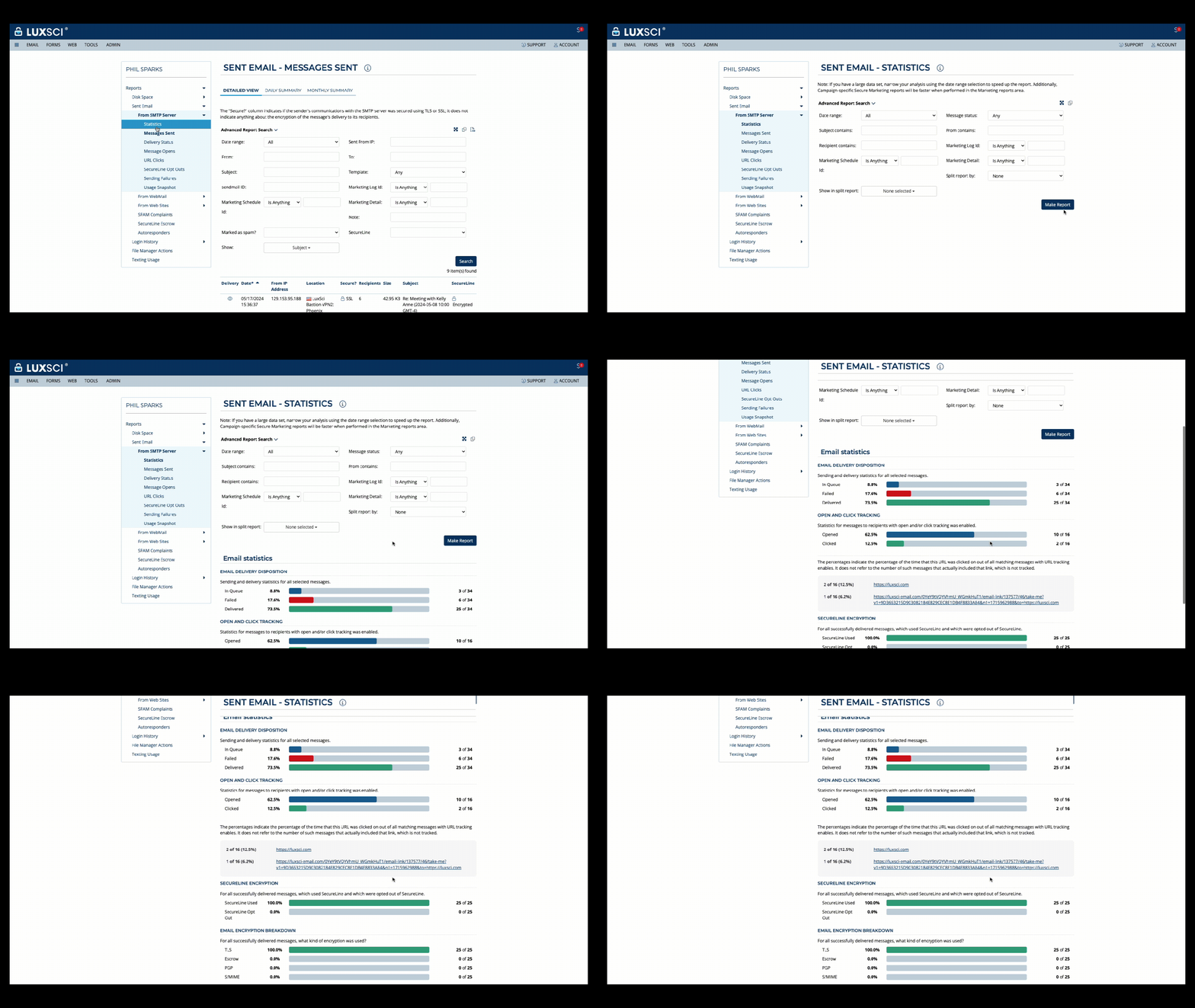
With our latest release, we made these powerful statistics easier to consume and analyze with an improved user interface for more efficiency and greater ease-of-use. Users can simply select the type of report they’d like and customize it using a range of filtering selections. This is great for diving deeper into your email performance to make adjustments on-the-fly, and to spot trends or opportunities for better engagement that you may have missed before.
New UI – Email Deliverability Statistics
Get more granular, ID trends in real time with Split Reporting
As part of this release, we are pleased to introduce our Split Reporting feature, which empowers users to drill down on email deliverability statistics across a range of parameters, including:
subject
from address
recipient domains
marketing ID or campaign
custom field
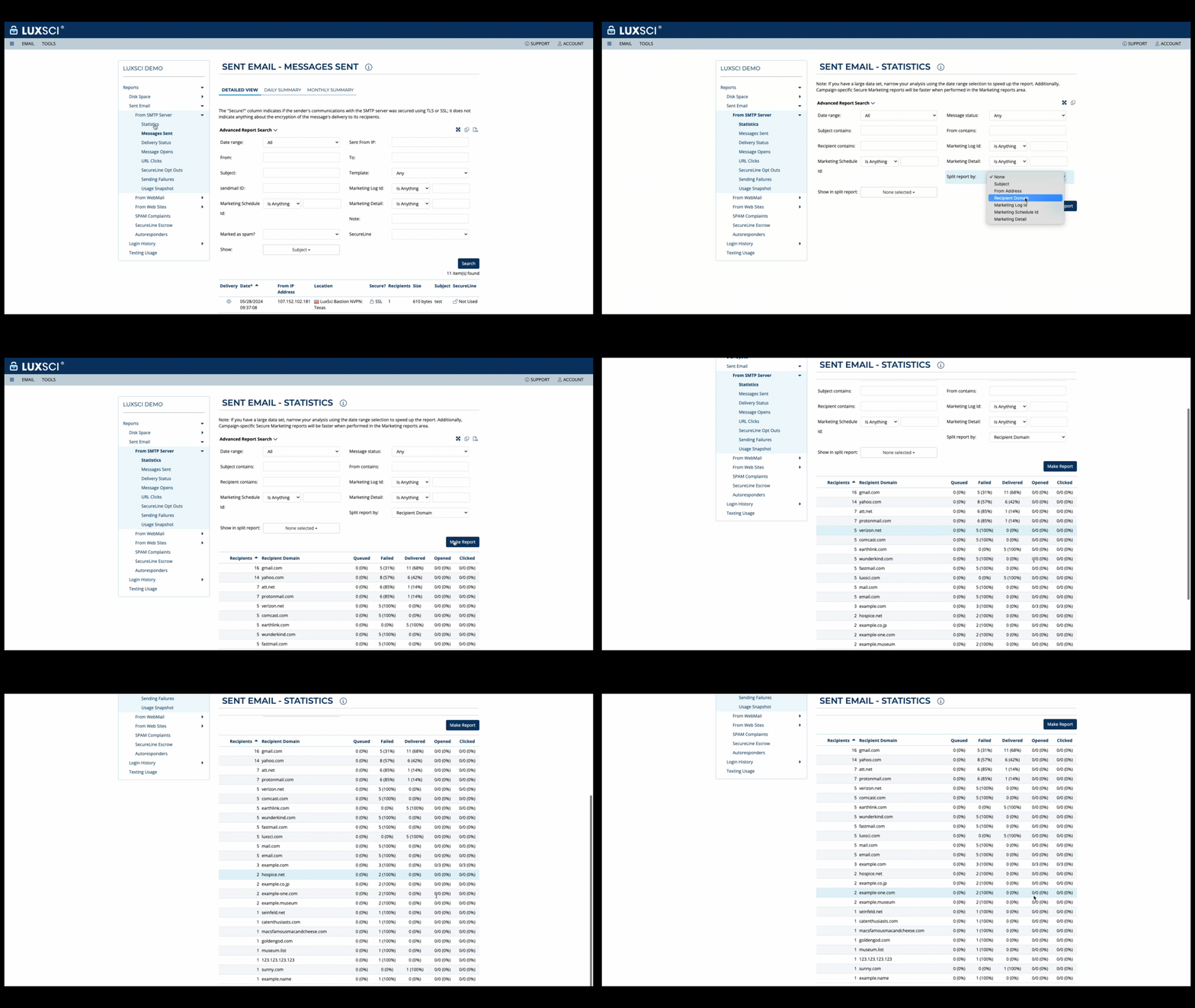
For example, users can analyze email deliverability statistics by subject to determine which ones are performing best, by use case to track results by campaign, or to track performance by recipient email domains. With split reporting, users also can analyze email volumes across queued, delivered, opened, failed and clicked parameters, and determine click-through rates (CTR) to measure effectiveness and ROI of campaigns.
New Feature Example – Split Reporting by Recipient Domain
If you’d like to learn more, reach out and connect with us today!
Secure email is not the same as “email with encryption turned on.” True secure email requires enforced automated encryption, a signed BAA, access controls, audit logs, and documented processes — not just a feature toggle.
Standard email platforms like Gmail and Microsoft 365 rely on opportunistic TLS by default, which can silently fall back to unencrypted delivery if the recipient’s server doesn’t support encryption.
HIPAA’s encryption safe harbor means a misdirected but properly encrypted email is a non-event. The same email sent unencrypted is a presumed breach unless a risk assessment shows otherwise.
A signed Business Associate Agreement (BAA) with your email provider is non-negotiable — without one, you cannot legally send or store PHI through that provider.
The proposed 2025 HIPAA Security Rule update, planned for finalization in 2027, would make encryption of ePHI in transit and at rest a mandatory requirement rather than “addressable,” raising the stakes for organizations still relying on opportunistic TLS.
Best for: Healthcare IT Directors, Compliance Officers, Privacy Officers, and Marketing Managers at provider, payer, and supplier organizations that handle protected health information (PHI).
In healthcare IT, the term “secure email” gets thrown around loosely. Vendors slap the label on anything with a padlock icon, and internal teams often assume that because their provider offers TLS, they’re covered. They’re not, and the gap between what’s assumed and what’s actually required is where data breaches occur and HIPAA violations happen.
This guide breaks down exactly what secure email means from a technical and regulatory standpoint, why the email platform your staff uses every day probably isn’t compliant out of the box, and what to look for when evaluating a provider that needs to protect PHI at scale. If you want the full picture of what compliance requires beyond email specifically, our HIPAA Compliance Checklist is a useful companion read.
What Is Secure Email?
Secure email refers to an email system that protects the confidentiality, integrity, and availability of message content — specifically PHI — through a combination of technical safeguards and contractual protections. It’s not a single feature. It’s a stack of controls working together.
At minimum, secure email in a healthcare context includes:
Enforced encryption in transit, so messages can’t fall back to plaintext delivery
Encryption at rest, so stored messages remain protected on the server
Authentication protocols (SPF, DKIM, DMARC) that prevent spoofing and impersonation
Access controls and audit logs that track who accessed what, and when
A signed Business Associate Agreement (BAA) with the email provider
The distinction that trips up most organizations is this: encryption is a component of secure email, not the whole picture. A provider can offer encryption and still fail to meet HIPAA requirements if that encryption isn’t enforced, if there’s no BAA in place, or if audit logging doesn’t exist. Secure email is the combination of all these pieces functioning as a system, which is why it needs to be evaluated holistically rather than checked off feature by feature.
For healthcare provider, payer, and supplier organizations, this matters because email remains one of the highest-volume channels for PHI exposure, from clinical referrals to patient billing statements to routine staff communication. Getting the definition right is the first step toward closing the compliance gap.
Why Standard Email Is Not HIPAA-Compliant
Many healthcare organizations run on Gmail (Google Workspace) or Microsoft 365, and most assume they’re protected because encryption exists somewhere in the stack. That assumption is the single most common — and most dangerous — misconception in healthcare email security.
Here’s the problem: standard email services use opportunistic TLS by default. TLS is attempted between mail servers, but if the receiving server doesn’t support it, the message is delivered anyway — unencrypted, in plaintext. Neither the sender nor the recipient typically sees a warning. The email just goes through.
This isn’t a hypothetical edge case. IT professionals managing healthcare email infrastructure have flagged this exact issue directly: opportunistic TLS is often enabled by default and creates a false sense of security, since it offers no guarantee that a given message, including one containing PHI, won’t be transmitted in plaintext if the recipient’s mail server doesn’t support encryption. Organizations assume they’re protected simply because TLS is technically “on,” without realizing it isn’t enforced.
That gap has real consequences under HIPAA. The Security Rule currently treats transmission encryption as an “addressable” safeguard, meaning covered entities can, in theory, implement an equivalent alternative measure instead. In practice, regulators and auditors from the Office for Civil Rights (OCR) expect enforced encryption as the standard of care. “Addressable” has never meant optional — it means an organization needs a documented, defensible reason if it isn’t doing enforced encryption, and few reasons hold up under scrutiny. Finally, under OCR’s proposed changes to the HIPAA Security Rule for ePHI, scheduled for final publication in July 2027, email encryption moves from addressable to mandatory.
Beyond the encryption gap, standard consumer and even most business email plans typically lack:
A BAA that’s actually offered and signed (available on some enterprise tiers, but not automatic)
Audit logging sufficient to meet HIPAA Security Rule requirements
Built-in encryption at rest guarantees for stored messages
None of this means Gmail or Microsoft 365 are inherently insecure products. It means their default configuration is built for general business use, not for an environment where every misrouted or intercepted message carries breach notification liability. Making either platform HIPAA-appropriate requires layering on additional tools, policies, and critically, a provider relationship that includes a signed BAA covering the exact services in use.
The Technical Components of Secure Email
Secure email is built upon five technical layers. Understanding each one, and where it fails in standard email, clarifies exactly what a compliant solution needs to deliver.
Encryption in Transit (TLS)
Transport Layer Security (TLS) encrypts the connection between mail servers as a message travels from sender to recipient. There are two flavors, and the difference between them is the crux of most healthcare email compliance failures:
Opportunistic TLS attempts an encrypted connection but falls back to unencrypted delivery if the receiving server doesn’t support it. This is the default across most consumer and business email platforms.
Enforced TLS requires an encrypted connection for delivery to succeed. If encryption can’t be established, the message fails to send rather than going out in plaintext, or a link to secure portal can be sent to securely access the information.
HIPAA’s Security Rule lists encryption as addressable, but enforced TLS has become the de facto standard that auditors and OCR expect from covered entities and business associates handling PHI over email. As one healthcare IT professional put it while debating this exact tradeoff internally: the goal is to require TLS for all outbound email and then document the remaining controls around it, treating enforced TLS as the technical baseline, with policy and process built on top.
Encryption at Rest
Transit encryption only protects a message while it’s moving. Once it lands on a mail server — sender’s outbox, recipient’s inbox, backups, archives — it needs to remain encrypted in storage. This is encryption at rest, and it’s where many organizations underestimate their exposure.
Encryption in transit alone offers zero control over a message after it’s been delivered. If the destination server isn’t itself encrypting stored data, or if a backup snapshot is taken without encryption, PHI sitting in an inbox is exposed regardless of how securely it arrived. HIPAA’s Security Rule requires safeguards for ePHI both in transit and at rest, a compliant secure email provider needs to guarantee both, not just one.
End-to-End Encryption (S/MIME, PGP)
End-to-end encryption (E2EE) encrypts message content itself, not just the connection it travels over — meaning even the email provider can’t read the content. Two standards dominate here:
S/MIME uses certificate-based encryption and is common in enterprise environments, such as healthcare, particularly where organizations already manage a public key infrastructure.
PGP (Pretty Good Privacy) uses a public/private key model and is more common in technical or security-conscious communities, though it’s less frequently deployed at scale in healthcare due to key management complexity.
E2EE isn’t a baseline requirement for every PHI-containing email, enforced TLS plus encryption at rest satisfies most use cases. But it becomes necessary for especially sensitive communications, cross-organization data sharing where you don’t control the recipient’s infrastructure, or when a business associate agreement specifically requires it.
Authentication (SPF, DKIM, DMARC)
These three protocols work together to prevent domain spoofing and email impersonation, a growing attack vector against healthcare organizations specifically, given how often phishing campaigns impersonate providers, payers, or patients.
SPF (Sender Policy Framework) specifies which mail servers are authorized to send email on behalf of a domain.
DKIM (DomainKeys Identified Mail) adds a cryptographic signature verifying a message wasn’t altered in transit.
DMARC (Domain-based Message Authentication, Reporting & Conformance) tells receiving servers what to do when SPF or DKIM checks fail, and provides reporting visibility.
Without these configured correctly, an organization’s domain can be spoofed to send convincing phishing emails to patients or staff, creating a security failure that compounds the compliance risk of email interception.
Digital Signatures
Digital signatures verify sender identity and confirm a message hasn’t been tampered with between sending and receipt. Paired with encryption, they close the loop on message integrity, confirming not just that content was protected, but that it came from who it claims to have come from and arrived unaltered.
Standard Email vs. Secure Email: Feature Comparison
Feature
Standard Email
Secure Email (HIPAA-Compliant)
Encryption in Transit
Opportunistic TLS — attempted but not enforced
Enforced TLS — connection fails if encryption unavailable, can include delivery via secure portal option
Encryption at Rest
Not guaranteed; provider-dependent
Required — server-side encryption of stored messages
End-to-End Encryption
Not available
Supported via S/MIME and/or PGP
Digital Signatures
Not available
Included — verifies sender identity and message integrity
Authentication (SPF / DKIM / DMARC)
Optional, rarely enforced
Required — spoofing and impersonation protection
Business Associate Agreement (BAA)
Not provided on standard plans
Required — must be signed before sending PHI
Audit Logs
Basic or none
Full audit trail — required under HIPAA Security Rule
Access Controls
Basic password only
Role-based access, MFA, admin controls
Misdirected Email
Reportable HIPAA breach
Non-reportable if properly encrypted (safe harbor)
HIPAA Compliant by Default
No
Yes
What Makes Email HIPAA-Compliant Specifically
Technical safeguards alone don’t make email HIPAA-compliant. Compliance is a combination of technology, contracts, and documented processes — all four need to be in place simultaneously. This includes:
A signed BAA with your email provider – Any vendor that transmits, processes, or stores PHI on your behalf is a business associate under HIPAA, and business associates are legally required to sign a BAA before handling that data. Email providers have persistent access to ePHI — even end-to-end encrypted messages pass through their infrastructure at some point — which makes this requirement absolute, not situational. If a provider won’t sign a BAA, using them to send or store PHI isn’t a compliance risk you can mitigate; it’s a violation from the start.
Encryption as an addressable safeguard – Under 45 CFR §164.312(e)(2)(ii), the HIPAA Security Rule lists encryption of ePHI in transit as “addressable” rather than strictly “required.” In practice, this doesn’t mean optional, it means an organization must implement it, or document and justify an equivalent alternative safeguard. Enforced encryption has become the expected standard, and with the newly proposed HIPAA Security Rule planned for July 2027 publication, NPRM would formalize that expectation by making encryption of ePHI in transit and at rest mandatory rather than addressable. Organizations still relying on opportunistic TLS as their “equivalent alternative” should treat this as a closing window.
Access controls and audit logs – HIPAA requires the ability to track who accessed PHI, when, and what they did with it. This means role-based access permissions, multi-factor authentication, and a complete, retained audit trail — not just for compliance reporting, but for identifying and responding to incidents quickly.
The encryption safe harbor – This is one of the most consequential, and most underused, provisions in HIPAA. If PHI is sent via properly encrypted email and ends up misdirected to the wrong recipient, it is not a reportable breach under the Breach Notification Rule, because the encrypted content is considered unreadable and therefore not “unsecured PHI.” The exact same misdirection with unencrypted email is a reportable breach, triggering notification obligations to the individual and to HHS/OCR. Encryption isn’t just a security best practice here, it’s the line between a non-event and a formal breach investigation.
HITRUST certification as a trust signal – When evaluating vendors, HITRUST CSF certification is a strong external indicator that a provider’s security controls have been independently assessed against a recognized healthcare-specific framework. It’s not a HIPAA requirement in itself, but it meaningfully reduces the diligence burden on your side when vetting a provider.
Types of Healthcare Email That Must Be Secure
Not all internal debate here is about “should we secure email” — it’s about scope. Which specific email flows actually carry PHI, and therefore need to run through a compliant channel? In practice, the answer is broader than most teams initially assume.
The common thread: if a message references anything that could identify a patient in connection with health information — a name next to a diagnosis, an account number tied to a service date, an annual test reminder — it needs to move through a secure channel, regardless of whether it’s clinical, financial, or administrative in nature.
How to Evaluate a Secure Email Provider for Healthcare
Vendor evaluation in this category tends to go one of two ways: teams either take a provider’s “HIPAA-compliant” label at face value, or they get buried in RFP questions without knowing which answers actually matter. Ask these key questiosn to focus the evaluation on what’s operationally and legally significant.
“Does the provider sign a BAA? This is the first filter, not the last. If a vendor won’t sign a BAA — or offers a heavily limited one — everything else is irrelevant. Some organizations go a step further and negotiate indemnity or make-whole clauses into the BAA itself, seeking financial protection beyond the baseline liability allocation.
What encryption methods are supported? Confirm specifically whether the provider offers TLS only, or also supports S/MIME and/or PGP for end-to-end encryption where needed. TLS-only coverage is sufficient for most standard PHI communication; organizations with cross-border data sharing or especially sensitive use cases may need E2EE options available.
Is encryption enforced or opportunistic? This is the single most important technical question to ask directly, in those terms. A vendor that describes its encryption vaguely, without distinguishing enforced from opportunistic delivery, hasn’t answered the question. Push for specifics.
How are large attachments handled? Lab results, imaging files, and clinical documents often exceed standard attachment size limits. Confirm the provider has a secure, compliant method for large file transfer that doesn’t force users onto an unencrypted workaround.
What audit logging and reporting capabilities exist? You need visibility into delivery, access, and any failed encryption attempts, not just a generic sent/received log. Ask whether logs are retained for a period consistent with your organization’s HIPAA documentation requirements.
Do they support high-volume transactional email? Appointment reminders, billing notices, and patient communications at scale require infrastructure built for volume without sacrificing per-message compliance. Confirm the provider’s platform is built for this your specific pattern, not just person-to-person messaging.
Is the platform US-based with US data residency? For many healthcare organizations, where data physically resides — and under which jurisdiction — is a material factor in vendor risk assessment, particularly for payers and larger provider organizations with strict data governance policies.”
One operational factor worth weighing alongside these questions: secure email portals — the kind that require recipients to click through to a separate web page to read a message — solve the encryption problem but often create a real adoption problem. IT teams have reported a direct conflict between phishing-awareness training and portal-based workflows: staff and patients trained not to click suspicious links in emails are, understandably, reluctant to click the “secure link” a portal email contains. This is a legitimate reason many organizations increasingly prefer platforms that enforce encryption transparently in the background — like LuxSci’s SecureLine encryption technology — rather than routing every message through a separate portal experience.
Secure Email Checklist for Healthcare Organizations
Every safeguard covered in this guide comes down to a handful of concrete, verifiable actions. Use the checklist below as a working reference for what needs to be in place across your legal agreements, technical controls, and internal processes. This is not a one-time setup task, but something worth revisiting as your email volume, vendors, and regulations evolve. Share it across your compliance and IT teams as a starting point for an internal audit.
Legal and Contractual – BAA signed with email provider and all third-party vendors handling PHI.
Encryption – Forced TLS, not opportunistic only for emails in transit and all stored data encrypted with AES-256 bit encryption.
Access and Audit – Unique user IDs, role-based access, and login monitoring with advanced MFA enabled for all email accounts; audit logs active and maintained.
People and Processes – Staff trained in PHI handling, established breach response plan, annual email security policy review.
What Should I Do Now?
Secure email isn’t a single setting you switch on — it’s a combination of enforced encryption, a signed BAA, access controls, and documented process working together. Get any one piece wrong, and the rest doesn’t hold up under an OCR audit or a breach investigation.
If your organization is still relying on opportunistic TLS, an unsigned or incomplete BAA, or a patchwork of workarounds to move PHI through email, now is the time to close that gap, especially with the proposed 2025 HIPAA Security Rule update poised to make encryption a mandatory requirement rather than an addressable one in 2027.
Below are three ways you can continue your journey to securing your healthcare email:
Email can be HIPAA compliant, but only when the right safeguards are in place — enforced encryption, a signed BAA with your email provider, access controls, audit logs, and staff training on PHI handling. Standard email without these safeguards is not compliant.
2. Do I need to sign a BAA with my email provider?
Yes. Email providers have persistent access to ePHI — even encrypted messages pass through their servers — making them Business Associates under HIPAA. A signed BAA is required. If your provider won’t sign one, you cannot legally use them to send or store PHI.
3. What is the difference between opportunistic TLS and enforced TLS — and which does HIPAA require?
Opportunistic TLS attempts encryption but falls back to plaintext if the recipient’s server doesn’t support it. Enforced TLS stops delivery rather than sending unencrypted. HIPAA’s Security Rule treats transmission encryption as an addressable specification, in practice, enforced TLS is the standard auditors and OCR expect. The proposed 2025 HIPAA Security Rule NPRM would make encryption of ePHI in transit a mandatory requirement in 2027.
4. What happens if I send PHI in an unencrypted email?
It is an impermissible disclosure under HIPAA’s Privacy Rule and triggers the Breach Notification Rule, requiring you to notify the individual and HHS/OCR within 60 days. Penalties range from $100 to $50,000 per violation. Had the email been properly encrypted, the same incident would qualify for HIPAA’s encryption safe harbor, meaning no notification required.
5. Is Gmail or Microsoft 365 HIPAA compliant for sending patient emails?
Neither is compliant in their default configuration. Both use opportunistic TLS, meaning PHI can be sent in plaintext if the recipient’s server doesn’t support encryption. A signed BAA is available on enterprise plans but doesn’t close the technical gap alone. A purpose-built HIPAA-compliant email platform is the reliable solution.
If you’ve been waiting for the final word on the new HIPAA Security Rule before you touch your email encryption strategy, you now have an official reason to keep waiting.
Our advice: Don’t do it.
What is the new HIPAA Security Rule for ePHI?
The Department of Health and Human Services’ Office for Civil Rights had targeted May 2026 for a final rule implementing the most significant update to the HIPAA Security Rule in over two decades. The proposal eliminates the “addressable” standard and makes encryption of ePHI in transit and at rest mandatory for every covered entity and business associate. That deadline came and went quietly. Now we know why: an updated federal regulatory agenda shows OCR’s timeline has moved to July 2027, with the rule-making downgraded from “final rule stage” to “long-term action.” OCR is still working through more than 4,700 public comments on the January 2025 proposal.
For an industry that had been expecting a tighter deadline, a year-plus delay is the kind of news that invites a collective exhale — and a shelved project plan. At LuxSci, we think that would be a mistake, for three reasons:
The current rule already requires you to address encryption. “Addressable” was never “optional.” It has always meant you must implement the safeguard, implement an equivalent alternative, or document in writing why neither is reasonable for your organization. Most healthcare organizations have never done that documentation rigorously, and OCR’s existing enforcement authority applies today, not in 2027.
Breach costs haven’t waited for the rule.IBM’s 2025 Cost of a Data Breach Report puts the average healthcare breach at $7.42 million, still the highest of any industry. At the same time, email remains the number one attack vector into healthcare organizations. None of that risk is paused by a regulatory delay.
Delay is not withdrawal.OCR has not signaled it’s abandoning the encryption mandate, only that it’s taking longer to finalize it. Organizations that build now toward the standard already proposed will be ahead (and more secure) regardless of exactly when, or in what final form, the rule lands. Organizations that wait risk a compressed scramble once it does.
What should healthcare IT and compliance leaders actually do with this news?
Reevaluate your ePHI security posture, recalibrate its urgency, and use the extra runway to do the job right, instead of racing against a deadline. This includes:
Getting a real inventory of where ePHI moves by email today, inbound and outbound, and where encryption is inconsistent or absent.
Closing the documentation gap on “addressable” now, while you have time to do it well rather than defensively.
Pushing your email vendor for concrete answers on encryption standards, MFA enforcement, audit logging, and breach notification — the same technical controls the proposed rule would make mandatory.
Building (or updating) a written, enforcement-ready posture: policies, vendor agreements, certifications and verifications, test results, and training records that would hold up under an OCR investigation today, not just in a future compliance deadline.
Get LuxSci’s new Definitive Guide on the new HIPAA Security Rule
From Addressable to Mandatory: Email Encryption Under the New HIPAA Security Rule provides the latest update on the rule, what it means for healthcare email encryption, and what you can do now to properly prepare for what’s coming in 2027. The guide also includes an interactive scorecard that lets you evaluate your current email set up and vendor across seven security and compliance dimensions in under two minutes, no email address required.
If you want a second set of eyes on where your organization stands, our team offers a free 30-minute compliance assessment of your current email environment against the proposed rule’s requirements.
Most healthcare organizations view email as a utility, a necessary tool for sending messages between staff, communicating with patients, sending out newsletters, connecting workflows, and so on. Historically, IT teams focused on keeping it running, security teams worried about phishing, and compliance teams made sure sensitive emails were encrypted.
Today, however, that view is rapidly becoming outdated.
Email has evolved into one of healthcare’s most critical digital infrastructure components, and also one of it’s biggest security threats. It’s a core channel for patient engagement, care coordination, revenue cycle operations, digital marketing, remote monitoring, and increasingly, AI-powered communications. The organizations that recognize this shift are building communications platforms designed for security, performance, automation, and growth. With the new HIPAA Security Rule requiring email encryption on the horizon, those companies that don’t may find themselves constrained by systems that were never intended to support modern healthcare.
Email Is No Longer Just a Messaging Tool
Healthcare organizations now depend on email to support dozens of mission-critical workflows every day.
Patients receive appointment reminders, registration instructions, imaging results, billing notifications, Explanation of Benefits (EOBs), prescription updates, preventive care reminders, patient education, and post-discharge follow-up. Marketing teams deliver personalized wellness campaigns and service line promotions. Clinical systems generate transactional notifications. Revenue cycle teams rely on secure digital communications to accelerate payments and reduce paper costs.
For many organizations, mission-critical patient communications flow through email every month.
When viewed collectively, email is more than a simple communications channel. It has become operational infrastructure with high levels of security needed and increasing compliance requirements.
The Stakes Continue to Rise
As healthcare becomes more digital, every communication carries greater business and clinical importance.
A delayed billing email may postpone payment. A failed appointment reminder can increase no-show rates. An undelivered care management message may impact patient outcomes. A misconfigured security policy can expose protected health information (PHI). Poor deliverability can undermine expensive patient engagement initiatives before they ever reach the inbox.
These are no longer isolated IT issues. Email can affect revenue, patient satisfaction, operational efficiency, compliance, and organizational reputation.
Today’s healthcare leaders require email infrastructure to provide the same reliability and visibility they demand from electronic health records, identity management systems, and other core infrastructure.
AI Is Raising the Bar Even Higher
There’s little doubt that artificial intelligence (AI) promises to transform patient communications.
Healthcare organizations everywhere are exploring AI-generated patient education, personalized outreach, intelligent scheduling, multilingual communications, and automated follow-up programs.
But AI also increases the importance of the underlying communications infrastructure.
Generating more personalized emails means little if organizations cannot:
Automatically protect PHI.
Apply consistent security policies.
Maintain complete audit trails.
Deliver messages reliably.
Integrate with EHRs, RCM and CRM platforms, and customer data platforms.
Demonstrate compliance during an audits.
In many ways, AI amplifies both the opportunities and the risks. Your email platform can help determine whether AI initiatives succeed or create new compliance and operational challenges.
Infrastructure Matters More Than Features
Healthcare buyers have traditionally evaluated email platforms based on individual features such as encryption, spam filtering, or secure portals.
Those capabilities remain important, but they no longer tell the whole story.
Today’s healthcare organizations should be evaluating communications platforms the same way they evaluate any mission-critical infrastructure.
Questions increasingly include:
Can it support both transactional and marketing communications?
Does it automatically enforce security policies without relying on user decisions?
Can it integrate with EHRs, CRM systems, CDPs, and business applications?
Will it scale during peak communication periods?
Does it provide detailed audit logging and reporting?
Can it adapt as regulatory expectations evolve?
Does it maintain high deliverability at enterprise scale?
Does it support single-tenant dedicated infrastructure for high performance and increased security?
These infrastructure characteristics often determine long-term success far more than any single feature comparison.
Email and the Future Of Secure Healthcare Communications
Healthcare is steadily moving toward a world where nearly every patient interaction is digital, personalized, and data-driven.
Healthcare leaders often ask whether they need a more secure email solution. That may be the wrong question.
The better question is whether their communications infrastructure is ready for where healthcare is headed over the next decade.
If you want talk about the future of your healthcare email infrastructure, reach out today and schedule a 30-minute assessment call with our experts.
Email marketing can be a powerful tool for healthcare organizations, but it requires careful planning and execution because of HIPAA compliance requirements. In this blog post, we will discuss email marketing best practices to help healthcare marketers achieve their goals.
1. Define Your Campaign Goals
The success of any email marketing campaign depends on the goals you want to achieve. However, because healthcare organizations are often not selling products to their patients, marketers can be confused about how to set measurable goals for their campaigns that aren’t tied to revenue generation.
Healthcare marketers want to use email marketing campaigns for various purposes, including patient engagement, education, and retention. Some possible objectives of your campaigns could be:
New patient acquisition
Re-engaging lapsed patients
Spreading awareness about vaccines, treatments, or medical conditions
Increasing treatment or medication adherence
Collecting survey responses or patient-reported outcomes
All of these campaign objectives will correlate with different metrics. Identifying the campaign goal and the corresponding metrics you need to track is critical before selecting the audience and crafting the content.
2. Select Your Audience
Gone are the days of sending giant email blasts to your entire contact list. The best email marketers are creating highly targeted campaigns for specific audiences. Healthcare marketers using patient data in their audience targeting efforts are at an advantage. They can use patient information to create distinct audience segments. Targeting a patient population with common attributes makes it easier to craft a relevant message to drive clear results. For example, marketers can create more relevant campaigns when they can divide their patient population into subgroups based on shared characteristics like diagnoses, risk factors, and demographic data.
3. Personalize Your Content
Once you have clearly defined your goal and your audience, it’s essential to use personalization techniques to craft relevant messaging. Healthcare consumers expect more personalization from their providers and want to receive messages that tie into their past experiences. Generic, irrelevant messaging is more likely to annoy patients than get them to act. Healthcare marketers are lucky to have a wealth of data points to use in their messaging, but they must be aware of patient privacy and take steps to secure their messaging. When you have taken the appropriate steps to secure patient data, including protected health information in email messages is possible. This improves the patient experience and makes it easier for healthcare marketers to achieve their objectives.
4. Use A Clear Call-to-Action
Your emails should include a clear call-to-action (CTA) that encourages your audience to take the desired action. These actions may include scheduling an appointment, downloading a resource, logging into a patient portal, filling out a survey, or contacting your organization. Ensure that your CTA is prominent, stands out from the rest of your content, and ties back to the goal of your campaign. Most importantly, implement appropriate tracking technologies so you can see how many email recipients followed through on the CTA.
Don’t include too many calls to action in one message! Including multiple prompts may confuse the recipient and make it more difficult for your team to understand how the campaign performed.
5. Review Your Data
Finally, it’s essential to monitor your email metrics to evaluate the success of your campaigns. Some key metrics may include open rates, click-through rates, surveys completed, successful logins, appointments scheduled, and other relevant metrics that tie back to your goals. Use this data to refine your email marketing strategy, trigger follow-up campaigns and marketing activity, and optimize future campaigns. Use APIs or webhooks to ensure your email campaign statistics are tied into marketing dashboards to get a holistic view of how your campaigns are performing.
6. Choose an Email Marketing Platform Designed for Healthcare
Finally, to use the tactics recommended above, it’s necessary to use a HIPAA-compliant email marketing platform. Segmenting audiences and personalizing content requires the use of protected health information. Therefore, it must be secured in compliance with HIPAA. You must select a platform that can protect data both at rest and in transit to utilize the power of your data fully.
LuxSci’s HIPAA-compliant Secure Marketing was designed to meet the needs of healthcare marketers and enables the use of PHI at scale. Contact our sales team to learn more about our capabilities and email marketing best practices.
HIPAA compliant email software is a specialized communication platform that protects electronic Protected Health Information (ePHI) through encryption, access controls, audit logging, and administrative safeguards required by the HIPAA Security Rule. The software incorporates technical, administrative, and physical safeguards to ensure that patient information transmitted via email meets federal privacy and security standards. Healthcare organizations use this software to communicate securely with patients, providers, and business partners while maintaining compliance with HIPAA regulations and avoiding costly violations. Healthcare providers need secure email solutions that balance operational efficiency with regulatory requirements. Understanding the features and capabilities of HIPAA compliant email software helps organizations select platforms that protect patient privacy while supporting clinical workflows and administrative operations.
Why Organizations Need HIPAA Compliant Email Software
Healthcare organizations need HIPAA compliant email software to meet federal security requirements while maintaining efficient communication channels. Standard email platforms lack the security controls and audit capabilities required to protect ePHI during transmission and storage. The HIPAA Security Rule mandates that covered entities implement administrative, physical, and technical safeguards to protect patient information, making specialized email software necessary for compliance. Data breach statistics highlight the risks of using non-compliant email systems. The Department of Health and Human Services Office for Civil Rights reported that email-related breaches accounted for numerous incidents affecting millions of patients in recent years. Organizations using standard email platforms face increased vulnerability to cyberattacks, unauthorized access, and accidental disclosure of patient information. HIPAA compliant email software reduces these risks through built-in security features and automated protection mechanisms.
Cost considerations also drive the adoption of compliant email software. HIPAA violations can result in fines ranging from $137 to over $2 million per incident, depending on the severity and scope of the breach. The financial impact of data breaches ranges from regulatory fines to include legal costs, remediation expenses, and reputation damage. Investing in HIPAA compliant email software helps organizations avoid these costs while showing commitment to patient privacy and regulatory compliance.
Features of the Best HIPAA Compliant Email Software
Access control features form the foundation of HIPAA compliant email software by ensuring that only authorized users can access patient information. The software implements user identification through individual login credentials, role-based access permissions, and automatic session termination after periods of inactivity. Multi-factor authentication adds further security by requiring users to provide multiple forms of verification before accessing the system. Encryption capabilities protect ePHI both in transit and at rest within the email system. HIPAA compliant email software uses advanced encryption standards to convert readable patient information into coded format that unauthorized parties cannot decrypt. The software encrypts messages during transmission between email servers and maintains encryption when storing messages in the system. End-to-end encryption ensures that only intended recipients can view the content of healthcare communications.
Audit logging functionality tracks all system activity to create detailed records of who accessed patient information, when access occurred, and what actions were performed. The software generates audit trails that include login attempts, message delivery events, encryption status, and user permissions changes. Healthcare organizations can review these logs to identify potential security incidents, investigate unauthorized access attempts, and demonstrate compliance during regulatory inspections.
Data backup and recovery features protect against information loss while maintaining HIPAA compliance throughout the process. The software automatically creates secure backups of email communications and stores them in encrypted format. Recovery procedures ensure that patient information can be restored quickly after system failures while maintaining all security protections. Backup systems include geographic redundancy to protect against natural disasters and other catastrophic events.
HIPAA Compliant Email Software & BA Requirements
Business Associate Agreements (BAAs) create legal frameworks that define how email software vendors protect patient information on behalf of healthcare organizations. HIPAA compliant email software providers willingly sign BAAs and accept responsibility for implementing appropriate safeguards to protect ePHI. The agreements specify security requirements, breach notification procedures, and audit rights that allow healthcare organizations to verify vendor compliance with HIPAA regulations.
Vendor compliance certifications provide additional assurance that email software meets industry security standards. Many HIPAA compliant email software providers undergo third-party security audits and obtain certifications such as SOC 2 Type II, HITRUST CSF, or ISO 27001. These certifications validate that the vendor has implemented appropriate controls to protect customer data and maintain compliance with applicable regulations.
Data processing and storage practices within the best HIPAA compliant email software align with HIPAA requirements for protecting patient information. Vendors implement data segregation to ensure that each healthcare organization’s information remains separate and secure. The software includes features for data retention management, allowing organizations to comply with legal requirements for maintaining patient records while securely disposing of information when retention periods expire.
Incident response procedures within the software help healthcare organizations meet HIPAA breach notification requirements. The system monitors for potential security incidents and provides automated alerts when suspicious activity is detected. When breaches occur, the software facilitates rapid investigation and documentation of the incident, helping organizations meet the 60-day notification requirement for reporting breaches to the Office for Civil Rights.
Support of Administrative Features
Policy management tools within HIPAA compliant email software help healthcare organizations implement and enforce email security policies. The software allows administrators to configure automatic encryption rules, data loss prevention policies, and message retention schedules. Users receive automated notifications when attempting to send emails that may contain patient information without proper encryption or to unauthorized recipients.
User training and awareness features help healthcare organizations educate staff about proper email security practices. The software can include training modules, security reminders, and policy acknowledgment requirements. Some platforms integrate with learning management systems to track training completion and ensure that all users understand their responsibilities for protecting patient information.
Workflow integration capabilities allow HIPAA compliant email software to work seamlessly with existing healthcare systems and processes. The software can integrate with electronic health record systems, practice management platforms, and other healthcare applications. Integration reduces the complexity of sending secure communications and helps ensure that patient information flows securely between different systems within the organization.
Reporting and analytics features provide healthcare organizations with insights into email security practices and compliance status. The software generates reports on encryption usage, policy violations, and user behavior patterns. Healthcare administrators can use this information to identify training needs, adjust security policies, and demonstrate compliance efforts to regulators and auditors.
Evaluating HIPAA Compliant Email Software
Security assessment criteria help healthcare organizations evaluate whether email software meets their specific compliance requirements. Organizations examine encryption methods, access control mechanisms, audit logging capabilities, and data protection features. The evaluation process includes reviewing vendor security documentation, conducting security questionnaires, and assessing the software’s ability to integrate with existing security infrastructure.
Usability considerations play a crucial role in software selection because complex systems can lead to user resistance and workaround behaviors that compromise security. Healthcare organizations evaluate user interface design, mobile device support, and integration with existing workflows. The software needs to provide security without creating barriers that prevent healthcare workers from communicating effectively with patients and colleagues.
Scalability requirements vary based on organization size and growth projections. Healthcare organizations assess whether the email software can accommodate current user counts and expand to meet future needs. Evaluation criteria include storage capacity, user licensing models, and performance under increasing email volumes. The software architecture needs to maintain security and compliance capabilities as the organization grows.
Cost analysis encompasses both direct software expenses and indirect implementation costs. Healthcare organizations compare subscription fees, setup costs, training expenses, and ongoing maintenance requirements. The evaluation includes calculating return on investment based on avoided compliance violations, reduced security incidents, and improved operational efficiency.
Implementation Challenges
User adoption challenges arise when healthcare staff resist changing from familiar email systems to new HIPAA compliant platforms. Staff members may perceive the new software as more complex or time-consuming than their current email applications. Organizations address adoption challenges through change management programs, hands-on training sessions, and clear communication about the benefits of secure email communications.
Integration complexity can create technical difficulties when connecting HIPAA compliant email software with existing healthcare systems. Different software platforms may use incompatible data formats, authentication methods, or communication protocols. Organizations need to plan integration projects carefully and may require technical assistance from vendors or third-party consultants to ensure seamless connectivity.
Migration planning involves transferring existing email communications and configurations to the new HIPAA compliant platform. Healthcare organizations need to develop procedures for moving historical email data while maintaining security protections throughout the migration process. The transition period requires careful coordination to avoid disrupting patient care or administrative operations.
Performance optimization is highly important as healthcare organizations implement HIPAA compliant email software across large user bases. Email volumes in healthcare settings can be substantial, particularly in hospital systems or large medical practices. Organizations need to monitor system performance and work with vendors to optimize configurations that maintain both security and responsiveness under peak usage conditions.
Marketing helps medical practices attract new patients, retain existing ones, build their reputation, and communicate their value in competitive healthcare markets. Effective practice marketing increases patient awareness of available services, educates communities about health topics, and establishes trust with potential patients. A strategic marketing approach allows practices to grow sustainably while maintaining focus on quality patient care.
Patient Acquisition and Practice Growth
Medical practices depend on a consistent stream of new patients to maintain financial health and expand their services. Marketing campaigns that present specialties, physician credentials, and treatment approaches help differentiate a practice from local competitors. When potential patients search for healthcare providers online, digital marketing ensures the practice appears in relevant local results. Many successful practices implement referral programs where current patients recommend services to friends and family, creating organic growth. Geographic expansion becomes possible when marketing targets new communities or demographic groups with specific healthcare needs. Without effective marketing, even excellent medical practices can struggle to maintain optimal patient volume.
Strengthening Patient Relationships
Patient relationships flourish beyond initial appointments when practices implement thoughtful marketing strategies. Regular health newsletters educate patients about relevant medical topics while keeping the practice top-of-mind between visits. Automated appointment reminders decrease no-shows and demonstrate respect for patients’ time commitments. Many practices find that personalized communications acknowledging birthdays or health milestones create meaningful connections that patients appreciate. Effective promotion of patient portal features increases engagement with health information and simplifies administrative interactions. Maintaining existing patient relationships through marketing typically costs less than acquiring new patients. Patient loyalty translates to word-of-mouth recommendations that benefit practices more than most paid advertising.
Building Practice Reputation
In competitive healthcare markets, reputation directly influences which providers patients choose to visit. Consistent marketing messages about quality care and positive patient experiences shape public perception over time. Patients increasingly research providers online before making appointments, making reputation management across review platforms essential for practice success. A professional website featuring physician backgrounds, facility information, and patient stories establishes credibility with potential new patients. Local involvement through community health initiatives or event sponsorships builds goodwill while increasing practice visibility. Prospective patients often form their first impression of a practice long before any clinical interaction occurs. Medical practices with solid reputations attract more patients and qualified clinical staff seeking respected work environments.
Service Awareness and Education
Patients frequently remain unaware of many services available at medical practices they already visit regularly. Marketing campaigns presenting specialized treatments, technologies, or expanded services help patients understand all available care options. Educational content addressing when to seek care for specific symptoms empowers patients to make appropriate healthcare decisions. Seasonal health communications about topics like flu prevention or sun safety address timely concerns while promoting preventive visits. When patients understand the full range of available services, they make more informed choices about their healthcare needs. Practice revenue becomes more consistent when patients utilize appropriate services based on marketing education. The combination of better-informed patients and optimized service utilization benefits both medical outcomes and practice sustainability.
Communicating Practice Changes
The healthcare landscape continuously evolves through provider changes, location expansions, and technological advancements. Marketing creates structured communication channels to inform patients about these developments without causing confusion. New physician announcements help build patient panels quickly when practices expand their medical teams. When practices open additional locations, targeted geographic marketing builds awareness in new service areas. Insurance network changes require clear, timely communication to affected patients to prevent appointment surprises. The introduction of telehealth services depends on effective marketing to achieve patient adoption and utilization. Practices that communicate changes clearly maintain patient confidence during transitions and prevent unnecessary anxiety. Throughout healthcare evolutions, marketing provides the link between practice advancements and patient awareness.
Measuring Practice Performance
Marketing activities generate valuable data that shows a practice’s market position and operational performance. Patient satisfaction surveys reveal service strengths and improvement opportunities that might otherwise remain hidden. Website analytics identify which services generate the greatest public interest, helping practices allocate clinical resources appropriately. Campaign tracking metrics connect specific marketing investments to appointment bookings and revenue generation. Understanding referral sources helps practices identify which professional relationships and community connections drive patient growth. Practice leadership makes more informed business decisions when marketing data supplements clinical quality measures. The combination of marketing metrics and clinical outcomes provides full insight into overall practice performance from multiple perspectives.
HIPAA email requirements include implementing administrative, physical, and security protections for electronic protected health information transmitted through email communications. Healthcare organizations must establish policies, provide staff training, implement encryption measures, maintain audit trails, and execute business associate agreements when using email systems that handle PHI to ensure compliance with Privacy and Security Rule obligations. Email communication has become indispensable for healthcare operations, yet many organizations lack comprehensive understanding of specific HIPAA obligations that apply to electronic messaging. Clear knowledge of these requirements helps healthcare providers maintain compliance while utilizing email efficiency for patient care and administrative functions.
Administrative Protection Requirements
Written policies must govern how healthcare organizations use email for PHI communications, including procedures for patient authorization, encryption standards, and incident response protocols. These policies should address all aspects of email usage from initial setup through message retention and disposal. Privacy officer designation ensures that healthcare organizations have qualified personnel responsible for developing email policies, training staff, and monitoring compliance with HIPAA email requirements. This individual must have authority to implement changes and investigate potential violations. Workforce training programs must educate healthcare personnel about proper email usage, patient privacy rights, and security procedures for PHI protection. Training should be provided to all staff who use email systems and updated regularly to address new threats and regulatory guidance.
Physical Protection Standards
Workstation security controls prevent unauthorized individuals from accessing email systems containing PHI through unattended computers or mobile devices. Healthcare organizations must implement automatic screen locks, secure login procedures, and physical access restrictions for devices used to access patient information. Device controls help healthcare organizations manage smartphones, tablets, and laptops used for email communications containing PHI. These controls should include encryption requirements, remote wipe capabilities, and restrictions on personal use of organizational devices. Facility access restrictions protect email servers and network infrastructure from unauthorized physical access. Healthcare organizations must secure server rooms, network equipment, and backup systems that store or transmit PHI through appropriate access controls and environmental protections.
Information Access Management Controls
User authentication systems verify the identity of individuals accessing email systems before granting access to PHI. Healthcare organizations must implement strong password requirements, account lockout procedures, and regular access reviews to ensure that only authorized personnel can access patient information. Role-based access controls limit email functionality based on job responsibilities and PHI access needs. Administrative staff might have different email permissions than clinical personnel, ensuring that users only access information necessary for their specific duties within the healthcare organization. Account management procedures ensure that email access aligns with current employment status and job responsibilities. Healthcare organizations must promptly remove access when employees leave and update permissions when staff change roles to prevent unauthorized PHI access.
Audit Control and Accountability Measures
Activity logging systems must capture detailed records of email access, transmission, and modification activities involving PHI. These logs should include user identification, timestamps, and actions taken to support compliance monitoring and potential breach investigations. Regular log reviews help healthcare organizations identify unusual access patterns, potential security threats, and policy violations related to email usage. These reviews should be conducted by qualified personnel who can recognize indicators of inappropriate PHI access or disclosure. Accountability documentation helps healthcare organizations track individual responsibility for email activities involving PHI. Clear assignment of user accounts and regular certification of access needs ensure that email usage can be traced to specific individuals when necessary.
Information Integrity Protections
Data validation procedures help ensure that PHI transmitted through email remains accurate and complete during transmission. Healthcare organizations should implement controls that detect unauthorized modifications to email content or attachments containing patient information. Backup and recovery systems protect email data from loss due to system failures, security incidents, or natural disasters. These systems must maintain the same security protections as primary email systems while ensuring that PHI can be restored when needed for patient care or compliance purposes. Version control measures help healthcare organizations track changes to email policies, system configurations, and security settings that affect PHI protection. These controls support audit requirements and help ensure that security measures remain current and effective.
Transmission Security Standards
Encryption implementation protects PHI during email transmission between healthcare organizations and external recipients. Healthcare organizations must evaluate their email systems to determine appropriate encryption methods based on risk assessments and HIPAA email requirements. Network security controls protect email infrastructure from unauthorized access and cyber threats. These controls include firewalls, intrusion detection systems, and secure network configurations that prevent attackers from intercepting or modifying email communications containing PHI. Message routing procedures ensure that emails containing PHI follow secure transmission paths and reach intended recipients without unauthorized disclosure. Healthcare organizations should implement controls that prevent accidental misdirection of patient information to wrong email addresses.
Business Associate Management Obligations
Vendor evaluation processes help healthcare organizations select email service providers that can meet HIPAA email requirements and provide appropriate security protections for PHI. These evaluations should include security assessments, compliance audits, and reviews of vendor policies and procedures. Contract requirements ensure that business associates providing email services agree to protect PHI and comply with HIPAA obligations. Business associate agreements must specify security requirements, breach notification procedures, and audit rights that healthcare organizations need to maintain compliance. Monitoring procedures help healthcare organizations verify that business associates continue meeting HIPAA email requirements and maintaining appropriate PHI protections.