LuxSci

HIPAA Compliant Email

Discover the best practices, tools, and insights for HIPAA compliant email. Learn how to protect sensitive patient information and maintain compliance with HIPAA regulations by using HIPAA compliant email in your healthcare organization.

encrypted email transmission

Is the Email Encrypted? How to Tell if an Email is Transmitted Using TLS

SMTP TLS encryption is popular because it provides adequate data protection without creating a complicated user experience for email recipients. Sometimes, though, the experience is too seamless, and recipients may wonder if the message was protected at all.

Luckily, there is a way to tell if an email was encrypted using TLS. To see if a message was sent securely, we can look at the raw headers of the email. However, it requires some knowledge and experience to understand the text. It is actually easier to tell if a recipient’s server supports TLS than to tell if a particular message was securely transmitted.

To analyze a message for transmission security, we will look at an example email message sent from Hotmail to LuxSci. We will explain what to look for when decoding the message headers and how to tell if the email was transmitted using TLS encryption.

An Example Email Message

First, we must understand how an email message typically travels through several machines on its way from the sender to the recipient. Roughly speaking:

  1. The sender’s computer talks to the sender’s email or WebMail server to upload the message.
  2. The sender’s email or WebMail server then talks to the recipient’s inbound email server and transmits the message to them.
  3. Finally, the recipient downloads the message from their email server.

It is step 2 that people are most concerned about when trying to understand if their email message is transmitted securely. They usually assume or check that everything is secure and OK at the two ends. Indeed, most users who need to can take steps to ensure that they are using SSL-enabled WebMail or POP/IMAP/SMTP/Exchange services so that steps 1 and 3 are secure. The intermediate step, where the email is transmitted between two different providers, is where messages may be sent insecurely.

To determine if the message was transmitted securely between the sender’s and recipient’s servers (over TLS), we need to extract the “Received” header lines from the received email message. If you look at the source of the email message, the lines at the top start with “Received.” Let’s look at an example message from a Hotmail user below. The email addresses, IPs, and other information are obviously fake.

LuxSci:

The Outlook email was sent to a LuxSci user. The Received headers appear in reverse chronological order, starting with the server that touched the message last. Therefore, in this example, we see the LuxSci servers first.

Received: from abc.luxsci.com ([1.1.1.1])
	by def.luxsci.com (8.14.4/8.13.8) with ESMTP id r7JEfLgH003867
	(version=TLSv1/SSLv3 cipher=DHE-RSA-AES256-SHA bits=256 verify=NOT)
	for <user-xyz@def.luxsci.com>; Mon, 19 Aug 2019 10:41:21 -0400
Received: from abc.luxsci.com (localhost.localdomain [127.0.0.1])
	by abc.luxsci.com (8.14.4/8.13.8) with ESMTP id r7JEfK0Z030182
	for <user-xyz@def.luxsci.com>; Mon, 19 Aug 2019 09:41:20 -0500
Received: (from mail@localhost)
	by abc.luxsci.com (8.14.4/8.13.8/Submit) id r7JEfKXD030178
	for user-xyz@def.luxsci.com; Mon, 19 Aug 2019 09:41:20 -0500
Received: from dispatch1-us1.ppe-hosted.com (dispatch1-us1.ppe-hosted.com [2.2.2.2])
	by abc.luxsci.com (8.14.4/8.13.8) with ESMTP id r7JEfIkK030002
	(version=TLSv1/SSLv3 cipher=DHE-RSA-AES256-SHA bits=256 verify=NOT)
	for <someone@luxsci.net>; Mon, 19 Aug 2019 09:41:19 -0500

Proofpoint:

LuxSci uses an email filtering service, Proofpoint. Messages reach Proofpoint’s servers before being delivered to LuxSci. Here’s what their servers report about the email transmission:

Received: from unknown [65.54.190.216] (EHLO bay0-omc4-s14.bay0.hotmail.com)
	by dispatch1-us1.ppe-hosted.com.ppe-hosted.com
        (envelope-from <someone@hotmail.com>);
	Mon, 19 Aug 2019 08:41:18 -0600 (MDT)

Outlook:

And finally, here’s what we see from Oultook’s server.

Received: from BAY403-EAS373 ([65.54.190.199]) by bay0-omc4-s14.bay0.outlook.com
       with Microsoft SMTPSVC(6.0.3790.4675); 
       Mon, 19 Aug 2019 07:41:19 -0700

How to Use Received Message Headers to Tell if the Email is Encrypted

The message headers contain information that can help us determine if an email is encrypted. Here are a few helpful notes to help you decode the text:

  1. We said this above, but the message headers appear in reverse chronological order. The first one listed shows the last server that touched the message; the last one is the first server that touched it (typically the sending server).
  2. Each Received line documents what a server did and when.
  3. There are three sets of servers involved in this example: one machine at Hotmail, one machine at Proofpoint, where our Premium Email Filtering takes place, and some machines at LuxSci, where final acceptance of the message and subsequent delivery happened.

Presumably, the processing of email within each provider is secure. The place to be concerned about is the hand-offs between Hotmail and Proofpoint and between Proofpoint and LuxSci, as these are the big hops across the internet between providers.

In the line where LuxSci accepts the message from Proofpoint, we see:

(version=TLSv1/SSLv3 cipher=DHE-RSA-AES256-SHA bits=256 verify=NOT)

This section, typical of most email servers running “sendmail” with TLS support, indicates that the message was encrypted during transport with TLS using 256-bit AES encryption. (“Verify=not” means that LuxSci did not ask Proofpoint for a second SSL client certificate to verify itself, as that is not usually needed or required for SMTP TLS to work correctly). Also, “TLSv1/SSLv3” is a tag that means that “Some version of SSL or TLS was used;” it does not mean that it was SSL v3 or TLS v1.0. It could have been TLS v1.2 or TLS v1.3.

So, the hop between Proofpoint and LuxSci was locked down and secure. What about the hop between Hotmail and Proofpoint? The Proofpoint server’s Received line makes no note of security at all! This means that the email message was probably not encrypted during this step.

Hotmail either did not support opportunistic TLS encryption for outbound emails, or Proofpoint did not support receipt of messages over TLS, and thus, TLS could not be used. With additional context, you can know which server supports TLS and which does not.

In this case, we know that Proofpoint supports inbound TLS encryption. In fact, from another example message where LuxSci sent a message to Proofpoint, we see the Received line:

Received: from unknown [44.44.44.44] (EHLO wgh.luxsci.com)
	by dispatch1-us1.ppe-hosted.com.ppe-hosted.com
        (using TLSv1.2 with cipher ECDHE-RSA-AES256-GCM-SHA384 (256/256 bits))
	with ESMTP id b-022.p01c11m003.ppe-hosted.com
        (envelope-from <from@domain.com>);
	Mon, 02 Feb 2009 19:28:27 -0700 (MST)

The red text makes it clear that the message was indeed encrypted. Based on the additional context, we can deduce that the Hotmail sending server did not securely transmit the email using TLS.

How To Tell if an Email is Encrypted With TLS

  1. When analyzing your message headers, consider the following items to determine if the email is encrypted:
    1. The receiving server will log what kind of encryption, if any, was used in receiving the message in the headers.
    2. Different email servers use different formats and syntax to display the encryption used. Look for keywords like “SSL,” “TLS,” and “Encryption,” which will signify this information.
    3. Not all servers will record the use of encryption. While LuxSci has always logged encryption use, not every email service provider does. It is possible to use TLS encryption and not log it. Sometimes, there is no way to tell from the headers if a message is encrypted if it is not logged.
    4. Messages passed between servers at the same provider do not necessarily need TLS encryption to be secure. For example, LuxSci has back-channel private network connections between many servers so that information can be securely passed between them without SMTP TLS. So, the lack of TLS usage between two servers does not mean the transmission between them was “insecure.” You may also see multiple received lines listing the same server: the server passes the message between different processes within itself. This communication also does not need to be TLS encrypted.
    5. If you are a LuxSci customer, you can view online email delivery reports to see if TLS was used for any particular message. We record the kind of encryption in the delivery reports, so it’s easy to see which emails were encrypted.

How can you Ensure Emails Are Securely Transmitted?

With some servers not recording TLS in message headers, how can you determine if a message was transmitted securely from sender to recipient?

To answer this question accurately, you must understand the properties, servers, and networks involved. It may be easy to determine that the message was transmitted securely if included in the header information. However, the absence of information does not necessarily mean the message was insecurely transmitted. You can only know this if you know what each system’s servers record.

In our example of a message from Hotmail to LuxSci, you need to know that:

  1. Proofpoint and LuxSci will always log the use of TLS in the headers. We can infer that the Hotmail to Proofpoint transmission was not secure as nothing was recorded there.
  2. The transmission of messages within LuxSci’s infrastructure is secure due to private back channel transmissions. So, even though there is no mention of TLS in every Received line after LuxSci accepts the message from Proofpoint (in this example), transferring the messages between servers in LuxSci is as secure as using TLS. Also, the same server can add multiple received lines as it talks to itself. Generally, these hand-offs on the same server will not use TLS, as there is no need. In the LuxSci example, we see this as “abc.luxsci.com” adds several headers.
  3. We don’t know anything about Hotmail’s email servers, so we don’t know how secure the initial transmissions within their network are. However, since we know they did not securely transmit the message to Proofpoint, we are not confident that the transmissions and processing within Hotmail (which may have gone unrecorded) were secure.

Was the email message sent and received using encryption?

We skipped steps 1 and 3 and focused on step 2 – the transmission between servers. Steps 1 and 3 are equally, if not more, necessary. Why? Because eavesdropping on the internet between ISPs is less of a problem than eavesdropping near the sender and recipient (i.e., in their workplace or local wireless hotspot). So, it’s essential to ensure messages are sent securely and received securely. This means:

  • Sending: Use SMTP over SSL or TLS when sending messages from an email client or use WebMail over a secure connection (HTTPS).
  • Receiving: Ensure your POP or IMAP connection is secured via SSL or TLS. If using WebMail to read your email, be sure it is over a secure connection (HTTPS).
  • WebMail: There is generally no record in the email headers to indicate if a message sent using WebMail was transmitted from the end-user to WebMail over a secure connection (SSL/HTTPS).

You can typically control one side and ensure it is secure; you can’t control the other without taking extra steps. So, what can you do to ensure your message is secure even if it might not be transmitted with encryption or if the recipient tries to access it insecurely?

You could use end-to-end email encryption (like PGP or S/MIME, which are included in SecureLine) or a secure web portal that doesn’t require the recipient to install or set up anything to get your secure email message. These methods meet HIPAA and other regulatory compliance requirements for secure data transmission and provide complete confidence that the message will be sent and received securely.

LuxSci’s SecureLine offers flexible encryption options, including TLS, secure web portal, PGP, and S/MIME. Its dynamic capabilities can determine what types of encryption the recipient’s server supports to ensure your emails are always sent securely. Contact our team today to learn more about how to secure your emails.

replying to an email

Are Replies to Encrypted Emails also Secure?

Sending HIPAA-compliant emails is easy when you use an encryption solution like LuxSci. But what happens when someone replies to an encrypted message? Are the replies also secure? This is primarily a concern when using SMTP TLS as a secure means of email delivery. 

This article will explain how messages are sent securely, how replies behave, and whether they are secure and compliant. At the end, we provide some recommendations for how to balance security and usability. 

(more…)

Send Secure Emails: Alternatives to Web Portals

Digital technologies have entirely shifted how individuals want to interact with their healthcare providers. As consumers have become used to emailing or texting with their hairstylists, mechanics, and other providers to schedule appointments, they want to have the same level of interaction with their healthcare providers.

However, many healthcare organizations find it challenging to deliver the same experience because of their compliance requirements under HIPAA. They must balance usability and access with security and patient privacy. To send secure emails, they often resort to secure web portals. 

mail sending from phone Send Secure Emails: Alternatives to Web Portals

Problems with Secure Web Portals

One of the most common ways that healthcare organizations communicate securely with patients is by using the secure web portal method of email encryption. In this scenario, messages are sent to a secure web server, and a notification is sent to the recipient, who then logs into the portal to retrieve the message.

While highly secure, this method is not popular with recipients because of the friction it creates.

To maintain a high level of security, users must log in to a separate account to retrieve the message. This extra step creates a barrier, especially for individuals who are not tech-savvy. In addition to creating a new account, they must remember a different username and password to access their secure messages. If the recipient doesn’t have this information readily available, they will likely delete the message and move on with their day. Many users will never bother logging in because of the inconvenience. This creates issues for organizations that want to use email for standard business communications and patient engagement efforts. 

While this method may be appropriate for sending highly sensitive information like medical records, financial documents, and other valuable information, many emails that must meet compliance requirements only infer sensitive information and do not require such a high level of security. Flu shot reminder emails are not as sensitive or potentially devastating as sending the wrong medical file to someone. Healthcare organizations need to use secure email solutions that are flexible enough to send only the most sensitive emails to the portal and less sensitive emails using other methods.

How to Meet Compliance Requirements for Sending Secure Email

So, what other options do you have for sending secure emails? The answer will depend on what specific requirements you need to meet. Healthcare organizations that must abide by HIPAA regulations will find a lot of flexibility regarding the technologies they can use to protect ePHI in transit.

In addition to a secure web portal, three other types of encryption are suitable for email sending: TLS, PGP, and S/MIME. PGP and S/MIME are more secure than a web portal. They also require advanced technological skills and coordination with the end-user to implement, which makes them impractical for most business email sending.

That leaves us with TLS, which is suitable to meet most compliance standards (including HIPAA) and delivers an email experience much like that of a “regular” email.

Send Secure Emails with TLS Encryption

TLS encryption is an excellent option for secure email sending that provides a seamless experience for the recipient. Emails sent securely with TLS appear like regular, unencrypted emails in the recipient’s inbox.

TLS encrypts the message contents as they travel between mail servers to prevent interception and eavesdropping. Once the message reaches the inbox, it is unencrypted and can be read by anyone with access to the email account. For this reason, it is less secure than a portal but secure enough to meet compliance requirements like HIPAA.

If you’re wondering why this is, HIPAA only requires covered entities and business associates to protect PHI when it is stored on their systems or as it is transmitted elsewhere. After the message reaches the recipient, it is up to the recipient to decide what they want to do to secure the information. HIPAA does not apply to individuals. Each person is entitled to share and store their health information however they see fit.

Conclusion

Balancing security and usability is a significant challenge for healthcare organizations. If the message is too secure, it may be difficult for the recipient to open and engage with it. If it’s not secure enough, it is too easy for cybercriminals and other bad actors to intercept private information as it is sent across the internet. 

Choosing an email provider like LuxSci, which offers flexible email encryption options, allows users to choose the right level of encryption for each message to maximize engagement and improve health outcomes. Contact our team today to learn more about how we can support your efforts.

Email Marketing Best Practices for Healthcare

Email marketing can be a powerful tool for healthcare organizations, but it requires careful planning and execution because of HIPAA compliance requirements. In this blog post, we will discuss email marketing best practices to help healthcare marketers achieve their goals. 

woman viewing email program

1. Define Your Campaign Goals

The success of any email marketing campaign depends on the goals you want to achieve. However, because healthcare organizations are often not selling products to their patients, marketers can be confused about how to set measurable goals for their campaigns that aren’t tied to revenue generation.

Healthcare marketers want to use email marketing campaigns for various purposes, including patient engagement, education, and retention. Some possible objectives of your campaigns could be:

  • New patient acquisition
  • Re-engaging lapsed patients
  • Spreading awareness about vaccines, treatments, or medical conditions
  • Increasing treatment or medication adherence
  • Collecting survey responses or patient-reported outcomes

All of these campaign objectives will correlate with different metrics. Identifying the campaign goal and the corresponding metrics you need to track is critical before selecting the audience and crafting the content.

2. Select Your Audience

Gone are the days of sending giant email blasts to your entire contact list. The best email marketers are creating highly targeted campaigns for specific audiences. Healthcare marketers using patient data in their audience targeting efforts are at an advantage. They can use patient information to create distinct audience segments. Targeting a patient population with common attributes makes it easier to craft a relevant message to drive clear results. For example, marketers can create more relevant campaigns when they can divide their patient population into subgroups based on shared characteristics like diagnoses, risk factors, and demographic data.

3. Personalize Your Content

Once you have clearly defined your goal and your audience, it’s essential to use personalization techniques to craft relevant messaging. Healthcare consumers expect more personalization from their providers and want to receive messages that tie into their past experiences. Generic, irrelevant messaging is more likely to annoy patients than get them to act. Healthcare marketers are lucky to have a wealth of data points to use in their messaging, but they must be aware of patient privacy and take steps to secure their messaging. When you have taken the appropriate steps to secure patient data, including protected health information in email messages is possible. This improves the patient experience and makes it easier for healthcare marketers to achieve their objectives.

4. Use A Clear Call-to-Action

Your emails should include a clear call-to-action (CTA) that encourages your audience to take the desired action. These actions may include scheduling an appointment, downloading a resource, logging into a patient portal, filling out a survey, or contacting your organization. Ensure that your CTA is prominent, stands out from the rest of your content, and ties back to the goal of your campaign. Most importantly, implement appropriate tracking technologies so you can see how many email recipients followed through on the CTA.

Don’t include too many calls to action in one message! Including multiple prompts may confuse the recipient and make it more difficult for your team to understand how the campaign performed.

5. Review Your Data

Finally, it’s essential to monitor your email metrics to evaluate the success of your campaigns. Some key metrics may include open rates, click-through rates, surveys completed, successful logins, appointments scheduled, and other relevant metrics that tie back to your goals. Use this data to refine your email marketing strategy, trigger follow-up campaigns and marketing activity, and optimize future campaigns. Use APIs or webhooks to ensure your email campaign statistics are tied into marketing dashboards to get a holistic view of how your campaigns are performing.

6. Choose an Email Marketing Platform Designed for Healthcare

Finally, to use the tactics recommended above, it’s necessary to use a HIPAA-compliant email marketing platform. Segmenting audiences and personalizing content requires the use of protected health information. Therefore, it must be secured in compliance with HIPAA. You must select a platform that can protect data both at rest and in transit to utilize the power of your data fully.

LuxSci’s HIPAA-compliant Secure Marketing was designed to meet the needs of healthcare marketers and enables the use of PHI at scale. Contact our sales team to learn more about our capabilities and email marketing best practices.

secure email sending button on keyboard

What is a Secure Email Gateway?

As threats to email security are increasing, organizations are looking for ways to enhance their security and reduce risk. One option is a secure email gateway. In this article, we review what secure email gateways are and how they can be used to secure sensitive data as it flows into and out of your accounts.

secure email sending button on keyboard

Protect Your Accounts With A Secure Email Gateway

Secure email gateways are an excellent way to strengthen the security of your email accounts without a costly switch to a new email provider. They layer on top of your existing email accounts to encrypt messages, scan for threats, and even capture messages for archival or backup purposes. They can also hide the sender’s IP address because messages are routed through another email infrastructure before delivery to the recipient. If you are concerned about increasing risks to sensitive data, secure email gateways offer a simple and effective way to enhance your email security.

How Do Secure Email Gateways Work?

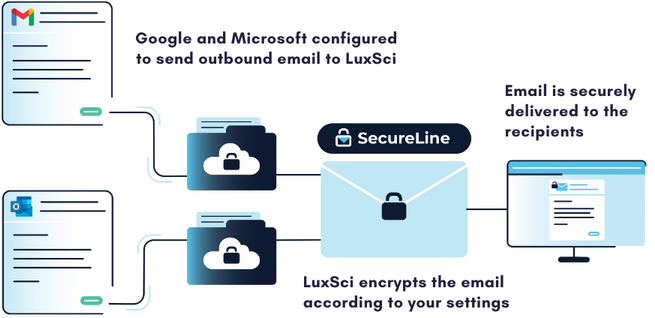
When using a secure email gateway, your messages are routed to a separate server before being sent or received. When sending an outbound message with LuxSci’s Secure Connector, it is routed through our SecureLine encryption before being securely delivered to the recipient. A copy of the message may also be sent to an independent email archive to help meet compliance requirements for message retention.


LuxSci Secure Connector


For incoming messages, the gateway can employ email filtering technology to quarantine suspicious messages. These technologies can scan incoming messages and prevent spammers and scammers from reaching employee inboxes and wreaking havoc. Just like with outbound email sending, the gateway can also capture a copy of inbound messages and retain them in an independent message archive.

The exact features of a secure email gateway will vary from vendor to vendor, but these represent some of the core functions that these tools provide. Simply put, a secure email gateway protects both incoming and outgoing messages to ensure that sensitive data is guarded from threats.

Why Choose a Secure Gateway?

There are two main reasons to implement a secure email gateway: the security and compliance benefits and their ease of use. Let’s look at each.

Compliance and Security Benefits

Many companies, like healthcare organizations, must comply with regulations for protecting patient or customer data. Many organizations grapple with the best way to secure potentially sensitive communications without interfering with or slowing down critical business workflows. Because secure email gateways layer on top of existing email accounts, they offer a speedy way to bring your organization into compliance with data security and retention guidelines.

As email continues to be an important channel for essential business communications, all organizations can benefit from protecting their employee accounts and reducing their risk and liability.

Easy to Administer and Use

Another benefit of using a secure email gateway is that your organization does not need to switch your primary email provider to enhance its security. Changing to a more secure email provider can be extremely challenging, especially if you have a lot of users with a lot of data that needs to be migrated to a new system. Add on the training time, and some organizations will find that switching email providers is a significant burden on the organization.

Installing a secure email gateway is very easy for account administrators and often does not require additional training or implementation for email users. Employees can continue to use their regular Microsoft or Google email accounts and do not need to take additional steps to learn an entirely new email program. With 73% of breaches in the healthcare industry caused by human factors, implementing tools that don’t rely on employee decision-making is essential.

Learn More About LuxSci’s Secure Connector

LuxSci’s Secure Connector is unlike other secure email gateways in that it encrypts every email automatically to reduce the risk of breaches caused by human errors. LuxSci provides the flexibility to opt-in to more secure methods of encryption for highly sensitive messages. Email filtering and archival tools are also available to reduce risk and improve resilience in the case of a cyber incident. Contact our sales team to learn more about our email security tools.

What is HIPAA-Compliant Email Marketing?

If you are one of the 92% of Americans with an email address, you are likely familiar with email marketing. It is a tried and true marketing strategy that delivers a superior return on investment compared to other digital channels. However, when healthcare organizations want to utilize these strategies, out-of-the-box solutions are not a good fit. Healthcare organizations must utilize email marketing platforms specifically designed to meet HIPAA’s unique privacy and security requirements.

checking email on smartphone What is HIPAA-Compliant Email Marketing?

When Do You Need a HIPAA-Compliant Email Marketing Platform?

Healthcare organizations are required to use a HIPAA-compliant email for HIPAA marketing because their messages often contain electronic protected health information (ePHI). This includes information that is both individually identifiable and relates to someone’s healthcare.

Individually identifiable information includes identifiers like a patient’s name, address, birth date, email address, social security number, and more. By default, every email marketing communication includes the patient’s email address and is, therefore, individually identifiable. Not only does the definition of ePHI cover people’s past, present, and future health conditions, but it also includes treatment provisions and billing details. This information is often contained in email marketing messages.

While the law does not cover anonymous health details or individual identifiers sent by themselves, you must be careful and abide by HIPAA regulations when the two are brought together. You will need a HIPAA-compliant email marketing service whenever you send ePHI. As we will see, even if you think an email may not contain ePHI, it is still best to be cautious.

Types of HIPAA-Compliant Email Marketing Communications

An excellent example of an email blast that must comply with HIPAA is a newsletter sent to a clinic’s cancer patients. At first glance, the email doesn’t contain any specific PHI. It doesn’t mention Jane Smith’s chemotherapy treatments, other specific patients, or their medical information. However, upon closer look, it may violate HIPAA regulations.

Every email in this campaign contains a personal identifier- the patient’s email address. In this example, only cancer patients received the newsletter, which also tells you personal medical information. A hacker could infer that anyone who received this email has cancer, which is ePHI and protected under HIPAA. If you use a medical condition to create a segment of email recipients, the email campaign must comply with HIPAA.

Sometimes, it can be challenging to identify if an email contains ePHI. If you sent the same practice newsletter to a list of all current and former medical clinic patients, it may or may not contain ePHI. Even if the newsletter contained benign info about the practice’s operating hours or parking information, if the practice is centered around treating a specific condition like cancer or depression, it may be possible to infer information about the recipients regardless of the message.

There are a lot of gray areas, and it can be difficult to determine if an email contains PHI. We recommend using HIPAA-compliant email marketing for any promotional materials to reduce the risk of violations.

The Benefits of Using a HIPAA-Compliant Marketing Platform

After reading this, you may think the answer is to avoid sending PHI in email campaigns. However, by keeping your communications bland, generic, and broadly targeted, you miss out on significant opportunities to engage your patients.

Using a HIPAA-compliant email marketing solution, you can leverage ePHI to send much more effective messages. In the above example, cancer patients actively receiving treatment at your clinic are much more likely to be interested in your business updates. Targeted emails receive much higher open and click rates than those sent to a general list.

Results of leveraging PHI

Sending the right information to your patients at the right time is an effective patient engagement strategy. Think about it using an e-commerce example- when a retailer sends you product recommendations based on past purchases; they use your data to influence future purchasing decisions. By utilizing patient data to create highly relevant and personalized campaigns and offers, you receive a better return on investment in your efforts.

What is Required for HIPAA-Compliant Email Marketing?

Finding the right HIPAA-compliant email marketing platform can be challenging. Most of the common vendors aren’t HIPAA-compliant at all. Others claim compliance and will sign BAAs to protect your information at rest but still will not enable you to send PHI via email. Finding a provider that suits your business needs and protects the email messages requires careful vetting.

Generally speaking, a HIPAA-compliant email platform must meet three broad requirements:

  1. The vendor will sign a Business Associates Agreement that outlines how they will protect your data and what happens in case of a breach.
  2. The vendor protects the data at rest using appropriate storage encryption, access controls, and other security features.
  3. The vendor protects messages in transit using an appropriate level of encryption with the proper ciphers.

Thankfully, LuxSci’s Secure Marketing email platform has been designed to meet the healthcare industry’s unique needs. Our platform was built with both security and compliance at the forefront. With Secure Marketing, organizations can send fully HIPAA-compliant email marketing messages to the right patients at the right time and receive a better return on their marketing investment.

person filling out a secure web form on a laptop

Creating Secure Web Forms: What You Need to Know

Creating secure web forms starts with creating a secure website. This process is more complex than creating web pages and adding an SSL Certificate. A certificate is a solid first step, but it only goes so far as to protect whatever sensitive data necessitates security in the first place.

Naive attempts at security can ultimately make the data less secure and more likely to be compromised by creating an appetizing target for the unscrupulous.

So, what do you do beyond hiring a developer with significant security expertise? Start with this article. Its purpose is to shed light on many of the most significant factors in creating secure web forms and how to address them. At a minimum, reading this article will help you intelligently discuss website security with the developers you hire.

person filling out a secure web form on a laptop

(more…)

hands on a keyboard sending secure email

How to Secure SMTP Email Delivery with TLS

Secure email sending is a priority for organizations that communicate sensitive data externally. One of the most common ways to send secure emails is with SMTP TLS. TLS stands for Transport Layer Security and is the successor of SSL (Secure Socket Layer). TLS is one of the standard ways that computers on the internet transmit information over an encrypted channel. In general, when one computer connects to another computer and uses TLS, the following happens:

  1. Computer A connects to Computer B (no security)
  2. Computer B says “Hello” (no security)
  3. Computer A says, “Let’s talk securely over TLS” (no security)
  4. Computers A and B agree on how to do this (secure)
  5. The rest of the conversation is encrypted (secure)

In particular:

  • The conversation is encrypted
  • Computer A can verify the identity of Computer B (by examining its SSL certificate, which is required for this dialog)
  • The conversation cannot be eavesdropped upon (without Computer A knowing)
  • A third party cannot modify the conversation
  • Third parties cannot inject other information into the conversation.

TLS and SSL help make the internet a more secure place. One popular way to use TLS is to secure SMTP to protect the transmission of email messages between servers.

(more…)
oracle logo

LuxSci Provides Oracle Cloud Infrastructure Customers Secure High Volume Email Solution to Protect Healthcare Data

LuxSci Secure High Volume Email Sending is Powered by Oracle Cloud and Available on Oracle Cloud Marketplace

BOSTON, MA LuxSci, a HIPAA-compliant and HITRUST certified email service provider, and member of Oracle PartnerNetwork (OPN), is pleased to announce its Secure High Volume Email Sending solution has achieved Powered by Oracle Cloud Expertise and is now available on Oracle Cloud Marketplace, offering added value to Oracle Cloud customers.

Protected health information is highly valued by cybercriminals, which puts healthcare organizations at serious risk of ransomware and other cyberattacks. In 2020, 60% of all ransomware attacks targeted the healthcare industry. Oracle Cloud Infrastructure (OCI) is a deep and broad platform of public cloud services that enables customers to build and run a wide range of applications in a scalable, secure, highly available, and high-performance environment. OCI’s security-first design, encryption by default, and computing model proactively addresses common cybersecurity threats posed to the healthcare industry. Powered by Oracle Cloud, LuxSci provides highly secure and custom healthcare communications solutions for customers of all sizes.

“Our mission is to protect healthcare communications through highly secure solutions that are also highly flexible. OCI’s configuration options allow us to architect custom deployments for our customers that meet their unique security and compliance needs,” said Erik Kangas, CEO of LuxSci.

Before working with OCI, LuxSci used several public and private cloud providers, but they needed many customizations and upgrades to meet LuxSci’s stringent security standards. Combining OCI’s best-in-class cloud infrastructure with LuxSci’s best-in-class security solutions for healthcare communications creates a highly secure environment for any compliance need.

In addition to the security advantages of OCI, LuxSci has recorded measurable performance improvements to its systems, including memory that is 10 to 20 times faster than other public clouds and markedly improved CPU performance. These benefits are delivered directly to its customers, whose email and web services are speedier and more responsive.

“The cloud represents a huge opportunity for our partner community,” said David Hicks, vice-president, Worldwide ISV Cloud Business Development, Oracle. “LuxSci’s commitment to innovation and security with Oracle Cloud Infrastructure can help our mutual customers with cloud-enabled encrypted communications solutions designed for healthcare and compliance and ready to meet critical business needs.”

As ransomware threats increase, so does the demand for digital patient communication. Healthcare organizations must invest in the patient experience to keep patients satisfied and engaged in their healthcare journey. 60% of consumers expect their digital healthcare experience to mirror the consumer experience of retail. Healthcare organizations must adopt digital communication technology that is secure enough to send PHI and can engage patients at scale.

Together, Oracle and LuxSci are providing their customers with the highly secure environment needed for healthcare data. LuxSci Powered by Oracle Cloud enables secure, scalable, and reliable communications designed to meet the healthcare industry’s unique needs.

The Oracle Cloud Marketplace is a one-stop shop for Oracle customers seeking trusted business applications offering unique business solutions, including ones that extend Oracle Cloud Applications. Powered by Oracle Cloud Expertise recognizes OPN members with solutions that run on Oracle Cloud. For partners earning the Powered by Oracle Cloud Expertise, this achievement offers customers confidence that the partner’s application is supported by the Oracle Cloud Infrastructure SLA, enabling full access and control over their cloud infrastructure services as well as consistent performance.

About Oracle PartnerNetwork

Oracle PartnerNetwork (OPN) is Oracle’s partner program designed to enable partners to accelerate the transition to cloud and drive superior customer business outcomes. The OPN program allows partners to engage with Oracle through track(s) aligned to how they go to market: Cloud Build for partners that provide products or services built on or integrated with Oracle Cloud; Cloud Sell for partners that resell Oracle Cloud technology; Cloud Service for partners that implement, deploy and manage Oracle Cloud Services; and License & Hardware for partners that build, service or sell Oracle software licenses or hardware products. Customers can expedite their business objectives with OPN partners who have achieved Expertise in a product family or cloud service. To learn more visit: http://www.oracle.com/partnernetwork.

Trademarks

Oracle, Java, MySQL, and NetSuite are registered trademarks of Oracle Corporation. NetSuite was the first cloud company–ushering in the new era of cloud computing.

Get in touch

Find The Best Solution For Your Organization

Talk To An Expert & Get A Quote


A member of our staff will reach out to you

Get Your Free E-Book!

LuxSci High Email Deliverability Best Practices Paper

What you’ll learn: